
Participating Frequently
December 13, 2012
Question

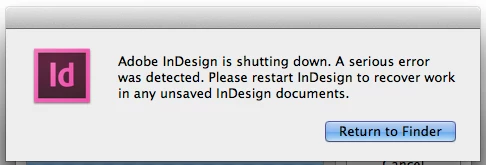
InDesign shuts down...A serious error was detected.

  • December 13, 2012
  • 4 replies
  • 39919 views

I'm getting this alert after opening an InDesign document and then updating an ".icml" link. I'm having no other issues with InDesign files, only those that have changes made in InCopy.

The document is created using InDesign CS6 and worked on with InCopy CS6 (latest versions). I am able to open the InDesign file as long as I don't update all the links when opening the file. I've tried isolating which ".icml" link is causing the problem without success.

I would appreciate any help. Thanks!
This topic has been closed for replies.

4 replies

Participant
July 8, 2013

I had the same issue/error message happening this morning. Although I'm not using InCopy, I am using CS6 (on a network, for whatever that's worth).

The simple method of resetting InDesign's preferences did the trick for me.

Double-click the ID app-icon in the Applications folder while holding Shift+ctrl+alt+CMD.

ID will ask you to reset preferences, click "Yes".

I realize this doesn't solve the above problems that have been described using InCopy, but it may be a fix for others like me, who have experienced this problem using IDCS6.

Good luck!

CMYKompany
Participant
August 20, 2013

Adding my own experiences here. My own most recent crash:

Adobe InDesign Protective Shutdown Log

Tue Aug 20 15:31:36 2013

Unhandled error condition

Session started up at 3:12 PM on Tuesday, August 20, 2013

Version: 8.0.1 - Build: 406

Error Code 0x20705: "The content is locked and cannot be modified."

Called to process command 0x7313

Command Processor Stack (from top to bottom):

5. Command Sequence "Re-import File"

4. Command 0x7314 "Re-import File"

3. Command Sequence "Update"

2. Command Sequence ""

1. Command 0x8c59 "Update Link"

Steps taken:

1. Unlink InCopy story that crashed, re-export

2. Unlink InCopy story that crashed, relink

3. Unlink 'bad' InCopy story, then open the InCopy story *in InCopy,* copy content back into InDesign, re-export

4. Unlink InCopy stories, save as IDML, re-open, re-export

5. Create new blank InDesign file, copy master pages, then doc pages, then import pstyles cstyles, then import object styles, re-export. (This worked.)

Here's my error log: http://pastebin.com/Ct0JTzSg

Participating Frequently
April 17, 2013

I have a coworker getting the same error under the same circumstances: "Error Code 0x20705: "The content is locked and cannot be modified."", as recorded in the ProtectiveShutdownLog file. It happens when importing InCopy content. We'll try the suggestions of how to isolate the issue, and report back if we find anything.

Participant
April 17, 2013

You may also want to see if you have a lot of tracked changes that have not been accepted. That will hog the memory as Indesign/Incopy try to keep track of all those changes. We had this problem and went into the stories in Indesign via the Story Editor, after updating the links, and accepted all tracked changes. This fixed the problem in a file that was crashing.

It may not fix your problem, but worth checking. Good luck!

Participating Frequently
May 9, 2013

Hmm. Track changes. I'll check on that.

Just jumping into this thread as we are having the same problem. The only group here at work that is NOT having this problem is using DropBox. The freelancer in that project cannot use our file servers because of University firewalls. I am switching the current project that is crashing like this to a shared DropBox folder. If we no longer have any problems, I think it's safe to say that it is some networking issue between InCopyCS6 and InDesignCS6 and how they connect through a file server. At this point though, I would consider the InCopy>InDesign workflow unreliable and we are going to stop using it until this gets solved.

I'll let everyone know what we come up with.

John Hawkinson
Inspiring
January 11, 2013

Chances are your document is corrupted somehow. But when you get a protective shutdown, the next step is to open ~/Library/Caches/Adobe InDesign/Version 8.0/en_US/InDesign Recovery/ProtectiveShutdownLog and see what it says. Each time InDesign crashes w/ a protective shutdown it will append a new dump. You might want to upload it to http://pastebin.com/ as well.

You crash report suggests the problem has something to do with updating links, but that's not very helpful since that's clear from your narrative.

You said you could not isolate the problem -- so if you work with a copy and you delete all but one of the ICML links, the problem remains?

It's not implausible that all are corrupted in the same way, or damaged, or whatnot.

Have you tried exporting the InDesign file as IDML and opening that?

Participating Frequently
January 13, 2013

Thanks for you help.

I have deleted all of the ICML files that have caused the shutdown, ran the document back through InCopy and made more changes to a couple ICML linked files. A crash still occurs.

I have started with a fresh copy of the original publication and made only one ICML file. Made one text change in InCopy. A crash still occurs when trying to accept the change.

There is no "Adobe Indesign" folder in the ~/Library/Caches/~ path you mention above on my computer. Am I looking in the wrong spot?

I'm currently recreating portions of my magazine from a new InDesign file...My fingers are crossed.

Thanks!

Participating Frequently
February 15, 2013

Well, I was hoping for a better solution than having to start over. At the pace we work at it's probably faster to go old school and make the edits in indesign.

Thanks for all your help.


Yes, we did two issues with paper proofs. Kind of beats the idea of an InCopy-InDesign work flow.

Participant
January 8, 2013

Have this problem occasionally too, and no idea why it is happening.

Be great if someone was able to shed some light on this problem.

At the moment the only workaround is:

- find an icml file needing updating, delete it from assignment.

- cut and paste new content from the inCopy .icma files into the appropriate textbox in inDesign, using the pasteboard preference to maintain all information.

- recreate the icml assignment.

- repeat for each icml that needs updating.

I think it only happens with text content - not pictures.

Participating Frequently
January 11, 2013

I'm still having this problem and when I think I know how to correct it...surprise another crash.

Can you explain your work around? When I try using the pasteboard, I loose all text formatting.

Thanks!

Participating Frequently
January 11, 2013

I've been on the phone with Adobe Support this morning, and recreated the problem with the support person via Adobe Connect.

They say the problem is that my computer is connected to a network (ethernet). Please, someone tell me this is not so.

I tried to explain to support that the workflow worked perfectly with CS5.5...the problem started with a CS6 upgrade (clean install). The CS6 upgrade was the only thing that changed on my computer. (I've duplicated the same problem on another computer in another location.)

I'm hopeful someone that reads these forums are having the same problem and can offer a solution.

Thanks!