


- Home
- Lightroom Classic
- Discussions
- Re: Difference between Export via Lightroom and Sa...
- Re: Difference between Export via Lightroom and Sa...
Difference between Export via Lightroom and Save As via PS

Copy link to clipboard
Copied
I am observing an interesting conundrum.
If I process images in photoshop, save As JPG, it creates the full size image in JPG format.
If I save the above image in PSD format, and export it via Lightroom into a JPG format (without size changes) it puts out a file that is about 10mb smaller than the file a PS would create.
is there a reason for it? I am not sure if I am losing the quality, and I don't always retain the PSD files.
thanks in advance


 13
Replies
13
13
Replies
13


Copy link to clipboard
Copied
is there a reason for it?
Yes, there is a reason. You have most likely chosen options in PS and LR that cause this difference.
In addition, you are making a fundamental error in assuming that image quality can be measured by megabytes of the JPG. Image quality cannot be measured by megabytes of the JPG.


Copy link to clipboard
Copied
What jpg quality settings are you using in Photoshop and Lightroom?
And do all these images have the same pixel dimensions?
Copy link to clipboard
Copied
Yes, the output comes up to be the same size.
the quality is selected at 100 in LR and 12 in PS.
Copy link to clipboard
Copied
What about sharpening?
If one image is sharper than the other, jpg file size will be bigger. Applying output sharpening when exporting from Lightroom will also increase the file size.
Copy link to clipboard
Copied
hey! Good call! let me play around with this. you're likely spot on, though.
cheers!

Copy link to clipboard
Copied
Do keep an eye on this:
Jeffrey Friedl's Blog » An Analysis of Lightroom JPEG Export Quality Settings
I'm not certain PS and LR will be absolutely identical in producing a JPEG all things being equal setting wise.

Copy link to clipboard
Copied
At 100 LR Quality and 12 PS Quality settings (or any of the 12 equal settings) the JPEG file sizes should be nearly identical. LR appears to use Baseline Standard compression algorithm. The PS Baseline Standard created JPEG is slightly larger (63KB) due to PS specific metadata added along with the LR metadata. Something else is causing the large 10MB file size difference between the LR and PS JPEGs.

Copy link to clipboard
Copied
https://forums.adobe.com/people/Todd+Shaner wrote
At 100 LR Quality and 12 PS Quality settings (or any of the 12 equal settings) the JPEG file sizes should be nearly identical.
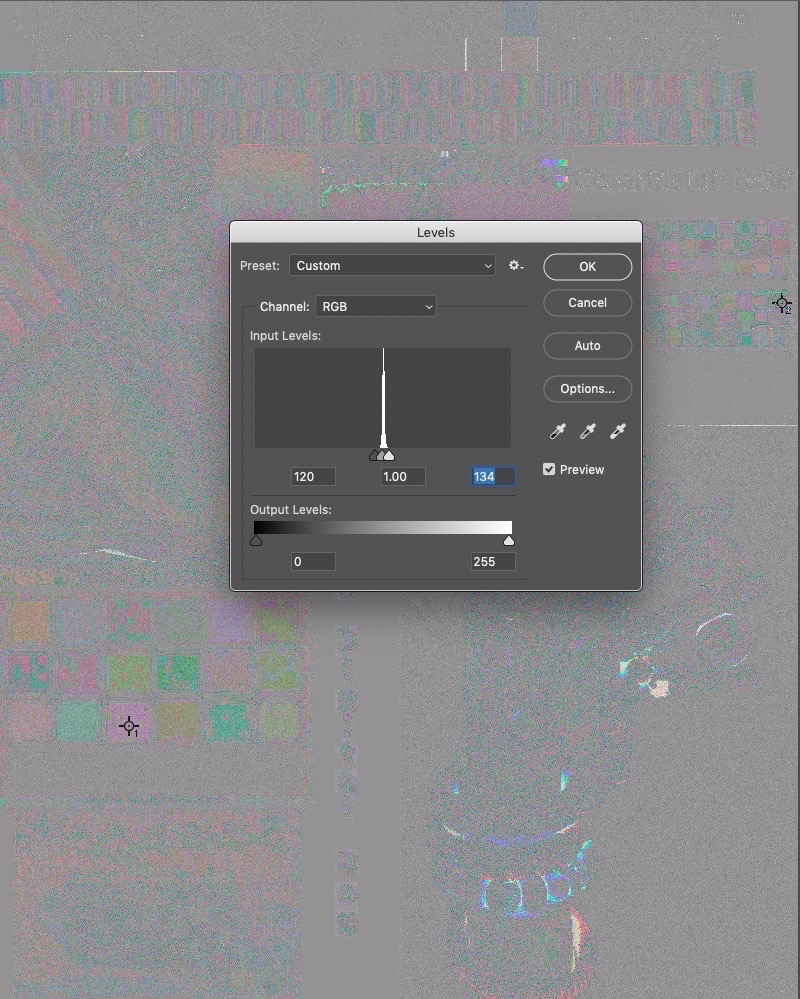
Close, not identical. Exported both ways, did an Apply Image>Subtract and as you can see, close but not identical but visually no one could tell the difference. None the less, by pulling levels, one can see the differences in the two here:
Copy link to clipboard
Copied
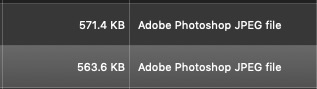
Oh, and very slightly different reported size on desktop:
Copy link to clipboard
Copied
thedigitaldog wrote
https://forums.adobe.com/people/Todd+Shaner wrote
At 100 LR Quality and 12 PS Quality settings (or any of the 12 equal settings) the JPEG file sizes should be nearly identical.
Close, not identical. Exported both ways, did an Apply Image>Subtract and as you can see, close but not identical but visually no one could tell the difference. None the less, by pulling levels, one can see the differences in the two here:
Interesting, perhaps LR isn't using Baseline Standard. Try comparing Baseline Optimized, and Progressive JPEGs to the LR JPEG. Either way these algorithm differences are very small compared to the OP's 10MB observed difference.
Copy link to clipboard
Copied
https://forums.adobe.com/people/Todd+Shaner wrote
Interesting, perhaps LR isn't using Baseline Standard. Try comparing Baseline Optimized, and Progressive JPEGs to the LR JPEG. Either way these algorithm differences are very small compared to the OP's 10MB observed difference.
Nope, all differ slightly like the original. The two applications do NOT produce identical JPEG conversions and that doesn't at all surprise me. None of the four variants are identical in size saved to the desktop either.
564K
571K
542K
534K
Copy link to clipboard
Copied
Given all of the possible variations in encoding used I guess that's not a surprise. So the LR Team chose different encoding settings than the PS Team. The differences in image quality and file size are small so it begs the question why the LR Team chose to deviate from PS's JPEG encoding. Perhaps they chose different DCT Method and Subsampling encoding settings that produce faster conversion to speed up the LR Export module?
This is interesting information, but not likely creating the large 10MB file size difference the OP is seeing. Per Berntsen's reply #4 concerning LR Output Sharpening settings is more likely the cause. The OP is investigating that possibility, but hasn't replied yet.
Copy link to clipboard
Copied
The processing path between LR and PS is very different.


Get ready! An upgraded Adobe Community experience is coming in January.
Learn more
 AdChoices