Exit
  • Global community
    • Language:
      • Deutsch
      • English
      • Español
      • Français
      • Português
  • 日本語コミュニティ
  • 한국 커뮤니티
0

Disable sync warning

Community Beginner ,
Sep 29, 2018 Sep 29, 2018

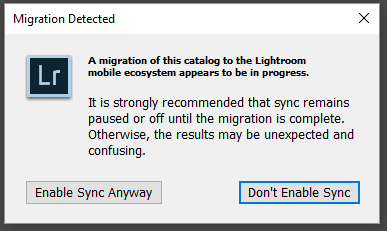
I tried the new version of Lighroom, but I prefer the classic.  I opted in to sync, since that was the main reason I was interested, so I could work on photos on my tablet while not at home.  However, when switching back to Classic, now I get a warning dialogue box telling me that a sync is in progress every time I try to do anything.  How do I make this go away?

395
Translate
Report
Community guidelines
Be kind and respectful, give credit to the original source of content, and search for duplicates before posting. Learn more
community guidelines
Community Expert ,
Sep 29, 2018 Sep 29, 2018

"Every time you try to do anything" or when you quit Lightroom? A warning on quit makes sense if the entire sync process has not been finished yet. I've never seen a warning when you try to do something in Lightroom and I would not know why it would do that. Sync takes place in the background.

-- Johan W. Elzenga
Translate
Report
Community guidelines
Be kind and respectful, give credit to the original source of content, and search for duplicates before posting. Learn more
community guidelines
Community Beginner ,
Sep 29, 2018 Sep 29, 2018

It's every time I open Lightroom, try to import photos, or change anything around.  Fortunately, it doesn't do it after every edit, or it would drive me insane.

Translate
Report
Community guidelines
Be kind and respectful, give credit to the original source of content, and search for duplicates before posting. Learn more
community guidelines
Community Beginner ,
Sep 29, 2018 Sep 29, 2018

For reference, here's the warning box.Lightroom warning.png

Translate
Report
Community guidelines
Be kind and respectful, give credit to the original source of content, and search for duplicates before posting. Learn more
community guidelines
Community Expert ,
Sep 30, 2018 Sep 30, 2018

Well, doesn't that message speak for itself? You have chosen to migrate your Classic catalog to Lightroom CC. And Lightroom is telling you that during this migration you should not enable sync in the Lightroom Classic catalog.

-- Johan W. Elzenga
Translate
Report
Community guidelines
Be kind and respectful, give credit to the original source of content, and search for duplicates before posting. Learn more
community guidelines
Community Beginner ,
Sep 30, 2018 Sep 30, 2018

I know that much.  I'm asking how to make it stop telling me that every time.  Sync is disabled.

Translate
Report
Community guidelines
Be kind and respectful, give credit to the original source of content, and search for duplicates before posting. Learn more
community guidelines
Community Expert ,
Oct 01, 2018 Oct 01, 2018
LATEST

Is it disabled, or paused?

-- Johan W. Elzenga
Translate
Report
Community guidelines
Be kind and respectful, give credit to the original source of content, and search for duplicates before posting. Learn more
community guidelines