


Copy link to clipboard
Copied
I select all pictures then TEXT Keywords, contain and search for BOATS
But I get pictures of boats plus bikes, Brandshatch ,and BSB
Lightroom classic 10.1
Mac big sur
{Moved from Lightroom Cloud to Lightroom Classic Forum by Moderator}


 3 Correct answers

[This post contains formatting and embedded images that don't appear in email. View the post in your Web browser.]
Steps to diagnose this:
1. In the Keyword List panel, type "boats" into the Filter Keywords box and make sure All is selected:
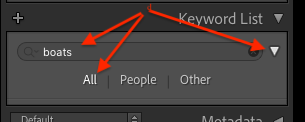
Post a screenshot of the entire resulting Keyword List panel. If there are ancestor keywords containing the string "boats", this will show them.
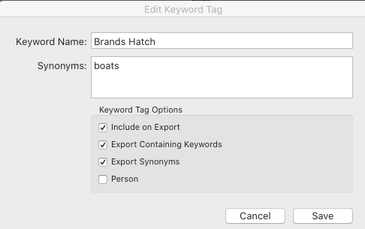
2. In the Keyword List panel, right-click the keyword "Brands Hatch" and do Edit Keyword Tag. Does "boa
...
Hi
Thanks sorted it found that Brands Hatch was in a sub folder
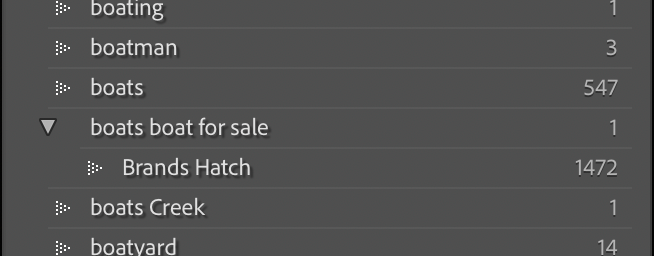
titled Boats for sale
[This post contains formatting and embedded images that don't appear in email. View the post in your Web browser.]
Glad you got it sorted. LR is a little mysterious when this happens.
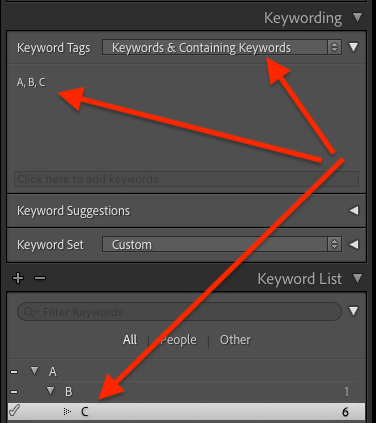
As you discovered, when you assign a keyword to a photo, LR considers all its ancestor keywords also assigned. You can also see the ancestor keywords assigned to a photo by using Keyword Tags: Keywords & Containing Keywords in the Keywording panel:
[Use the blue reply button under the first post to ensure r
... 11
Replies
11
11
Replies
11


Copy link to clipboard
Copied
It might help provide a better context for your issue if you could post a screenshot thx?
Please use the "Insert Photos" icon in the post reply window and not the "Insert/Edit Link" icon to post it.

Copy link to clipboard
Copied
Are these your own photos to which you have added keywords? In Library view, click on a single photo and look in the keywording panel to see what keywords are associated with the image.
Copy link to clipboard
Copied
Hi
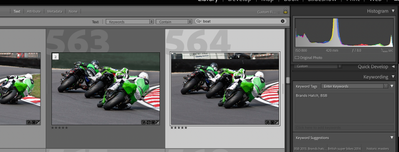
Yes all the pictures are mine I hope you can see the screen shot showing the search and the picture with its key words
The search brings up all the boats but includes these
Copy link to clipboard
Copied
In Library mode, in the right hand column look down the keyword list for *boats*. Click on the arrow to the extreme right of entry. Does it still return an unexpected result?
Copy link to clipboard
Copied
Thats different I get just boats now am I doing something wrong in the way I search.
its not somethink new its always done it
Copy link to clipboard
Copied
Very strange.
For entirely different reasons, I uninstalled 10.1 and reverted back to 10.00. I shall await 10.2.

Copy link to clipboard
Copied
What happens if you use 'Contains Words' instead of 'Contains.'
Copy link to clipboard
Copied
I have tried Contains words and all different combinations still the same but if as advised I go to the keyword list on the right and find boats then I just get Boats.
Its not a problem just slightly anoying It has been like it for a long time
Just thought I would ask just in case it was somthing simple I did wrong many thanks
Copy link to clipboard
Copied
[This post contains formatting and embedded images that don't appear in email. View the post in your Web browser.]
Steps to diagnose this:
1. In the Keyword List panel, type "boats" into the Filter Keywords box and make sure All is selected:
Post a screenshot of the entire resulting Keyword List panel. If there are ancestor keywords containing the string "boats", this will show them.
2. In the Keyword List panel, right-click the keyword "Brands Hatch" and do Edit Keyword Tag. Does "boats" occur anywhere within the Synonyms field, e.g.
Repeat for "BSB".
3. Do the menu command Metadata > Export Keywords. Open the file in a text editor and search for "boats". If you don't find it, upload the file to Dropbox or similar and post the sharing link here.
[Use the blue reply button under the first post to ensure replies sort properly.]
Correct answer by
riw
AUTHOR
Copy link to clipboard
Copied
Hi
Thanks sorted it found that Brands Hatch was in a sub folder
titled Boats for sale
Copy link to clipboard
Copied
[This post contains formatting and embedded images that don't appear in email. View the post in your Web browser.]
Glad you got it sorted. LR is a little mysterious when this happens.
As you discovered, when you assign a keyword to a photo, LR considers all its ancestor keywords also assigned. You can also see the ancestor keywords assigned to a photo by using Keyword Tags: Keywords & Containing Keywords in the Keywording panel:
[Use the blue reply button under the first post to ensure replies sort properly.]


Get ready! An upgraded Adobe Community experience is coming in January.
Learn more
 AdChoices