Exit
  • Global community
    • Language:
      • Deutsch
      • English
      • Español
      • Français
      • Português
  • 日本語コミュニティ
  • 한국 커뮤니티
0

LrC 11.3.1 on Windows 10 "AgStoreProviderSession:getEntity(): Multiple matching entities" at export.

New Here ,
Jun 02, 2022 Jun 02, 2022

Hello in the last two weddings when exporting the catalog I'm getting the above error and was wondering if anyone can help me figure this out. 

I'm on version 11.3.1

This has happened in both mac and PC

for trouble shooting context, this is a catalog that someone else culled remotely using smart previews.  However, I've been doing this for a long time and it has never happened until the last two weddings. 

I was able to pin point it to about 10 images in the whole catalog that stop the export process

These images are from different cameras, not just one.  

Most of are from cameras that were set up to shoot RAW+JPG but at least one is from a camera that shoots only JPG


Not sure what else to try.  Images have been renamed from Lightroom so starting a new catalog will be a bit of a pain.  

Help anyone? 

TOPICS
macOS , Windows
562
Translate
Report
Community guidelines
Be kind and respectful, give credit to the original source of content, and search for duplicates before posting. Learn more
community guidelines
Adobe Employee ,
Jun 03, 2022 Jun 03, 2022

Hi there,


Thanks for reaching out. Sorry for the trouble with Lightroom. I'd be happy to help you figure this out.

This could be a damaged catalog. We can bring everything from an existing & potentially damaged catalog to a new catalog.

Copy the primary catalog or the catalog in question and place it on your computer's desktop.

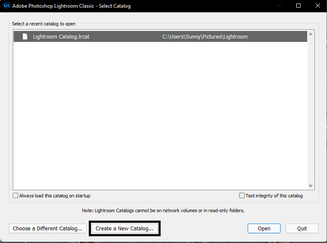
  • Press the Alt (Win) or OPT (macOS) when launching Lightroom Classic.
  • Choose the option to create a new catalog and create a new one on the internal drive.

SameerK_0-1654262170003.png

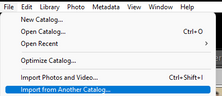
  • In the new catalog, head to File > Import from Another Catalog, as shown below.

SameerK_2-1654262170092.png

Proceed with merging the (potentially)corrupted catalog into the newly made, internal storage-based catalog. 

For more help via video-based steps, check here. See Merging individual catalogs into a master catalog


Please let us know if this helps.

Thanks!

Sameer K. 

Translate
Report
Community guidelines
Be kind and respectful, give credit to the original source of content, and search for duplicates before posting. Learn more
community guidelines
New Here ,
Jun 03, 2022 Jun 03, 2022

Thank you so much.  I will try this shortly.  However, it's too much of a coincidence that it's happened to the last two catalogs.  I will report back if this works.  Thank you.  

Translate
Report
Community guidelines
Be kind and respectful, give credit to the original source of content, and search for duplicates before posting. Learn more
community guidelines
New Here ,
Jun 12, 2022 Jun 12, 2022

I actually tried with another wedding all together and the person culling the wedding remotely receives the catalog already currupted.  I open mine up here in my computer and it's perfectly fine but he opens the one I upload to google drive and it's currupted.  Any ideas what may be happening here?

Translate
Report
Community guidelines
Be kind and respectful, give credit to the original source of content, and search for duplicates before posting. Learn more
community guidelines
New Here ,
Oct 30, 2022 Oct 30, 2022

Thanks, problem solved in LR 12


Translate
Report
Community guidelines
Be kind and respectful, give credit to the original source of content, and search for duplicates before posting. Learn more
community guidelines
New Here ,
Jul 23, 2023 Jul 23, 2023
LATEST

I am having the same problem. Unfortunately if I import the existing catalog into a new catalog, I lose all the Flickr associations which were created with the JF Flickr extension plug in. There were more than 100,000 of these, so there is no way I can rebuild them by hand. Is there some way to remove the offending photos from the catalog rather than rebuilding it? I have seen other suggestions of directly cleaning the catalog using .sqlite3 but I haven't been having much success with this either, possibly becuase the catalogue is fairly large (260,000 photos)

Translate
Report
Community guidelines
Be kind and respectful, give credit to the original source of content, and search for duplicates before posting. Learn more
community guidelines