
Exit
  • Global community
    • Language:
      • Deutsch
      • English
      • Español
      • Français
      • Português
  • 日本語コミュニティ
  • 한국 커뮤니티
1

LrC Start-up Issue

Contributor ,
Dec 02, 2024 Dec 02, 2024

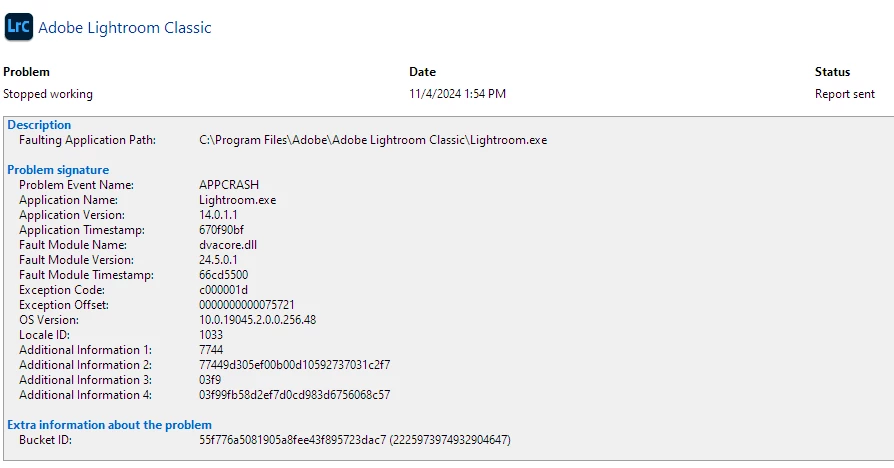
I have been troubleshooting this issue further and now believe the LrC app crash listing I see in the Windows Reliability Monitor is happening at startup each time I launch the latest version of LrC 14.0.1.1.  As noted before, LrC does not create a Crash Report so further details are difficult to provide. Here are the relevant logs from my system...  
JLCKJC2015_0-1733173013039.png

Is anyone else seeing this behavior after installing the most recent version of LrC on a Windows 10 system?      

TOPICS
Windows
584
Translate
Report
Community guidelines
Be kind and respectful, give credit to the original source of content, and search for duplicates before posting. Learn more
community guidelines
LEGEND ,
Dec 02, 2024 Dec 02, 2024

Interested in some system information. Normally as LrC shows it, but since LrC will not start, perhaps you can launch Lr, and select Help, then System Info. Copy that, then paste it in a reply (some of the info will be the same as in LrC, at least the OS, RAM, VRAM, and GPU info). I am not sure if gathering the similar info in PS will work, but if you never installed Lr, then perhaps via PS???


Translate
Report
Community guidelines
Be kind and respectful, give credit to the original source of content, and search for duplicates before posting. Learn more
community guidelines
Contributor ,
Dec 02, 2024 Dec 02, 2024

Thanks for your reply. Actually LrC is launching and is working properly as far as I can tell. My concern is the entry in the Windows Reliability Monitor that states that LrC stopped working as indicated in my original posting and shown here again for compleness. This entry shows up each time I start LrC.

JLCKJC2015_1-1733180986559.png

I don't see such entries from any other programs. This started after the most recent update to LrC 14.0.1.1.

Translate
Report
Community guidelines
Be kind and respectful, give credit to the original source of content, and search for duplicates before posting. Learn more
community guidelines
LEGEND ,
Dec 02, 2024 Dec 02, 2024

On a WIN 11 rig, and not seeing this.


You may want to look at your Windows Event Viewer for issues. Those may give a clue.

Translate
Report
Community guidelines
Be kind and respectful, give credit to the original source of content, and search for duplicates before posting. Learn more
community guidelines
Contributor ,
Dec 03, 2024 Dec 03, 2024

It appears upon launch LrC cannot locate a specific file (not sure which one) and Windows closes the program assuming it crashed. However, the program must relaunch as it does come up and, as reported, seems to run normally even though it's logged to have crashed. Is there someone with enough knowledge who can determine which file LrC is complaining about from the following log?

JLCKJC2015_1-1733245398541.png

Thanks!


Translate
Report
Community guidelines
Be kind and respectful, give credit to the original source of content, and search for duplicates before posting. Learn more
community guidelines
LEGEND ,
Dec 03, 2024 Dec 03, 2024
Translate
Report
Community guidelines
Be kind and respectful, give credit to the original source of content, and search for duplicates before posting. Learn more
community guidelines
Contributor ,
Dec 03, 2024 Dec 03, 2024
LATEST

I just completed a complete rebuid of my Windows Search Index. The issue still occurs.

Thanks for your ideas though.

Translate
Report
Community guidelines
Be kind and respectful, give credit to the original source of content, and search for duplicates before posting. Learn more
community guidelines
LEGEND ,
Dec 02, 2024 Dec 02, 2024

You may want to, if you have not already, search in the community on :

  • dvacore.dll

You will see several Discussions.


Some items that come up:


  • Bad GPU driver
  • Corrupted Catalog
  • MSI OC software
  • Defective CPU (very rare, not likely)


You may also want to search on:


  • exception code: c000001d


Some items that come up:


  • Bad GPU driver
  • Microsoft.NET Framework update
  •  


Translate
Report
Community guidelines
Be kind and respectful, give credit to the original source of content, and search for duplicates before posting. Learn more
community guidelines