Exit
  • Global community
    • Language:
      • Deutsch
      • English
      • Español
      • Français
      • Português
  • 日本語コミュニティ
  • 한국 커뮤니티
0

No puedo visualizar las fotos de las carpetas

New Here ,
May 11, 2022 May 11, 2022

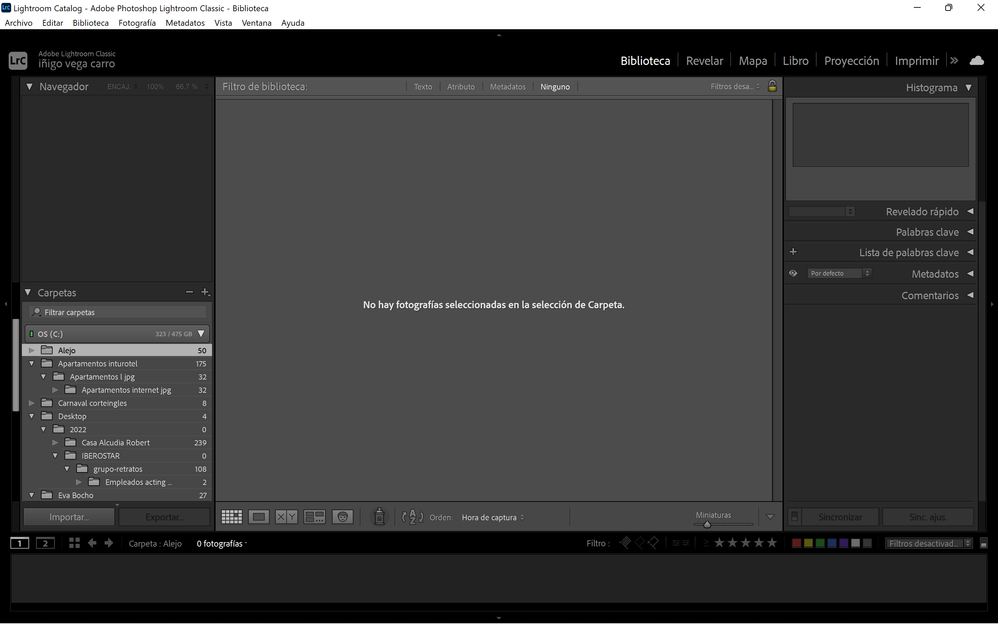
Hola en lightroom lo abro y no puedo visualizar las imagenes,en la pestaña de disco C me salen las carpetas el numero de fotos que hay pero no puedo visualizarlas cuando pincho en la carpeta. intento volver a importar la carpeta de nuevo y no me deja porque ya esta en la biblioteca.  Cuando pincho en la pestaña de catalogo me indica el numero total de fotos y si me deja verlas incluso editarlas pero no estan dividas en las carpeta.

TOPICS
Windows
297
Translate
Report
Community guidelines
Be kind and respectful, give credit to the original source of content, and search for duplicates before posting. Learn more
community guidelines
LEGEND ,
May 11, 2022 May 11, 2022

What do you see? Show us a screen capture. Use the "Insert Photos" icon to include the screen capture in your reply. Do not attach files.

Translate
Report
Community guidelines
Be kind and respectful, give credit to the original source of content, and search for duplicates before posting. Learn more
community guidelines
New Here ,
May 11, 2022 May 11, 2022

Captura de pantalla (1).png

Translate
Report
Community guidelines
Be kind and respectful, give credit to the original source of content, and search for duplicates before posting. Learn more
community guidelines
Adobe Employee ,
May 11, 2022 May 11, 2022

Hi there,


We're sorry about the trouble with Lightroom.

Could you please share the version of Lightroom (Help > About Lightroom) and the version of the operating system on your computer? Where are the images located; Internal or External drive? Do you see any error messages? Did you try re-installing the application? Try creating a new user.

Translate
Report
Community guidelines
Be kind and respectful, give credit to the original source of content, and search for duplicates before posting. Learn more
community guidelines
New Here ,
May 12, 2022 May 12, 2022
LATEST

hi version 11.3.1  C:\Users\iñigo\Pictures  windows11.  I olso try reinstall or reinstall another version and nothing hapend.

If i do and importation i can see with no problem, but i can se the old folders. i did deleted the folder preferences and nothing change.

 

Translate
Report
Community guidelines
Be kind and respectful, give credit to the original source of content, and search for duplicates before posting. Learn more
community guidelines