Exit
  • Global community
    • Language:
      • Deutsch
      • English
      • Español
      • Français
      • Português
  • 日本語コミュニティ
  • 한국 커뮤니티
0

No Sync settings button

New Here ,
Nov 01, 2020 Nov 01, 2020

I have a new Windows laptop and newly installed Lightroom Classic, but having watched vlogs on timelaps creation, I am confused as there are no Sync settings buttons at the bottom of my editing panel.

TOPICS
Windows
866
Translate
Report
Community guidelines
Be kind and respectful, give credit to the original source of content, and search for duplicates before posting. Learn more
community guidelines
LEGEND ,
Nov 01, 2020 Nov 01, 2020

If I am understanding you correctly, "Sync Settings" button is at the bottom right of the Library Module, not the Develop Module. There's also a "Sync" button at the bottom right of the Develop Module (which can be turned on if you select multiple photos in the filmstrip and then it says "Auto Sync").


If that isn't what you are talking about, and I misunderstood, please show us a screen capture of what you are talking about by including the screen capture into your reply via the "Insert Photos" icon. Do not attach a file.

Translate
Report
Community guidelines
Be kind and respectful, give credit to the original source of content, and search for duplicates before posting. Learn more
community guidelines
New Here ,
Nov 01, 2020 Nov 01, 2020

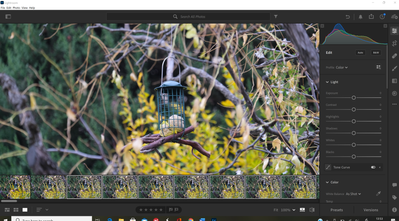
Thanks for the quick reply. Actually I don't have Library and Develop as titles at the top - does this mean I have a different Lightroom software !? However, you are correct with understanding my meaning that when in editing mode there is no Sync or Autosync even after selecting multiple images. Here is a screenshot where I have selected multiple images in


editing.Lightrrom capture1.PNG

Translate
Report
Community guidelines
Be kind and respectful, give credit to the original source of content, and search for duplicates before posting. Learn more
community guidelines
LEGEND ,
Nov 01, 2020 Nov 01, 2020

You should be using Lightroom Classic. You are not.

Translate
Report
Community guidelines
Be kind and respectful, give credit to the original source of content, and search for duplicates before posting. Learn more
community guidelines
New Here ,
Nov 01, 2020 Nov 01, 2020

OK thanks - I'll have a look at why that didn't download to my desktop.

Cheers

Translate
Report
Community guidelines
Be kind and respectful, give credit to the original source of content, and search for duplicates before posting. Learn more
community guidelines
LEGEND ,
Nov 01, 2020 Nov 01, 2020

What "plan" did you subscribe to (or use the free trial of)? If it says "Photography Plan", then you have Lightroom Classic. If it says anything else, like "Lightroom Plan", then you do not have Lightroom Classic.

https://www.adobe.com/creativecloud/photography/compare-plans.html#

Translate
Report
Community guidelines
Be kind and respectful, give credit to the original source of content, and search for duplicates before posting. Learn more
community guidelines
New Here ,
Nov 09, 2020 Nov 09, 2020
LATEST

I have a Creative Cloud plan which has a number of programmes - I just installed the wrong Lightroom by mistake as I wasn't sure at the time that it was mainly for mobiles. Its all good now. Cheers

Translate
Report
Community guidelines
Be kind and respectful, give credit to the original source of content, and search for duplicates before posting. Learn more
community guidelines