Exit
  • Global community
    • Language:
      • Deutsch
      • English
      • Español
      • Français
      • Português
  • 日本語コミュニティ
  • 한국 커뮤니티
0

Syncing Photos

New Here ,
Sep 04, 2018 Sep 04, 2018

I synced several photos about a week ago  on LR Classic CC.  However, 2 photos did not sync.  I cannot figure out which ones, and i cannot get the notice removed. Does anyone have any ideas?

526
Translate
Report
Community guidelines
Be kind and respectful, give credit to the original source of content, and search for duplicates before posting. Learn more
community guidelines

correct answers 1 Correct answer

Adobe Employee , Sep 04, 2018 Sep 04, 2018

You can delete them in the library module.

Translate
Adobe Employee ,
Sep 04, 2018 Sep 04, 2018

Hi Terryd,

Sorry to hear about this, how many images did you sync? Are you able to see the synced images here? Photo Editor | Online Photoshop Lightroom You can check and see which images are not synced.

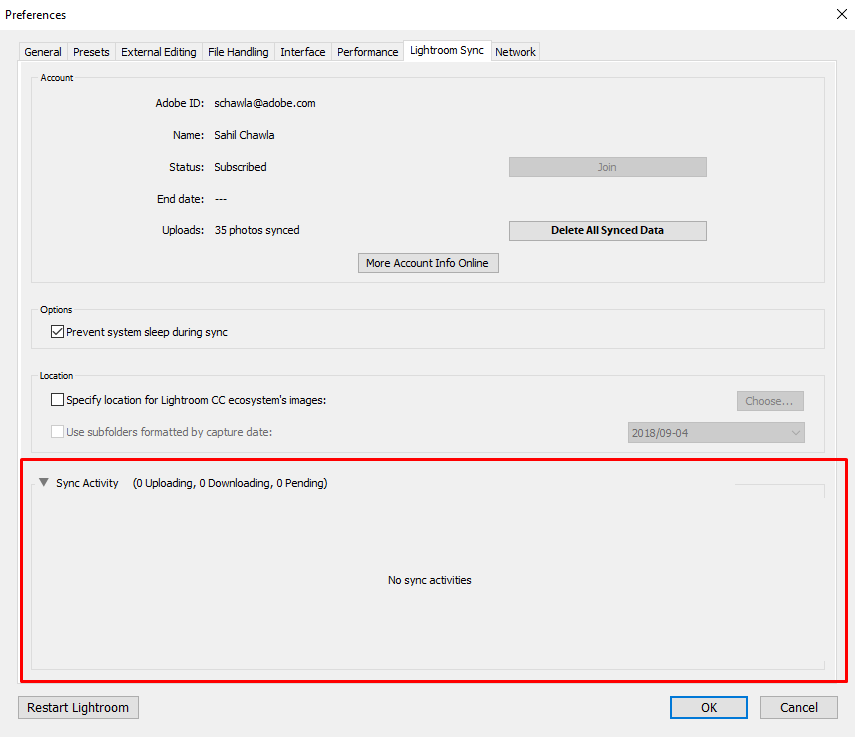
There's also a Sync Log in Preferences > Lightroom sync. That should help you identify the images.

Regards,
Sahil

Translate
Report
Community guidelines
Be kind and respectful, give credit to the original source of content, and search for duplicates before posting. Learn more
community guidelines
New Here ,
Sep 04, 2018 Sep 04, 2018

The last sync was about 300 photos. only 298 synced, but for the life of

me, i cannot figure out which ones didn't sync. I did another 596 today

and now it shows 5 photos syncing. Everything else synced with no problem.

On Tue, Sep 4, 2018 at 1:44 PM Sahil.Chawla <forums_noreply@adobe.com>

Translate
Report
Community guidelines
Be kind and respectful, give credit to the original source of content, and search for duplicates before posting. Learn more
community guidelines
Adobe Employee ,
Sep 04, 2018 Sep 04, 2018

Please go to Lightroom's Preferences > Lightroom Sync and check under Sync Activity and see if there are images listed there.

Screenshot_2.png

Translate
Report
Community guidelines
Be kind and respectful, give credit to the original source of content, and search for duplicates before posting. Learn more
community guidelines
New Here ,
Sep 04, 2018 Sep 04, 2018

Thank you, I found them. Now, how do I delete them. I tried right click

and it gave option to view errors but not to delete.

On Tue, Sep 4, 2018 at 2:13 PM Sahil.Chawla <forums_noreply@adobe.com>

Translate
Report
Community guidelines
Be kind and respectful, give credit to the original source of content, and search for duplicates before posting. Learn more
community guidelines
Adobe Employee ,
Sep 04, 2018 Sep 04, 2018

You can delete them in the library module.

Translate
Report
Community guidelines
Be kind and respectful, give credit to the original source of content, and search for duplicates before posting. Learn more
community guidelines
New Here ,
Sep 04, 2018 Sep 04, 2018

That did it. You are a life saver. I have had LR for a long time and

never knew about the preferences panel for syncing.

Again, Thank you,

Terry.

On Tue, Sep 4, 2018 at 2:32 PM Sahil.Chawla <forums_noreply@adobe.com>

Translate
Report
Community guidelines
Be kind and respectful, give credit to the original source of content, and search for duplicates before posting. Learn more
community guidelines
Adobe Employee ,
Sep 04, 2018 Sep 04, 2018
LATEST

Glad we did it! Feel free to reach out to us for any future queries!

Translate
Report
Community guidelines
Be kind and respectful, give credit to the original source of content, and search for duplicates before posting. Learn more
community guidelines