Exit
  • Global community
    • Language:
      • Deutsch
      • English
      • Español
      • Français
      • Português
  • 日本語コミュニティ
  • 한국 커뮤니티
0

The LRC screen

New Here ,
Oct 18, 2020 Oct 18, 2020

The Lightroom screen is stuck to the left of my screen covering up the dates. Does anyone know how to move it to the right? I have tried the obvious. thanks Simon

456
Translate
Report
Community guidelines
Be kind and respectful, give credit to the original source of content, and search for duplicates before posting. Learn more
community guidelines
Community Expert ,
Oct 18, 2020 Oct 18, 2020

Can you post a screenshot? I have no idea what you mean with this.


-- Johan W. Elzenga
Translate
Report
Community guidelines
Be kind and respectful, give credit to the original source of content, and search for duplicates before posting. Learn more
community guidelines
New Here ,
Oct 18, 2020 Oct 18, 2020
The left hand side is hidden. I cannot move the lightroom display to the
right?
Translate
Report
Community guidelines
Be kind and respectful, give credit to the original source of content, and search for duplicates before posting. Learn more
community guidelines
LEGEND ,
Oct 18, 2020 Oct 18, 2020

Is it hidden because it extends to the left edge of the screen and of ccourse you can't see it? Or is it hidden because the left side panel has been closed? What happens if you press F7?


If pressing F7 doesn't work, show us a screen capture.

Translate
Report
Community guidelines
Be kind and respectful, give credit to the original source of content, and search for duplicates before posting. Learn more
community guidelines
LEGEND ,
Oct 18, 2020 Oct 18, 2020

Show Us A Screen Shot of what you are seeing.


You have LrC in the Window mode and moved the left hand side to the left and then Explanded the window again.
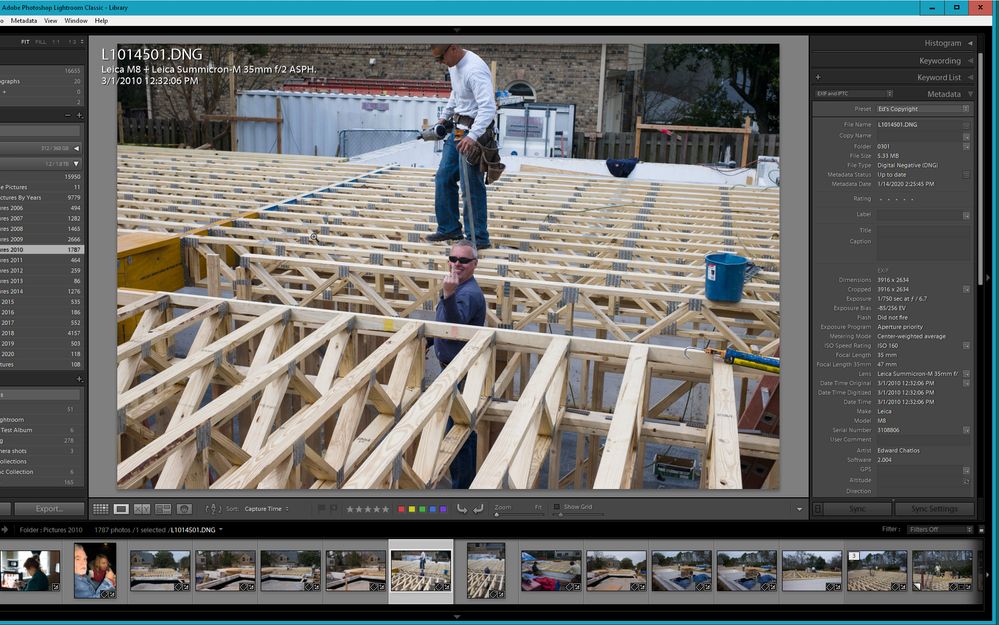
 

2020-10-18 08_29_24-LR Classic V9 Catalog - Adobe Photoshop Lightroom Classic - Library.png


Or "YOU" have been fooling around with the screen resolution and the scaling/Zoom factor in either the OS system, properties and in the LrC preferences.

Both User or System errors and not a problem with LrC.

 

Translate
Report
Community guidelines
Be kind and respectful, give credit to the original source of content, and search for duplicates before posting. Learn more
community guidelines
Community Expert ,
Oct 18, 2020 Oct 18, 2020

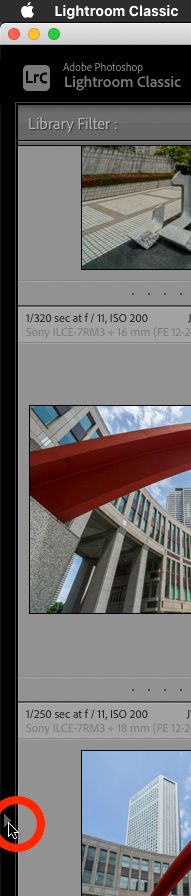
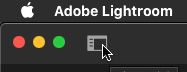
Sounds like you have simply hidden the left panel. In Lightroom Classic click on the small triangle in the middle of the side.

In Lightroom click on the icon in the upper right corner.


1 2020-10-18 15-49-33.jpg1 2020-10-18 15-50-14.jpg


-- Johan W. Elzenga
Translate
Report
Community guidelines
Be kind and respectful, give credit to the original source of content, and search for duplicates before posting. Learn more
community guidelines
Advocate ,
Oct 18, 2020 Oct 18, 2020

I'm afraid "the obvious" isn't quite obvious enough for everybody to know what you have tried.

Translate
Report
Community guidelines
Be kind and respectful, give credit to the original source of content, and search for duplicates before posting. Learn more
community guidelines
LEGEND ,
Oct 18, 2020 Oct 18, 2020
LATEST
Translate
Report
Community guidelines
Be kind and respectful, give credit to the original source of content, and search for duplicates before posting. Learn more
community guidelines