


Copy link to clipboard
Copied
Cannot close an image panel that floats above the app in LR Classic 9.3


 2 Correct answers


Try mouse clicking on the box labelled 2 at bottom left of LrC window (see attached screenshot)
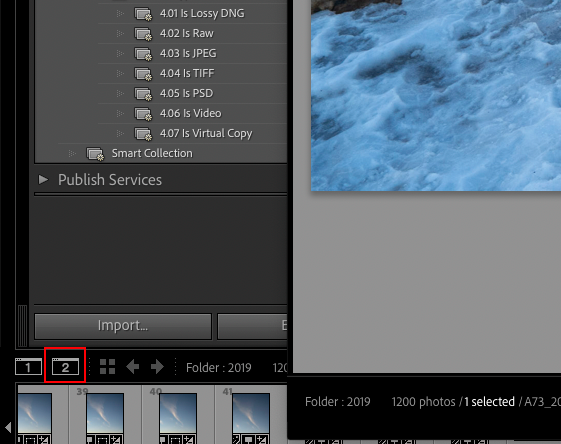

The keyboard shortcut for enabling/disabling the secondary window is Cmd/Ctrl + F11 However, you may also need to press the Function key (Fn) as part of the key combination.
If above doesn't work, then you would probably be better ff just resetting Lr prefernces than waiting on the phone for help
To reset Lr preference follow Method 1 at https://helpx.adobe.com/lightroom-classic/help/setting-preferences-lightroom.html This will reset everything back to default
 7
Replies
7
7
Replies
7

Copy link to clipboard
Copied
Try mouse clicking on the box labelled 2 at bottom left of LrC window (see attached screenshot)
Copy link to clipboard
Copied
Thanks, but there are no 1 & 2 window boxes like that. Here's a screen shot showing how the offending "window" covers up the usual LR interface unless I move the usual window around. As soon as I stop moving it the "floating" window reappears and covers everything up. The offending window cannot be moved on its own. It has no menu bar as such of its own. Adobe tech chat tried for 2 hours last night but couldn't resolve it. I'll try to reach them by phone early tomorrow. Could it be a graphics card issue? I can't use LR at all and have to get some orders out. Help! Please.

Copy link to clipboard
Copied
The keyboard shortcut for enabling/disabling the secondary window is Cmd/Ctrl + F11 However, you may also need to press the Function key (Fn) as part of the key combination.
If above doesn't work, then you would probably be better ff just resetting Lr prefernces than waiting on the phone for help
To reset Lr preference follow Method 1 at https://helpx.adobe.com/lightroom-classic/help/setting-preferences-lightroom.html This will reset everything back to default
Copy link to clipboard
Copied
Thank you so much for your help. The keyboard shortcut Cmd+F11+Fn got rid of the secondary window for now w/o having to reset the preferences. Is the secondary window option only available if I am running a second monitor (I use one to hold my Photoshop tool panels)? I can't imagine ever needed a seconday window in LR. Is there a way of disabling the feature so it never happens again? Thanks again for your help!
Copy link to clipboard
Copied
Originally, only a secondary monitor was supported. However, some customers asked that the functionality be enhanced to allow those with only a single monitor to avail of the additional screen options. Normally, there is no issue switching between secondary monitor / secondary window, but from your screenshot it would appear that the secondary window obscured the two switching icons I mentioned above. I suspect the reason you tripped over the secondary window option was due to accidently mouse clicking on the icons. The keyboard combination is obscure enough that it's unlikely to be the culprit.
> Is there a way of disabling the feature so it never happens again?
I don't believe there is. However, you now know how resolve the issue if it occurs again.

Copy link to clipboard
Copied
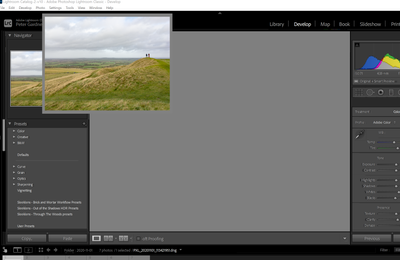
I have the same problem, see below and have tried both methods suggested by Ian, I have also uninstalled and reinstalled Lightroom, but the problem is still there. :
Copy link to clipboard
Copied
Adobe Help have resolved this for me.


Get ready! An upgraded Adobe Community experience is coming in January.
Learn more
 AdChoices