Exit
  • Global community
    • Language:
      • Deutsch
      • English
      • Español
      • Français
      • Português
  • 日本語コミュニティ
  • 한국 커뮤니티
0

Lightroom book module text columns

Explorer ,
Jun 11, 2020 Jun 11, 2020

Can anyone help me firgure out how to use columns in page text in the Book Module?


The option is greyed out, even when text is highlighted.  How can I divide my text into 2 columns?

918
Translate
Report
Community guidelines
Be kind and respectful, give credit to the original source of content, and search for duplicates before posting. Learn more
community guidelines
Community Expert ,
Jun 11, 2020 Jun 11, 2020

No need to highlight the text, and it should even work with an empty text (Photo Description) cell-

Just have the Text Cell selected and set the Columns in the type panel-

Are you sure you have a 'Text' Cell selected?

ScreenShot300.jpg

ScreenShot301.jpg


Regards. My System: Windows-11, Lightroom-Classic 15.1, Photoshop 27.2, ACR 18.1.1, Lightroom 9.1, Lr-iOS 10.4.0, Bridge 16.0.1 .
Translate
Report
Community guidelines
Be kind and respectful, give credit to the original source of content, and search for duplicates before posting. Learn more
community guidelines
Explorer ,
Jun 23, 2020 Jun 23, 2020

Thanks for the reply. I'd really like to make a book with Lightroom/Blurb but I'm about to give up. I need columns. They are greyed out no matter what I try. I tried Adobe support and the guy basically refused to help, incomprehensinly saying "I'm just technical support." ????????


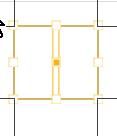
As far as I can tell, I have the Cell selected -- it is outlined in yellow. I have chosen text on L page, photo on R. I need to have my descriptions on the L in 2 columns.

Translate
Report
Community guidelines
Be kind and respectful, give credit to the original source of content, and search for duplicates before posting. Learn more
community guidelines
Community Expert ,
Jun 23, 2020 Jun 23, 2020

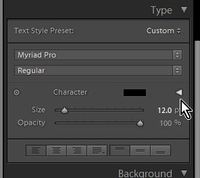
I you are not seeing the Slider to set the Columns then you may have the 'Type' panel collapsed down, like this-
ScreenShot202.jpg

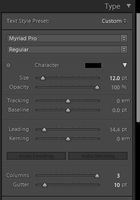
If so, Click on the small spinner triangle (see my cursor in above screen-clip) to show the full size panel with the Column slider-
ScreenShot201.jpg

Then try again- Select a TEXT cell, adjust the slider, or type #n of columns in the box. (Maximum 3).


Regards. My System: Windows-11, Lightroom-Classic 15.1, Photoshop 27.2, ACR 18.1.1, Lightroom 9.1, Lr-iOS 10.4.0, Bridge 16.0.1 .

Translate
Report
Community guidelines
Be kind and respectful, give credit to the original source of content, and search for duplicates before posting. Learn more
community guidelines
Explorer ,
Jun 24, 2020 Jun 24, 2020

Nope. I can see the panel -- I have it open. The sliders are greyed out and I can't move them to create 2 columns. As I said, I have the cell selected; it is outlined in yellow.

Translate
Report
Community guidelines
Be kind and respectful, give credit to the original source of content, and search for duplicates before posting. Learn more
community guidelines
Explorer ,
Jun 24, 2020 Jun 24, 2020
LATEST

I've got it figured out. Even though I chose the layout with text page on left and photo on the right, LR didn't give me that. Not sure why that would be. So, I changed the page layout individually -- from photo to text ... and voila! 


It's taken me 2 weeks of searching to figure this out. The confounding question is why, when I contacted support, the person who took control of my computer couldn't have spotted that in 2 seconds and corrected it.

Translate
Report
Community guidelines
Be kind and respectful, give credit to the original source of content, and search for duplicates before posting. Learn more
community guidelines