


- Home
- Adobe Media Encoder
- Discussions
- Media Encoder 2018 12.1.1: QuickTime Animation Mis...
- Media Encoder 2018 12.1.1: QuickTime Animation Mis...

Copy link to clipboard
Copied
I have QuickTime 7.7.9 installed on a Windows 10 Professional x64 machine. Back in the the Media Encoder 2017 version, QuickTime Animation worked just fine. We never witnessed an error or issue.
I checked release notes prior to upgrading the systems at work and it specifically stated, "Professional codecs typically found in QuickTime movie files, such as ProRes, DNxHD, and Animation, are not affected by this change."
Supposedly Animation and Uncompressed are supposed to be valid options for Export within Media Encoder.
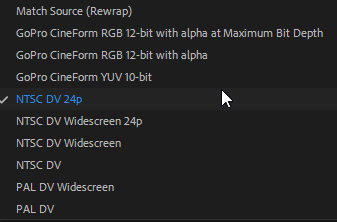
However, that does not appear to be the case. With QuickTime selected as the Format, I'm now missing Uncompressed, Animation and DNxHD as options. Where did these options go and why can I no longer utilize them with the QuickTime Format for Export? Despite the release notes claiming otherwise?
The following are the only codecs still available on Media Encoder 2018. Our company has progressively departed from MacOSX machines in lieu of more potent, cost effective Windows machines. However, we require these output codecs as we use them daily! At this point, I'm not sure what's causing this absence, but it occurs on every machine using 2018.


 1 Correct answer


Tasty Trade Tech Admin,
Sorry for this unfortunate incident.
I have QuickTime 7.7.9 installed on a Windows 10 Professional x64 machine. Back in the the Media Encoder 2017 version, QuickTime Animation worked just fine. We never witnessed an error or issue.
Here is your issue: Dropped support for QuickTime 7 era formats and codecs
This was a decision brought about by Apple's complete lack of QuickTime 32 bit support beginning in 2019. To get access to these codecs once more, install AME CC 2017 or ea
...
 1
Reply
1
1
Reply
1

Copy link to clipboard
Copied
Tasty Trade Tech Admin,
Sorry for this unfortunate incident.
I have QuickTime 7.7.9 installed on a Windows 10 Professional x64 machine. Back in the the Media Encoder 2017 version, QuickTime Animation worked just fine. We never witnessed an error or issue.
Here is your issue: Dropped support for QuickTime 7 era formats and codecs
This was a decision brought about by Apple's complete lack of QuickTime 32 bit support beginning in 2019. To get access to these codecs once more, install AME CC 2017 or earlier.
Thanks,
Kevin

Get ready! An upgraded Adobe Community experience is coming in January.
Learn more
 AdChoices