Exit
  • Global community
    • Language:
      • Deutsch
      • English
      • Español
      • Français
      • Português
  • 日本語コミュニティ
  • 한국 커뮤니티
0

color range missing

New Here ,
Jul 19, 2019 Jul 19, 2019

Hello guys. I'm new to Photoshop and this community as well.

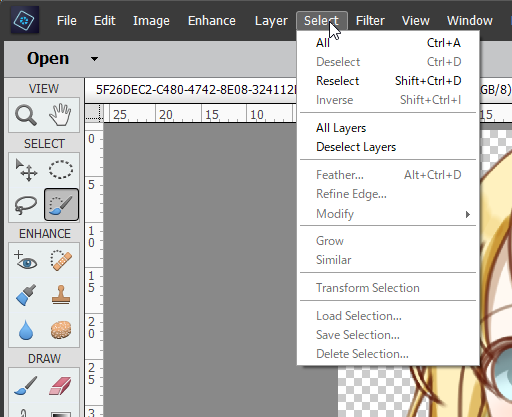
The problem I have is there's no such thing "color range".

I was instructed by this video tutorial: [How to Select and Change Colors in Photoshop - YouTube](https://www.youtube.com/watch?v=n9fwiNyDHLI)

In the beginning of this tutorial, there's "color range" selection in the select tab. But In my case, there's no such stuff. why and how do I use color range?

Thanks.

ShareX_ScreenShot_e8ae05eb-6b42-400b-b7de-3bd3cf81f364.png

![https://yuis.xsrv.jp/images/ss/ShareX_ScreenShot_e8ae05eb-6b42-400b-b7de-3bd3cf81f364.png](https://y...)

1.5K
Translate
Report
Community guidelines
Be kind and respectful, give credit to the original source of content, and search for duplicates before posting. Learn more
community guidelines

correct answers 1 Correct answer

Community Expert , Jul 19, 2019 Jul 19, 2019

Hi

It looks like you are using Photoshop Elements but following instructions for the full version of Photoshop.

If you are to follow video tutorials - make sure they are for Elements.

Dave

Translate
Community Expert ,
Jul 19, 2019 Jul 19, 2019

Hi

It looks like you are using Photoshop Elements but following instructions for the full version of Photoshop.

If you are to follow video tutorials - make sure they are for Elements.

Dave

Translate
Report
Community guidelines
Be kind and respectful, give credit to the original source of content, and search for duplicates before posting. Learn more
community guidelines
Guide ,
Jul 19, 2019 Jul 19, 2019

Are you using Photoshop CC or Photoshop Elements?


ICC programmer and developer, Photographer, artist and color management expert, Print standards and process expert.
Translate
Report
Community guidelines
Be kind and respectful, give credit to the original source of content, and search for duplicates before posting. Learn more
community guidelines
Community Expert ,
Jul 19, 2019 Jul 19, 2019

The video is for Photoshop, not Photoshop Elements.    I am moving your question to the Elements forum.

Moved from Photoshop to Photoshop Elements

Nancy O'Shea— Product User, Community Expert & Moderator
Translate
Report
Community guidelines
Be kind and respectful, give credit to the original source of content, and search for duplicates before posting. Learn more
community guidelines
New Here ,
Jul 19, 2019 Jul 19, 2019
LATEST

I got it. Thanks guys.

Translate
Report
Community guidelines
Be kind and respectful, give credit to the original source of content, and search for duplicates before posting. Learn more
community guidelines