

Walter_H
Legend
March 6, 2021
Answered

What Causes Broken Thumbnail In Organizer 2020

  • March 6, 2021
  • 1 reply
  • 1915 views

I am using PSE 2020 in Windows 10. I just imported a few JPG images into my Organizer. One of them displays a thumbnail with the "broken" icon. I can right-click the thumbnail and Open it in the Editor and edit it. But when I save the edit it still shows the "broken" thumbnail in the Organizer. I've tried using the Update Thumbnail function but it does nothing. The attached screenclip shows the original and two edits of this photo.
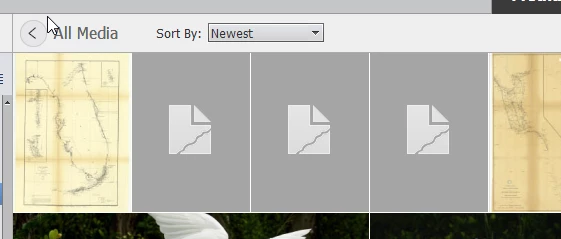


How can I fix this?


This topic has been closed for replies.
Correct answer MichelBParis

Walter,

The most common explanation is that the size of the file exceeds the limits for the thumbnails in the organizer:

https://helpx.adobe.com/photoshop-elements/kb/maximum-image-size-limits-photoshop.html

That's frequent for scans at high resolution.

1 reply

MichelBParis
MichelBParisCorrect answer
Legend
March 6, 2021

Walter,

The most common explanation is that the size of the file exceeds the limits for the thumbnails in the organizer:

https://helpx.adobe.com/photoshop-elements/kb/maximum-image-size-limits-photoshop.html

That's frequent for scans at high resolution.

Walter_H
Walter_HAuthor
Legend
March 6, 2021

Thank you, Michel! The image size that had the broken thumbnail was 9667px X 14543px. I used the registry hack in the article you referenced. I added the "MaxImageSize" and set the value to 150 Megapixels (157,286,400). Instead of deleting and re-importing as the article says, I just used the Edit>Update Thumbnail function. Now the thumbnail is fixed. BTW, the image is a 1943 Nautical chart that locates shipwrecks along the Florida coast from Cape Canaveral to Key West to Cape Romano.


--Walter in Davie, FL