


- Home
- RoboHelp
- Discussions
- Re: Conditional text in Responsive HTML5 file outp...
- Re: Conditional text in Responsive HTML5 file outp...

Copy link to clipboard
Copied
I am investigating converting our ancient .chm help into Responsive HTML5 help. I am looking an William van Weelden's blog on the topic (Merging Multiscreen HTML5 help). I'm hoping it applies to Responsive HTML5 as well.
My question relates to output folder structure. His structure looks like this:

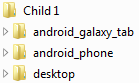
My application comes in two modes (say Mode A and Mode B). Therefore, I have conditional text in some topics for Mode A and Mode B. Should I create output folders under each Child project for each mode? If so, do I have to create them under each screen profile folder as well (so far I am not sure which profiles I will need other than desktop).
I am using RoboHelp 11.0.4.291.


 1 Correct answer

Responsive help works different from multiscreen (it's simpler!). See: http://www.wvanweelden.eu/blog/2014/03/18/adobe-robohelp-merging-responsive-html5-help
With Responsive help, you only have 1 set of content for all devices. If you want 2 different CBT's applied, you will have to create two outputs.

 5
Replies
5
5
Replies
5

Copy link to clipboard
Copied
Responsive help works different from multiscreen (it's simpler!). See: http://www.wvanweelden.eu/blog/2014/03/18/adobe-robohelp-merging-responsive-html5-help
With Responsive help, you only have 1 set of content for all devices. If you want 2 different CBT's applied, you will have to create two outputs.
Copy link to clipboard
Copied
Thank you Willam! Easier is good.
Copy link to clipboard
Copied
Do I have to create two parent projects (for Mode A and Mode B) as well?
Copy link to clipboard
Copied
You can have one parent project SOURCE. You will need two parent project OUTPUTS. One output for each conditional build expression.


Copy link to clipboard
Copied
The reason Willam's layout is different is because it avoids issues with links between the parent project and child projects. See the topics on Merged Help on my site. If you don't have any such links, your structure is OK.
See www.grainge.org for RoboHelp and Authoring tips


Get ready! An upgraded Adobe Community experience is coming in January.
Learn more
 AdChoices