



AthensSlim
Inspiring
November 20, 2022
解決済み

MiniTOC - No hyperlinks beyond H2

  • November 20, 2022
  • 返信数 10.
  • 714 ビュー

RH 2022.0.346


When I use a MiniTOC in a topic that is configured to display H2 through H4 headings (default setting), only the H2 headings have links associated with them. 
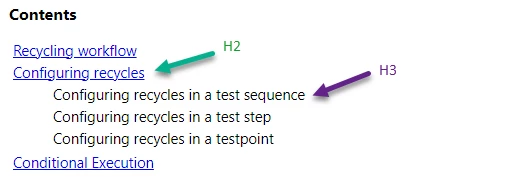
 

Bug, feature, or configuration error?

    このトピックへの返信は締め切られました。
    解決に役立った回答 Peter Grainge

    Add the bookmark after the heading. It works then.

    ________________________________________________________

    My site www.grainge.org includes many free Authoring and RoboHelp resources that may be of help.


    返信数 10

    Peter Grainge
    Community Expert
    Community Expert
    November 23, 2022

    @AthensSlim Did that work?

    ________________________________________________________

    My site www.grainge.org includes many free Authoring and RoboHelp resources that may be of help.


    Use the menu (bottom right) to mark the Best Answer or Highlight particularly useful replies. Found the answer elsewhere? Share it here.
    AthensSlim
    AthensSlim作成者
    Inspiring
    November 25, 2022

    Yes, that's an effective workaround

    Peter Grainge
    Community Expert
    Peter GraingeCommunity Expert解決!
    Community Expert
    November 22, 2022

    Add the bookmark after the heading. It works then.

    ________________________________________________________

    My site www.grainge.org includes many free Authoring and RoboHelp resources that may be of help.


    Use the menu (bottom right) to mark the Best Answer or Highlight particularly useful replies. Found the answer elsewhere? Share it here.
    AthensSlim
    AthensSlim作成者
    Inspiring
    November 22, 2022

    But did you add bookmarks to those headings? That is the thing that is causing the issue. 

    This does not work:

    <body>
      <h1>Test</h1>
      <div class="minitoc" data-minitoc-targetid="drop-down" data-type="minitoc" style="">
        <p class="minitoc-caption" data-close-text="" data-expanded="true" data-open-text="Contents" data-type="minitoc-caption" href="#" style="">Mini TOC (placeholder)</p>
        <ol class="minitoc-list" data-from-selector="h2" data-to-selector="h4" data-type="minitoc-list" style="">
          <li>Heading</li>
        </ol>
      </div>
      <h2><a id="bookmark"></a>Level 1</h2>
      <p>Words</p>
      <h3><a id="bookmark1"></a>Level 1a</h3>
      <p>Words</p>
      <h2>Level 2</h2>
      <p>Words</p>
      <h3>Level 2a</h3>
      <p>Words</p>
      <h4>Level 2aa</h4>
      <p>Words</p>
      <h3>Level 2b</h3>
      <p>Words</p>
    </body>


    But this does:

    <body>
      <h1>Test</h1>
      <div class="minitoc" data-minitoc-targetid="drop-down" data-type="minitoc" style="">
        <p class="minitoc-caption" data-close-text="" data-expanded="true" data-open-text="Contents" data-type="minitoc-caption" href="#" style="">Mini TOC (placeholder)</p>
        <ol class="minitoc-list" data-from-selector="h2" data-to-selector="h4" data-type="minitoc-list" style="">
          <li>Heading</li>
        </ol>
      </div>
      <h2>Level 1</h2>
      <p>Words</p>
      <h3>Level 1a</h3>
      <p>Words</p>
      <h2>Level 2</h2>
      <p>Words</p>
      <h3>Level 2a</h3>
      <p>Words</p>
      <h4>Level 2aa</h4>
      <p>Words</p>
      <h3>Level 2b</h3>
      <p>Words</p>
    </body>


    The difference being that the top has bookmarks added at the "Level 1" and "Level 1a" headers, while the bottom does not. 

    Peter Grainge
    Community Expert
    Community Expert
    November 22, 2022

    I just created a new project and this is what I see in the output. In source the topic has links as shown and in the output.


    That is why I am struggling to see this as a bug. If it were, the problem would exist for everyone.


    In the new project did you use the default CSS and new topics or did you import anything?

    ________________________________________________________

    My site www.grainge.org includes many free Authoring and RoboHelp resources that may be of help.


    Use the menu (bottom right) to mark the Best Answer or Highlight particularly useful replies. Found the answer elsewhere? Share it here.
    AthensSlim
    AthensSlim作成者
    Inspiring
    November 22, 2022

    That's exactly what it means. The issue doesn't exist in RH2020.8.

    Peter Grainge
    Community Expert
    Community Expert
    November 22, 2022

    Does that mean you replicated the problem in a new project using a default skin and tested the About RoboHelp sample project?


    I rather doubt this is a bug as it is a feature that has been in place for some time and no one else is reporting this issue. 


    My concern is it could take some time for this to be investigated and you will not be any further forward in seeing it working.

    ________________________________________________________

    My site www.grainge.org includes many free Authoring and RoboHelp resources that may be of help.


    Use the menu (bottom right) to mark the Best Answer or Highlight particularly useful replies. Found the answer elsewhere? Share it here.
    AthensSlim
    AthensSlim作成者
    Inspiring
    November 22, 2022
    Peter Grainge
    Community Expert
    Community Expert
    November 20, 2022

    I don't think that should break it. Please confirm that in another project and if it repeats, it should be reported as a bug.


    Please follow this link to report bugs or request new features. https://tracker.adobe.com. Post the link to your bug report / feature request in this thread and others can vote for it. The more people who do so, the higher it gets prioritised.

    ________________________________________________________

    My site www.grainge.org includes many free Authoring and RoboHelp resources that may be of help.


    Use the menu (bottom right) to mark the Best Answer or Highlight particularly useful replies. Found the answer elsewhere? Share it here.
    AthensSlim
    AthensSlim作成者
    Inspiring
    November 20, 2022

    Thanks, Peter. After seeing your reassurance that it should work, I dug in and found that the thing breaking it was the fact that I had added bookmarks to all of these H3 headers. If I remove the bookmarks/anchor elements, the MiniTOC is as expected.

    Peter Grainge
    Community Expert
    Community Expert
    November 20, 2022

    This page was created using 2022.0 and you will see the second level links are working so I think that rules out there being a bug. I have done nothing more than apply some styling as described on my site. See Snippets (grainge.org) > Generating Outputs > Item 7 for that.


    It should work by default. Test the same issue in the About RoboHelp sample project. Click Open Project and browse to Documents, then My RoboHelp Projects. Also try a fresh copy of whichever skin you are using.

    ________________________________________________________

    My site www.grainge.org includes many free Authoring and RoboHelp resources that may be of help.


    Use the menu (bottom right) to mark the Best Answer or Highlight particularly useful replies. Found the answer elsewhere? Share it here.