Exit
  • Global community
    • Language:
      • Deutsch
      • English
      • Español
      • Français
      • Português
  • 日本語コミュニティ
  • 한국 커뮤니티
0

Page missing from output htm

Community Beginner ,
Oct 01, 2021 Oct 01, 2021

The page is perfect from what I know as a beginnger user, has outputed before, just now it is not. I am sure it is something I am overlooking but it is a LARGE manual. Looking from some troubleshooting help on why when I generate, just one page would be missing.


478
Translate
Report
Community guidelines
Be kind and respectful, give credit to the original source of content, and search for duplicates before posting. Learn more
community guidelines
Community Expert ,
Oct 01, 2021 Oct 01, 2021

What version of RH? Things changed between Classic versions and the New UI versions regarding how stuff ends up in your output.

Translate
Report
Community guidelines
Be kind and respectful, give credit to the original source of content, and search for duplicates before posting. Learn more
community guidelines
Community Beginner ,
Oct 01, 2021 Oct 01, 2021

Using Robohelp 2020, it is an upgrade project.

Translate
Report
Community guidelines
Be kind and respectful, give credit to the original source of content, and search for duplicates before posting. Learn more
community guidelines
Community Beginner ,
Oct 01, 2021 Oct 01, 2021

RH 2020 it is an upgrades project

Translate
Report
Community guidelines
Be kind and respectful, give credit to the original source of content, and search for duplicates before posting. Learn more
community guidelines
Community Expert ,
Oct 01, 2021 Oct 01, 2021

Is the topic in the TOC? It must be in there to be included in the output now.

Translate
Report
Community guidelines
Be kind and respectful, give credit to the original source of content, and search for duplicates before posting. Learn more
community guidelines
Community Beginner ,
Oct 01, 2021 Oct 01, 2021

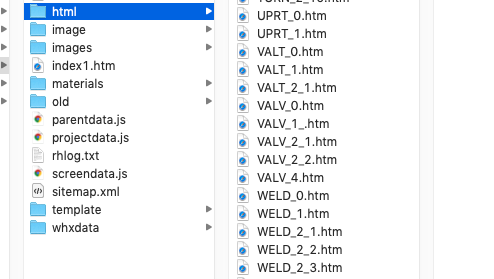
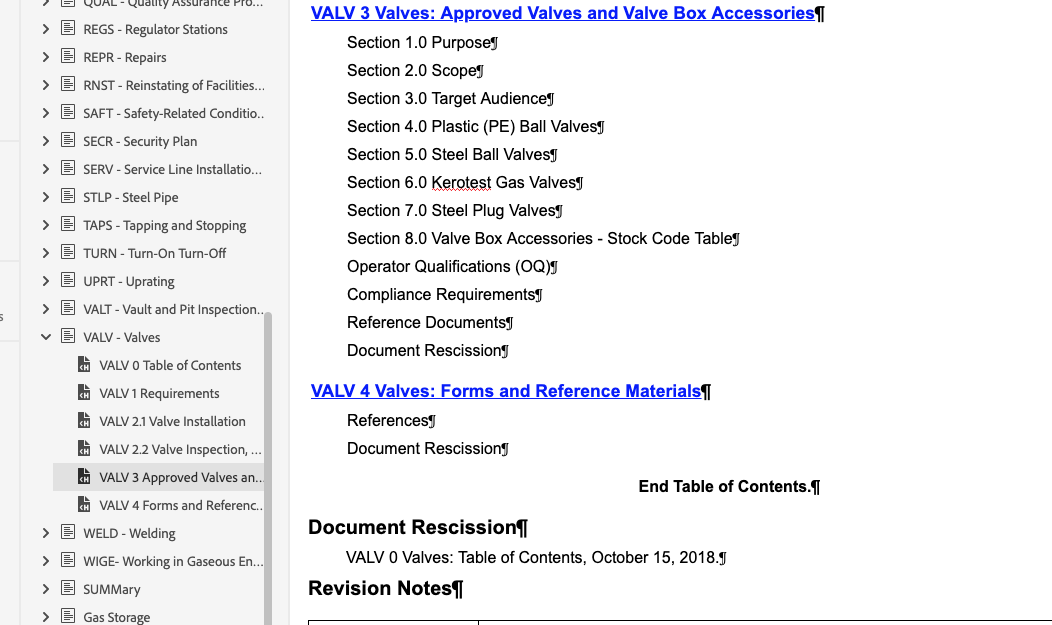
it is, I attached a screenshots to show the project then the output. Valve 3 is missing in the htm folder. Thank so much for replying and trying to help ! 

Translate
Report
Community guidelines
Be kind and respectful, give credit to the original source of content, and search for duplicates before posting. Learn more
community guidelines
Community Expert ,
Oct 01, 2021 Oct 01, 2021

Can you show it in the TOC? Add your images using the icon in the web interface; don't attach them because it makes it harder to see what you're talking about.

Translate
Report
Community guidelines
Be kind and respectful, give credit to the original source of content, and search for duplicates before posting. Learn more
community guidelines
Community Beginner ,
Oct 01, 2021 Oct 01, 2021

Screen Shot 2021-10-01 at 9.20.12 AM.pngScreen Shot 2021-10-01 at 9.03.25 AM.png

Translate
Report
Community guidelines
Be kind and respectful, give credit to the original source of content, and search for duplicates before posting. Learn more
community guidelines
Community Expert ,
Oct 01, 2021 Oct 01, 2021

Ok, now what does it show in the HTML5 output in your browser?

Translate
Report
Community guidelines
Be kind and respectful, give credit to the original source of content, and search for duplicates before posting. Learn more
community guidelines
Community Beginner ,
Oct 01, 2021 Oct 01, 2021

Screen Shot 2021-10-01 at 9.37.37 AM.png

Translate
Report
Community guidelines
Be kind and respectful, give credit to the original source of content, and search for duplicates before posting. Learn more
community guidelines
Community Beginner ,
Oct 01, 2021 Oct 01, 2021

Posting to a sharepoint and a local viewer, both do not output the VALV_3 that is listed in the TOC 

Translate
Report
Community guidelines
Be kind and respectful, give credit to the original source of content, and search for duplicates before posting. Learn more
community guidelines
Community Expert ,
Oct 01, 2021 Oct 01, 2021

Is your RH2020 running update 6? If so, try creating HTML5 output to a local folder & see if the topic is present there. If not, update & re-generate your SP output.

Translate
Report
Community guidelines
Be kind and respectful, give credit to the original source of content, and search for duplicates before posting. Learn more
community guidelines
Community Expert ,
Oct 01, 2021 Oct 01, 2021
LATEST

Try going to Reports > Topic List and looking for the topic there. It will show you which TOC the topic is in. Is that the TOC you are using when you generate?


Also check it is not being excluded by a condition expresssion.

________________________________________________________
See www.grainge.org for free Authoring and RoboHelp Information

Help others by clicking Correct Answer if the question is answered. Found the answer elsewhere? Share it here. "Upvote" is for useful posts.
Translate
Report
Community guidelines
Be kind and respectful, give credit to the original source of content, and search for duplicates before posting. Learn more
community guidelines
Resources
RoboHelp Documentation
Download Adobe RoboHelp