


- Home
- RoboHelp
- Discussions
- Paragraph styles font format mysteriously changed ...
- Paragraph styles font format mysteriously changed ...
Paragraph styles font format mysteriously changed on link (import) from FrameMaker source

Copy link to clipboard
Copied
Background/environment: I'm using Adobe TCS 3 (FM10 and RH9) to link to and update (import) FrameMaker source into RoboHelp HTML, and then trying to generate a CHM with Microsoft HTML Help output as my 'primary layout'
The most serious problem I've found (so far) is that I have 'body' text mysteriously turning to white font on white background on import-- even though the '[Source]' mapping style has no such specification-- so the resulting HTML is wrong. Here's what the import settings for the Paragraph style look like in my project:
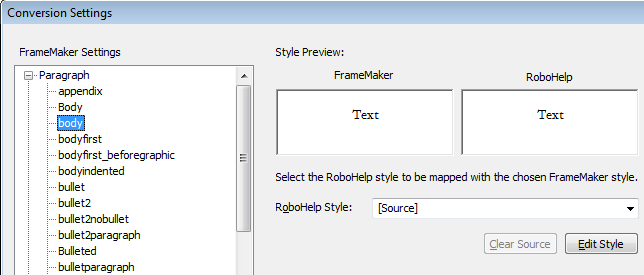
I click the "Edit Style" button, and here's the Styles dialog box settings (note that clicking Format button shows the text is black):
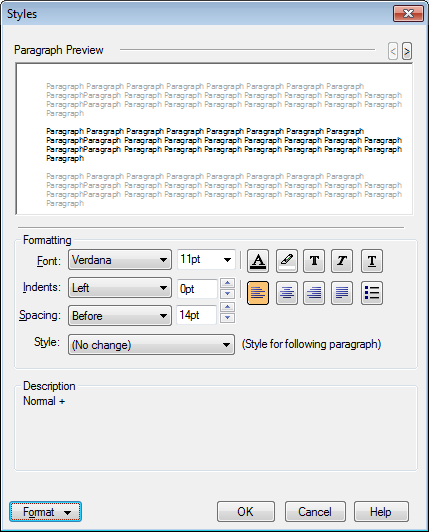
However, here's the result; white text on white background (I've highlighted some of the text so that you can see it in the picture below).

So,... any idea why/how this is happening and how to prevent it?
Thanks,
Kim
p.s.: Has anyone been able to actually successfully pull in FrameMaker source files into RH and then generate a CHM that looks good? If so, any helpful pointers to the Help, Blogs, forum posts here, etc. would be much appreciated. After a week of battling with Adobe TCS 3, I'm beginning to think this whole process is not ready for prime time... (and, given that my trial expires in 4 days, maybe I won't be buying TCS 3 to replace our FM6 to Web Works 7 to CHM application flow...  ).
).


 12
Replies
12
12
Replies
12




Copy link to clipboard
Copied
Terminology clarification: If you're importing, it's a one-time thing to suck content from FM into RH. With linking, you can change content in FM and have those changes reflected in your RH project when you tell it to update.
I do the import process because my FM docs are in a more complicated format (a book of books) than RH likes to link to. I create WebHelp (rather than CHM) because it was felt that CHMs really look dated.
The issue of your FM body paragraph format not converting is controlled by the css sheet that you selected on the first page of the import. Check inside it to see how "body" is treated. BTW - why do you have a "Body" and "body" paragraph format?
Copy link to clipboard
Copied
Hi Jeff,
Thanks for the answer; I know the CSS should control it. In answer to your questions:
I'm linking (I tried Import at first, but since I was planning on editing the source in FrameMaker, I discovered linking). I run an "update all" to ensure source is refreshed from FrameMaker (even though I haven't edited my FM source to do anything but ensure my FM7 files were opened/saved with FM10). I used 'import' in parenthesis in my original post because it really still is importing source from FM to RH; it simply happens to be a new import each time I update (or at least I assume that's how it works ).
The 'body' style in the CSS has a color of 0 (black); here's what I assume are the 2 relevant settings (bold emphasis is mine, of course):
body { font-family: Verdana, Arial, Helvetica, sans-serif; font-size: 11pt; font-style: normal; font-weight: normal; color: #000000; background-color: #FFFFFF; letter-spacing: normal; text-align: left; text-indent: normal; word-spacing: normal}
.body { font-size: 10pt; font-style: normal; font-weight: normal}
It doesn't seem to matter if I use my own CSS, the 'default.css' choice, or even the RHStyleMapping.css. I still get white text in the resulting HTML after the update (import from linked FM files).
What's maybe telling is when I edit my css in RH with Notepad; I end up with entries like this at the bottom:
p.FM_body {
}
I think the link/update (the process of linking to and then update-importing the source) may be creating "FM_<stylname>" entries, though I haven't dug into this too deeply yet... (I'm about ready to delete the whole project and start over from scratch, in case the fact that I imported first before re-doing as linking has something to do w/this... though I don't remember if I started a new project when I setup the link. :-})
I simply have 1 book that is a collection of .fm files; no book-of-books for me (so I hope the link can work OK  ).
).
As for your BTW question on why I have 2 body styles: I don't know; I inherited the FrameMaker source from my predecessors, and have been more focused on fixing the content of our Help than on fixing the 'interesting' ways in which the source has been formatted and edited by multiple authors over the years.
Kim
p.s.: I was hoping that since FM and RH are both Adobe products (and have been for awhile now), they would have figured out a way to pull the formatting/styles from FM into RH (without me needing to create a custom .fm template, edit a CSS, etc.), and have it look basically the same in RH as it does in FM. In other words, if FM specifies the formatting for each bit of text, why can't RH simply use that formatting (at least as far as font family, color, and other basics go)?
Copy link to clipboard
Copied
Yes, the CSS controls it all - see this blog post about the process (http://blogs.adobe.com/rjacquez/2009/05/linking_framemaker_9_books_in.html)
You can have RH apply 1 CSS to all your topics when you generate help - that's what I do, since it's easier than changing all the individual CSS's associated with each topic.
Copy link to clipboard
Copied
I'm still mystified why, with a CSS that defines this style, the text (and only that text) would get redefined to white on white. This hasn't been explained/answsered, and seems like a bug to me. However, when I apply the same CSS to the output/generation of HTML Help (CHM)-- that one that has the 2 lines I specified in an earlier post-- the text shows back up (so I am using the trick of applying a single CSS to all topics on generating the CHM). Why would it be changed on import, but then show back up on output? Again, this makes no sense. I guess I can submit it as a bug and see what Adobe says; any thoughts on this?
Anyway, the text showing back up is the 'good' news; it's a workaround. The bad news is that the formatting's all messed up (headings aren't formatted separately, bold text isn't bold, etc.), and it appears I have to go figure out why and custom-build a CSS file. I tried a 'save as' in FrameMaker 10 to an HTML or XML to generate a CSS, and it does generate one, but using that file on both input (link/update-import and output) doesn't fix the formatting issues. Is there a way to export, as a CSS, the formatting already in a FrameMaker book and its documents such that it will preserve 'exactly' the formatting in FrameMaker? If not, is there a 'standard' CSS file used for importing FrameMaker content that will get me 'most' of the way to having the same formatting? FYI, I've tried the 'default.css' and 'RHStyleMapping.css' files and neither one of those kept my formatting intact.

Copy link to clipboard
Copied
Hi,
I'm not too big on FM import/linking, but when you import/link a FM document, RoboHelp creates a new CSS based on the CSS used for mapping the styles. I noticed that some styles that RH sees as unused are incorrectly not copied to the newly created topics. Asigning the correct CSS instead of the auto generated CSS may solve some issues, as it obviously does in your case.
If you have a small example project, I can take a look at the generated HTML and CSS for you. But if something is going wrong with the import/link itself, Jeff can help way better than me.
Greet,
Willam
Copy link to clipboard
Copied
That does seem strange - I would have a look at the CSS created for the topic in the project that is displaying the white on white text and compare that one to the one you are applying to all topics when you generate. I can't imagine that they are exactly the same. Another approach might be to check out the HTML coding of a topic displaying the white on white text and see what style is being applied. It may just be an issue with the Preview pane not figuring out how to show the affected text.
Our company hired a consultant when we were revamping our documentation and they created our templates and CSS file. I've tweaked it a bit, but I'm no CSS guru (like Willam is) - that's on my list of things to learn more about. (Note to self - enroll in CSS intro class this fall.)
One thing I have learned about CSS is that there are several ways to affect the appearance of text. Using bold or italic attributes applied to paragraph formats without creating new named formats with those attributes can cause problems. Here's a chunk of one of my topic CSS for my Heading1 format (I use this one and Heading2 to paginate my topics in RH):
p.FM_Heading1 {
margin-left: 0.000pt;
margin-right: 0.000pt;
text-align: left;
text-indent: 0.000pt;
margin-top: 14.000pt;
margin-bottom: 6.000pt;
word-spacing: 0.250em;
font-family: Verdana;
font-style: normal;
font-weight: normal;
font-size: 14.0pt;
color: #001383;
background-color: none;
text-decoration: none;
letter-spacing: 0.00em;
}
And here's a character format I use called ScreenField that gives a blue bolded look to text that I apply it to:
span.FM_ScreenField {
font-style: normal;
font-weight: bold;
font-size: 10.0pt;
color: #001383;
text-decoration: none;
letter-spacing: 0.00em;
}
Copy link to clipboard
Copied
Willem and Jeff, thanks for the replies.
What's the same for the CSS is that I use the same file upon link/import and upon SSL publish to HTML Help (CHM).
I thnk I may have found the source of the problem(s):
- RoboHelp, on import, incorrectly changes the color of a paragraph style ('Body') from pinkish-purple to white (from ff00ff to ffffff).
- RoboHelp may not be using case-sensitive parsing of the CSS to display text in its 'design' view.
Is the CSS not case-sensitive? Or, perhaps more to the point, is the RH9 'Design' window view of the text not case-sensitive? I have a text definition of 'body' and 'Body'. They have black and white colors (respectively) in the CSS that RH9 creates after import, even though the latter has ff00ff (a pinkish-purple) in my CSS that I used on import.
Here's a portion of the HTML as viewed in RoboHelp HTML 9 (RH9) 'HTML' view of the HTML file created after import:
<p class="FM_body">The Resources page lists resources that the activity uses.</p>
Here's the entry for the paragraph styles in the CSS that RH creates specific to the topic (in my case, process_helpids.css):
p.FM_body {
margin-left: 0.000pt;
margin-right: 0.000pt;
text-align: left;
text-indent: 0.000pt;
margin-top: 0.000pt;
margin-bottom: 7.000pt;
word-spacing: 0.250em;
font-family: AmeriGarmnd BT;
font-style: normal;
font-weight: normal;
font-size: 11.0pt;
color: #000000;
background-color: none;
text-decoration: none;
letter-spacing: -0.00em;
}
p.FM_Body {
margin-left: 0.000pt;
margin-right: 0.000pt;
text-align: center;
text-indent: 0.000pt;
margin-top: 0.000pt;
margin-bottom: 0.000pt;
word-spacing: 0.250em;
font-family: Times New Roman;
font-style: normal;
font-weight: bold;
font-size: 9.0pt;
color: #ffffff;
background-color: none;
text-decoration: none;
letter-spacing: 0.00em;
}
Here's what it looks like on the screen (you can't see the text, as it's white-on-white, but I've highlighted some of it so you can see what I mean):

Here's the relevant portions of the CSS (in my case, called igrafx.css) that I used on link/update (import) from FM to RH:
P.body {
display: block;
text-align: left;
text-indent: 0.000000pt;
margin-top: 0.000000pt;
margin-bottom: 7.000000pt;
margin-right: 0.000000pt;
margin-left: 0.000000pt;
font-size: 11.000000pt;
font-weight: medium;
font-style: Regular;
color: #000000;
text-decoration: none;
vertical-align: baseline;
text-transform: none;
font-family: "AmeriGarmnd BT";
}
P.Body {
display: block;
text-align: left;
text-indent: 0.000000pt;
margin-top: 0.000000pt;
margin-bottom: 0.000000pt;
margin-right: 0.000000pt;
margin-left: 0.000000pt;
font-size: 10.500000pt;
font-weight: medium;
font-style: Regular;
color: #ff00ff;
text-decoration: none;
vertical-align: baseline;
text-transform: none;
font-family: "Times New Roman";
}
This gets repeated later on in the CSS for some reason, with slightly different order but same data (I'm using the CSS created by FrameMaker when I do a "Save As" to HTML format):
P.body {
display: block;
text-align: left;
text-indent: 0.000000pt;
margin-top: 0.000000pt;
margin-bottom: 7.000000pt;
margin-right: 0.000000pt;
margin-left: 0.000000pt;
font-size: 11.000000pt;
font-weight: medium;
font-style: Regular;
color: #000000;
vertical-align: baseline;
text-transform: none;
font-family: "AmeriGarmnd BT";text-decoration: none;
}
P.Body {
display: block;
text-align: left;
text-indent: 0.000000pt;
margin-top: 0.000000pt;
margin-bottom: 0.000000pt;
margin-right: 0.000000pt;
margin-left: 0.000000pt;
font-size: 10.500000pt;
font-weight: medium;
font-style: Regular;
color: #ff00ff;
vertical-align: baseline;
text-transform: none;
font-family: "Times New Roman";text-decoration: none;
}
You say "It may just be an issue with the Preview pane not figuring out how to show the affected text." That seems probable to me. The question, then, is why RH does this, and if it's a bug or not. It seems to me I am working around a bug in the ability of Adobe Tech Communication Suite 3 (FrameMaker 10 / RoboHelp 9) to properly convert and display some content from FM10 files brought into RH9.
Given that my trial expires at the end of this week, and my evaluation of TCS 3 is done, I'm not sure I should spend more time on this. However, if I did find some bug here, I'd like to report it so others don't also spend ridiculous amounts of time trying to figure out what's wrong...
Copy link to clipboard
Copied
Workaround: For me, if I go into the 'Conversion Settings' dialog box and set the 'Body' style to an RH style (of 'body'), then the text will be mapped correctly (note that it does not use the ff00ff color shown, but in this case I want the color to be black, as the CSS says it should be ;-):
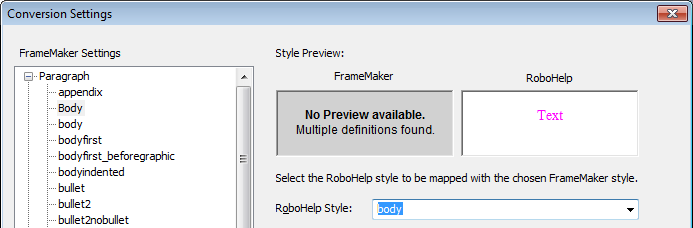
Apparently, when RH says "No Preview available. Multiple definitions found." for the RoboHelp text, it has the potential to get confused over what to do (given I was using a CSS on import, I think RH changing the font color to white on a white background is the wrong thing to do ;-). So, anyway, this workaround resolved my issue.
Copy link to clipboard
Copied
Glad to hear it's solved for you. Just a quick note about case in HTML and CSS:
HTML is not case sensitive, but attributes such as classes are case sensitive. A quick search learned that old browsers may have problems with class names where only the case is different. See https://developer.mozilla.org/en/Case_Sensitivity_in_class_and_id_Names. It could very well be that the RH design view doesn't correctly works with the case difference.
The workaround in the mozilla dev article may still be a good idea: avoid class names where only the case differs.
Greet,
Willam

Copy link to clipboard
Copied
Here it is, the end of April 2012, and I am experiencing the very same problems with Frame 10 and RH 9. Odd and unpredictable results between "Update All" and "Generate" and "Publish." RH seems to have a mind of its own. Here are the problems I'm seeing:
All my styles are very, very clear in Framemaker. No "multiple" styles exist, yet RH continues to report that these exist.
I map everything to individual HTML styles.
Run "Update All" and everything looks great.
Then I "Generate" making sure all of the settings are exactly as I want them to be and here is what happens:
List items (numbered, ordered, unordered) appear in different fonts, sizes and colors. NOT what is specified in the rhstylemapping.css (or RHStyleMapping.CSS)
A look at the HTML code (via Dreamweaver) shows .css files, as follows:
<link rel="stylesheet" href="../../rhstylemapping.css" type="text/css" />
<link rel="stylesheet" href="../../RHStyleMapping.css" type="text/css" />
<style type="text/css">
I specify that RH is to use RHStyleMapping.css and I am now hard coding my styles in this .css (via Dreamweaver) because I've lost faith in the Framemaker/RH process.
I have removed rhstlemapping.css from the HTML code and it mysteriously reappears on the next gen.
Image alignment is changed to "centered" for many images, or the alignment is changed is other ways, even though the alignment is NOT centered and even though I specify "At insertion point" for the anchored frames. All of the graphics are in anchored frames. I have even gone so far as to create a series of "Anchoredn" styles specifically for graphics and assigned them to separate BodyLeveln HTML styles, and formatted the alignment exactly to where I want the graphic to appear (some are in nested lists).
Spaces that are not in the Framemaker source are added or deleted before hyperlinks.
Hyperlinked text that is in a subsequent paragraph is somehow brought in to the preceding paragraph, causing content to be blue and underlined. This content is not hyperlinked in the sourced, nor do I intend it to be. Further, the arbitrarily hyperlinked content is separated from the actualy hyperlinked content by </p> and a new <p> and a new style starting the content that is supposed to be hyperlinked.
Extra lines are added and pargaraph breaks are deleted arbitrarily.
There are a few more problems that don't come to mind at the moment.
I've resorted to working directly in the HTML code to correct the problems. Very tedious since I have two helps systems with more that 400 files each that now need to be hand coded.
I'm quite annoyed. Sure would appreciate any fixes to these problems. Please don't send me to Jaquez's Frame9 tutorials. They don't apply to these problems....been there...done that.
Copy link to clipboard
Copied
Hi,
In your SSL, try enabling ‘Apply to all topics’ and choose the CSS you want. That might save you from manually removing CSS.
Greet,
Willam
Copy link to clipboard
Copied
Thanks. Not the problem. That's already been done and I double check to make sure it is still enabled before generating.
Jackie


Get ready! An upgraded Adobe Community experience is coming in January.
Learn more
 AdChoices