


Paragraph styles font format mysteriously changed on link (import) from FrameMaker source
Background/environment: I'm using Adobe TCS 3 (FM10 and RH9) to link to and update (import) FrameMaker source into RoboHelp HTML, and then trying to generate a CHM with Microsoft HTML Help output as my 'primary layout'
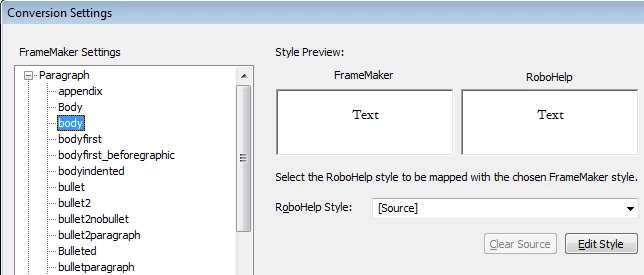
The most serious problem I've found (so far) is that I have 'body' text mysteriously turning to white font on white background on import-- even though the '[Source]' mapping style has no such specification-- so the resulting HTML is wrong. Here's what the import settings for the Paragraph style look like in my project:
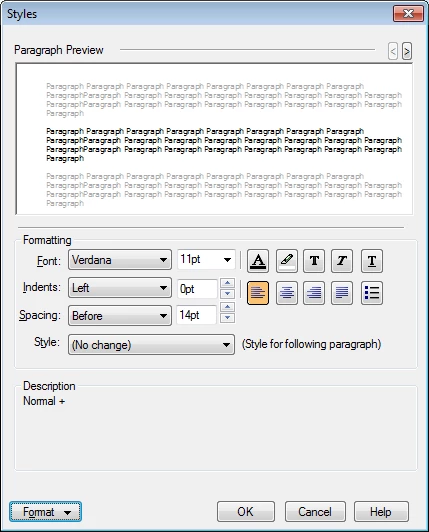
I click the "Edit Style" button, and here's the Styles dialog box settings (note that clicking Format button shows the text is black):
However, here's the result; white text on white background (I've highlighted some of the text so that you can see it in the picture below).

So,... any idea why/how this is happening and how to prevent it?
Thanks,
Kim
p.s.: Has anyone been able to actually successfully pull in FrameMaker source files into RH and then generate a CHM that looks good? If so, any helpful pointers to the Help, Blogs, forum posts here, etc. would be much appreciated. After a week of battling with Adobe TCS 3, I'm beginning to think this whole process is not ready for prime time... (and, given that my trial expires in 4 days, maybe I won't be buying TCS 3 to replace our FM6 to Web Works 7 to CHM application flow...  ).
).
 AdChoices