


Copy link to clipboard
Copied
Hello,
I am using new RoboHelp 2019 and have just created an index. When I build my help file only two topics get displayed. I have tried a few different outputs and still the same. I have checked that my index entries actually link to topics but they still don't display. It's really odd that just two topics display. I've checked their properties but can't see anything unusal about them. Any help would be greatly appreciated, thanks.


 1 Correct answer


In Classic versions all topics in a project went into the output unless excluded by a build expression. 2019 is different. Topics have to be in the TOC used in the preset. That is why I referred you to two sources of information so that you understood that and to ensure your output included the topics mssing from the index.
Take a look at the Index topic in one of those sources to make sure your index is set up correctly.
Also go to a topic where the index entry is missing and look in Proper
...
 13
Replies
13
13
Replies
13


Copy link to clipboard
Copied
New UI or Classic? All 9 updates applied? What type of output?
Copy link to clipboard
Copied
I'm using New Robohelp, I haven't applied any updates, I installed it about 3 months ago. Is there a link to install the updates? I have tried with Responsive HTML5 and Microsoft HTML Help but the same problem occurs.
Copy link to clipboard
Copied
Help > Updates should get you updated.
Are you talking about an index or a table of contents? Maybe you should post some screenshots of what you see in RH and what you see in the HTML5 output?
Copy link to clipboard
Copied
I just checked the Help > Updates and I'm all up to date.
Yes, I am talking about an index. I have this in RoboHelp:

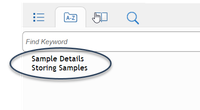
And this gets displayed when I build the file. I have circled the topics that get built; the others don't.
Copy link to clipboard
Copied
If you last updated about three months ago, you will not be up to date. Your version should show 2019.0.9.
Are the topics not showing in the TOC?
The build is now governed by the TOC. See the RoboHelp Reimagined sample project or the RoboHelp Tour on my site.
Copy link to clipboard
Copied
I am definitely up to date, when I select the Help > Updates option I get the following message:

My version is 2019.0.9:

Copy link to clipboard
Copied
The topics are displaying in the TOC.
Copy link to clipboard
Copied
What do you mean when you write 'The build is now governed by the TOC.' I don't understand what this means.
Copy link to clipboard
Copied
In Classic versions all topics in a project went into the output unless excluded by a build expression. 2019 is different. Topics have to be in the TOC used in the preset. That is why I referred you to two sources of information so that you understood that and to ensure your output included the topics mssing from the index.
Take a look at the Index topic in one of those sources to make sure your index is set up correctly.
Also go to a topic where the index entry is missing and look in Properties to see if the index entries show there.
Post back.

Copy link to clipboard
Copied
Hello Peter,
In my projects there are few hundred topics. I have upgraded my projects from RH2019 Classic to RH2019 Reimagined (New UI).
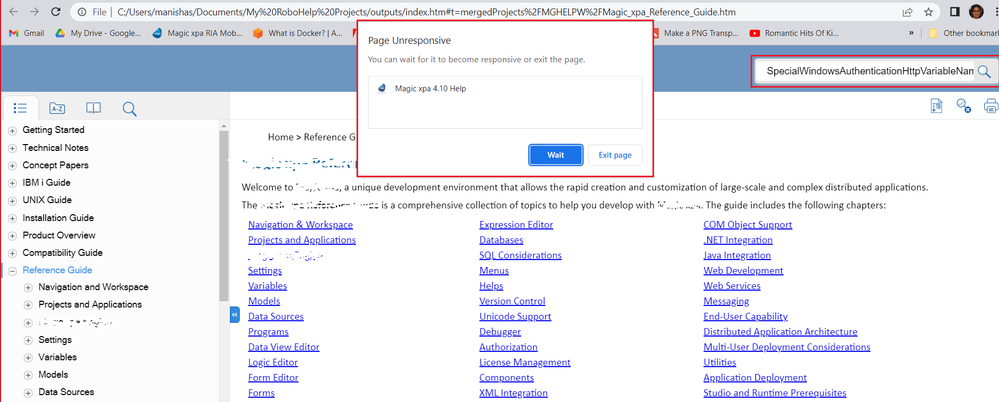
The highlighted dialog appears after around 10 seconds and when clicked on 'Wait', the same dialog is issued after a while. On clicking 'Exit page', an empty page is displayed.
Also, while trying to add a keyword to associate with the topic index (while adding Topic Properties > Index Keyword, RoboHelp stops working abrruptly), RH 2019 Reimagined abruptly stops working.
I will appreciate some help on these issues.
Kind regards,
Manisha
Copy link to clipboard
Copied
What has that got to do with this thread? Please start a new thread as topics with unrelated issues make it difficult to know what relates to what.
Also it's best not to nominate who should answer. People are not available 24/7 and they may not be the best person for the question. It's fine when replying.
________________________________________________________
My site www.grainge.org includes many free Authoring and RoboHelp resources that may be of help.

Copy link to clipboard
Copied
Is the keyword "Storage" linked to a topic? If it's not, I don't think it will display in the index. At least, that was the case for older versions of RH.
I don't have access to RH 2019 at the moment, but there is a difference between the keywords and subkeywords (the entries with a key) and the topic linked to the keyword (the entries with a page).
Copy link to clipboard
Copied
Thanks Peter,
The topics were not in the TOC so they didn't show up in the index.


Get ready! An upgraded Adobe Community experience is coming in January.
Learn more
 AdChoices