
Participating Frequently
February 6, 2024
Answered

Fake transparent background images

  • February 6, 2024
  • 6 replies
  • 2198 views

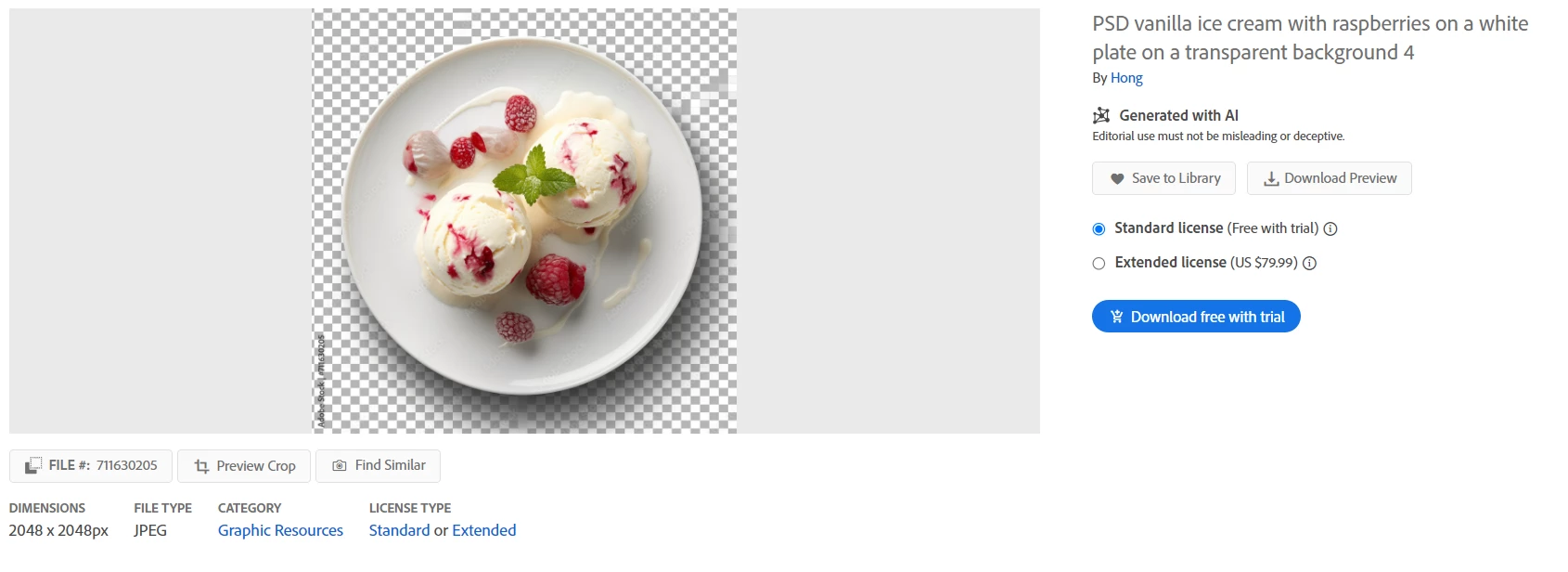
How is it that the approval process has allowed numerous fake transparent background images from a single account, and yet, the account has not been banned? This account is even appearing in the 'Recent Top Sellers'. One might argue that those who approve images could make a mistake and let one image slip through, but it's hard to believe when more than 10 images have a fake background. 

 

This topic has been closed for replies.
Correct answer Contributor1

Hello @Ismail30734032ltqu, I see the issue you're referencing and I've sent these details to be reviewed internally. Thank you for the report and sorry for the problem with the images.

6 replies

RALPH_L
Community Expert
Community Expert
February 7, 2024

I opened a ticket with contributor-support, which was quickly closed, or maybe @Contributor1 took some action, the user is now offline.

Thanks for reporting.

Abambo
Community Expert
Community Expert
February 8, 2024

Contributor1 is the one taking care of those things. His team has checked the account and closed it, and in a few days we will have someone here whining that his account has been closed.

ABAMBO | Hard- and Software Engineer | Photographer
Abambo
Community Expert
Community Expert
February 6, 2024
quote

One might argue that those who approve images could make a mistake and let one image slip through, but it's hard to believe when more than 10 images have a fake background. 

By @Ismail30734032ltqu

But it is so. Moderators make errors and some don't do their job correctly.

ABAMBO | Hard- and Software Engineer | Photographer
photorebelle
Inspiring
February 7, 2024

The most problematic were the clients who bought these images to integrate into their project and who must have been very disappointed.

Jill_C
Community Expert
Community Expert
February 7, 2024

Hopefully, they requested a credit !

Jill C., Forum Volunteer
Contributor1Community ManagerCorrect answer
Community Manager
February 6, 2024

Hello @Ismail30734032ltqu, I see the issue you're referencing and I've sent these details to be reviewed internally. Thank you for the report and sorry for the problem with the images.

Participating Frequently
February 6, 2024

Thank you for your attention. I was unsure of how to report it, which is problematic as it creates a negative experience for customers. I hope that Adobe Stock will incorporate a ‘report’ button for each image on their website in the future. This would simplify the process for users to report such issues.

Abambo
Community Expert
Community Expert
February 6, 2024

Making it too simple to report will increase the fake reports!


You can make your voice heard in the stock forum under ideas! 

ABAMBO | Hard- and Software Engineer | Photographer
daniellei4510
Community Expert
Community Expert
February 6, 2024

How bizarre. Especially since the contributor would have needed to cut out the objects in order to PUT them on the fake background. Unless they were prompting the AI bot in some manner to give the impression these are on a transparent background, as might be indicated by the sloppy job of the checkerboard pattern. I don't think this contributor is being purposely deceitful. They just don't know understand how transparencies work and they have no Photoshop experience whatsoever.

Adobe Community Expert | If you can't fix it, hide it; if you can't hide it, delete it.
Abambo
Community Expert
Community Expert
February 6, 2024
quote

How bizarre. Especially since the contributor would have needed to cut out the objects in order to PUT them on the fake background. Unless they were prompting the AI bot in some manner to give the impression these are on a transparent background, as might be indicated by the sloppy job of the checkerboard pattern. I don't think this contributor is being purposely deceitful. They just don't know understand how transparencies work and they have no Photoshop experience whatsoever.


By @daniellei4510

Anyhow, this should not be on Adobe stock and the contributor should not be allowed to put items like this into the database. It may well be that these assets have been created, uploaded and submitted without human intervention.

ABAMBO | Hard- and Software Engineer | Photographer
RALPH_L
Community Expert
Community Expert
February 6, 2024

You should report this to contributor support. The title and the keywords are misleading and are being only used to generate downloads. 

Legend
February 6, 2024

What do you mean by fake transparent backgrounds?

Participating Frequently
February 6, 2024

The titles of the images claim they have transparent backgrounds, but this is not the case. Each image features an object with a supposedly transparent background, seemingly designed to deceive people. You might download an image under the impression that it has a transparent background (typically indicating a PNG file), only to discover that the background isn’t transparent at all. Instead, it’s merely a checkered grey-and-white pattern.
Take a look - the file type is JPEG, not PNG :
https://stock.adobe.com/ma/images/psd-fresh-apple-tart-on-a-transparent-background-4/711675697

Legend
February 6, 2024

Oh, yes - and I see now that the checkered background is not even ... what a huge mistake from the reviewers ...!