


- Home
- Substance 3D Painter
- Discussions
- Re: Can't import Substance Painter assets
- Re: Can't import Substance Painter assets
Can't import Substance Painter assets

Copy link to clipboard
Copied
I'm trying to import several .sbsar assets to my library, but regardless of importing them as alpha, basematerial, filter, generator, procedural, or texture, I get the "[Resource Import] ... cannot be imported as..." error. I feel like I'm doing something wrong, but there aren't any clear instructions on how to import these assets.
This is one of the several assets. They're all stitches and seams like this one.
https://substance3d.adobe.com/assets/allassets/428ec3393f0d1d58f556c304a467427d008a530e?assetType=su...
Substnace Painter 7.4.3
Windows 10 21H1


 5
Replies
5
5
Replies
5




Copy link to clipboard
Copied
Either download them direct into your library shelf folder on your PC or, as I do, have a separate folder and point to it in Substance Painter > Settings >Library locations
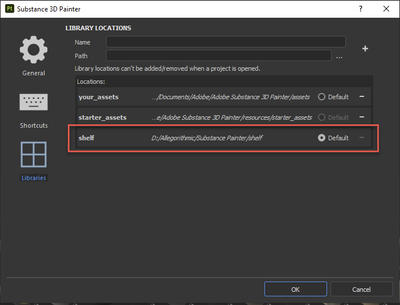
Dave
Copy link to clipboard
Copied
I tried dragging and dropping them into the library folder, but they still don't show up in the application. In the attached images, you can see both the cotton pinpoint material and etched metal in both the folder and the application, but the double top stitched seam still won't import.
Copy link to clipboard
Copied
Hi
I'm not sure what to suggest. To test it, I've just downloaded Double Top Stitched Seam into my library shelf folder under Materials and it shows up straight away when I filter on' Fabric'

Dave


Copy link to clipboard
Copied
Hi,
Would you mind sharing a log (go to help>export a log...)
Thank you,
Geoffroy

Copy link to clipboard
Copied
When you work with a share shelf, Painter created a temporary file named "_lock" to avoid conflict with other artists on the same shelf. To fix this pbm, you have to delete this temporary file _lock in your shelf library :
In my exemple :


Get ready! An upgraded Adobe Community experience is coming in January.
Learn more
 AdChoices

