Exit
  • Global community
    • Language:
      • Deutsch
      • English
      • Español
      • Français
      • Português
  • 日本語コミュニティ
  • 한국 커뮤니티
0

The GPU is not used when baking

Explorer ,
Sep 30, 2025 Sep 30, 2025

When I bake, only the CPU percentage increases, and it seems like the GPU isn't starting up. How do I change the settings in Windows or the app?

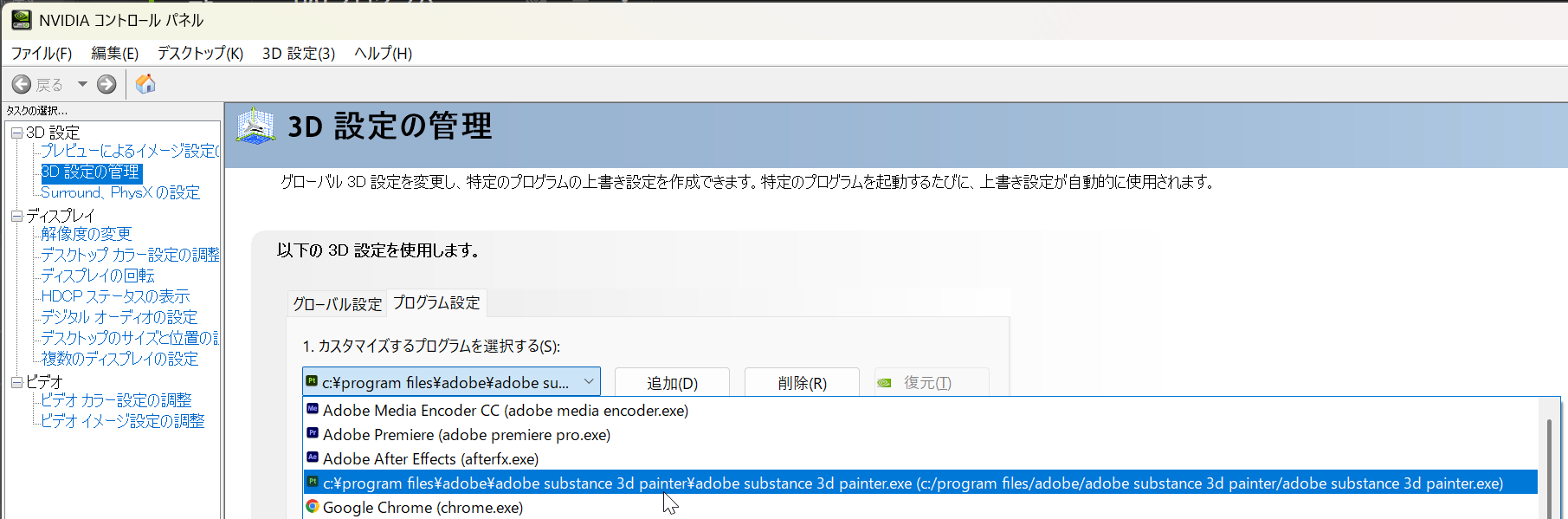
In the NVIDIA Control Panel, I've added the Substance Painter app, and in the Substance Painter settings, I have both CPU and GPU checked for IRAY HARDWARE.

Thank you in advance.

TOPICS
Baking , Discussion
184
Translate
Report
Community guidelines
Be kind and respectful, give credit to the original source of content, and search for duplicates before posting. Learn more
community guidelines

correct answers 1 Correct answer

Adobe Employee , Oct 01, 2025 Oct 01, 2025

Hello @sha19899999,


It's not that surprising, most of the channels are in fact using the CPU. I wouldn't worry too much about it, but if you're facing slow performances, I advise you to disable the baking live preview.

Edit > Settings > General > Baking options > Enable live preview


CyrilDellenbach_0-1759312208968.png


Best regards,


Translate
Adobe Employee ,
Oct 01, 2025 Oct 01, 2025

Hello @sha19899999,


It's not that surprising, most of the channels are in fact using the CPU. I wouldn't worry too much about it, but if you're facing slow performances, I advise you to disable the baking live preview.

Edit > Settings > General > Baking options > Enable live preview


CyrilDellenbach_0-1759312208968.png


Best regards,


Cyril Dellenbach (Micro) | QA Support Artist | Adobe
Translate
Report
Community guidelines
Be kind and respectful, give credit to the original source of content, and search for duplicates before posting. Learn more
community guidelines
Explorer ,
Oct 01, 2025 Oct 01, 2025
LATEST

Thank you so much!

Translate
Report
Community guidelines
Be kind and respectful, give credit to the original source of content, and search for duplicates before posting. Learn more
community guidelines