cassandrab42602363
Participant
December 21, 2016
Answered

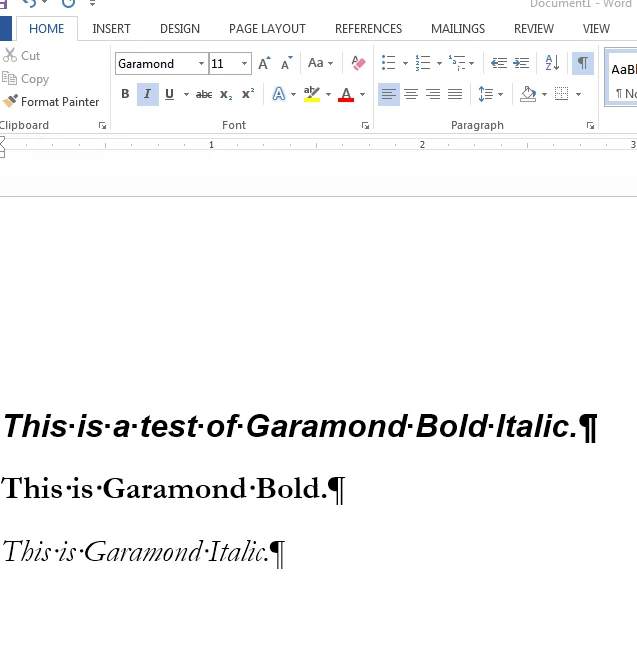
When I use garamond bold italic in Word 2013, it appears as a san serif.

  • December 21, 2016
  • 1 reply
  • 5951 views

It prints and pdfs fine, it is just how it appears in Word. I have tried uninstalling and reinstalling. My IT person thinks that it is a problem with the way Word and Adobe interact. I rely on this font as it is a company branding issue. I cannot format in Word because the font doesn't appear correctly. I have tried deleting the pfm and pfb fonts from the computer. I have tried reinstalling all fonts manually as well as deleting repetitive font names manually. Nothing seems to work. See below for an example. I can't imagine why this font would appear in Adobe programs just fine, but only seems to have an issue in Word 2013. This is the third machine I have had this problem with. I am at my wits end. I am not sure how to fix this problem. Any suggestions?

    This topic has been closed for replies.
    Correct answer Dov Isaacs

    Adobe has never offered a font or font family with the simple name “Garamond.” Adobe has offered Adobe Garamond (Type 1 and subsequently OpenType CFF formats) and Garamond Premier Pro (OpenType CFF format) families, both Adobe designs, as well as ITC Garamond, Garamond 3, and Stempel Garamond licensed from other foundries.

    My initial assumption was that the “Garamond” that you are most likely using is the Garamond family installed by Microsoft Office, licensed by Microsoft from Monotype. Ironically, this font family only has regular, italic, and bold faces. There is no bold italic face with that particular Garamond family. And apparently, for some reason, your Windows configuration refuses to “synthesize” a bold italic faux style for Garamond by obliquing Garamond Bold. (I am successful in doing this on my systems - I don't know why it doesn't work on yours).

    However, you mention uninstalling and reinstalling .pfb and .pfm files. That would be indicative of a Type 1 version of a Garamond font family. What I did find what that the old Type 1 ITC Garamond fonts licensed by Adobe indeed had a Windows application menu name of Garamond. That may be what you have been using.

    If that's the case, the cause of the problem is unfortunately very simple. Microsoft no long supports any Type 1 fonts (i.e., the fonts with .pfb and .pfm files) for Microsoft Office under Windows starting with Office 2013, although the Type 1 font names may appear on the font lists. What is probably happening is that Word is using the Monotype TrueType version of the regular, italic, and bold faces of Garamond but then has no direct substitute for the Type 1 bold italic face of Garamond, thus using Arial Bold Italic. That is consistent with the sample you display. (The Garamond in your sample does ​not ​look like ITC Garamond!)

    Since Adobe applications continue to fully support the old Type 1 fonts (although we no longer sell licenses for them), you don't see this problem in any Adobe application.

    For better or worse, there is nothing Adobe can do to assist you with this since the problem is neither caused by any Adobe software nor can it be fixed by anything from Adobe. And Microsoft has no intention of supporting Type 1 fonts going into the future. They do support TrueType, OpenType TrueType, and OpenType CFF (Type 1 outlines) fonts now!

    What are your alternatives? You could license TrueType, OpenType, or OpenType CFF versions of some version of Garamond from Adobe or some other vendor after carefully matching what you currently have in terms of style with Garamond fonts available. (Note that there are dramatic differences between the available Garamond typeface families even though they all have “Garamond” in their names!) You will probably need to modify your branding documents and document libraries to reflect the new font name(s).

    Yes, this is a royal pain in the tuchas, but it was Microsoft's choice to stop supporting Type 1 fonts. 

    Let us know if there is anything we can further assist with in terms of this issue.

              - Dov

    1 reply

    Dov Isaacs
    Dov IsaacsCorrect answer
    Legend
    December 22, 2016

    Adobe has never offered a font or font family with the simple name “Garamond.” Adobe has offered Adobe Garamond (Type 1 and subsequently OpenType CFF formats) and Garamond Premier Pro (OpenType CFF format) families, both Adobe designs, as well as ITC Garamond, Garamond 3, and Stempel Garamond licensed from other foundries.

    My initial assumption was that the “Garamond” that you are most likely using is the Garamond family installed by Microsoft Office, licensed by Microsoft from Monotype. Ironically, this font family only has regular, italic, and bold faces. There is no bold italic face with that particular Garamond family. And apparently, for some reason, your Windows configuration refuses to “synthesize” a bold italic faux style for Garamond by obliquing Garamond Bold. (I am successful in doing this on my systems - I don't know why it doesn't work on yours).

    However, you mention uninstalling and reinstalling .pfb and .pfm files. That would be indicative of a Type 1 version of a Garamond font family. What I did find what that the old Type 1 ITC Garamond fonts licensed by Adobe indeed had a Windows application menu name of Garamond. That may be what you have been using.

    If that's the case, the cause of the problem is unfortunately very simple. Microsoft no long supports any Type 1 fonts (i.e., the fonts with .pfb and .pfm files) for Microsoft Office under Windows starting with Office 2013, although the Type 1 font names may appear on the font lists. What is probably happening is that Word is using the Monotype TrueType version of the regular, italic, and bold faces of Garamond but then has no direct substitute for the Type 1 bold italic face of Garamond, thus using Arial Bold Italic. That is consistent with the sample you display. (The Garamond in your sample does ​not ​look like ITC Garamond!)

    Since Adobe applications continue to fully support the old Type 1 fonts (although we no longer sell licenses for them), you don't see this problem in any Adobe application.

    For better or worse, there is nothing Adobe can do to assist you with this since the problem is neither caused by any Adobe software nor can it be fixed by anything from Adobe. And Microsoft has no intention of supporting Type 1 fonts going into the future. They do support TrueType, OpenType TrueType, and OpenType CFF (Type 1 outlines) fonts now!

    What are your alternatives? You could license TrueType, OpenType, or OpenType CFF versions of some version of Garamond from Adobe or some other vendor after carefully matching what you currently have in terms of style with Garamond fonts available. (Note that there are dramatic differences between the available Garamond typeface families even though they all have “Garamond” in their names!) You will probably need to modify your branding documents and document libraries to reflect the new font name(s).

    Yes, this is a royal pain in the tuchas, but it was Microsoft's choice to stop supporting Type 1 fonts. 

    Let us know if there is anything we can further assist with in terms of this issue.

              - Dov

    - Dov Isaacs, former Adobe Principal Scientist (April 30, 1990 - May 30, 2021)
    Participating Frequently
    March 10, 2017

    I found your useful reply while researching a similar problem I have encountered with using Word 2016 and the Adobe Garamond Pro font family (i.e. not the built-in Garamond face per the OP).

    A document created with Word 2010 using the Adobe Garamond Pro font family worked as expected with correct pagination and, more specifically, correct page numbers in the generated index. When I open the document with Word 2016, it appears to be okay, and I attributed the slight differences in pagination to different layout settings. However, the index reports page numbers that are consistently ~25% off. For example, a term marked on page 342 is shown in the index as being on page 430 — despite the fact that the document has only 410 pages in total!

    I confirmed that this is related to the font by changing to different faces (Times New Roman and Segoe UI). In both cases, after repaginating and rebuilding the index, the page numbers are correct. Returning to the Adobe Garamond Pro font causes the incorrect page number reporting again.

    Your reply is the first I've found that may explain the problem. However, I am unsure how to tell if the font face I purchased from Adobe in September 2011 is a Type 1 font. When I open it in the Windows 10 Fonts folder and preview a face, it displays the following:

         Font name: Adobe Garamond Pro

         Version: Version 2.115; PS 2.000;hotconv 1.0.70;makeotflib2.5.5900

         OpenType Layout, Digitally Signed, Postscript Outlines

    Per your response above, the "OpenType" in the above would lead me to think that this font should be compatible with versions of Word after 2010, but is there any way to know for sure?

    And if my versions of this font family are no longer compatible, does Adobe have a newer version of the Garamond family that will work correctly with Word 2016?

    Thanks!

    Participating Frequently
    March 10, 2017

    Adobe Garamond Pro is indeed an OpenType CFF font, not a Type 1 font.

    In our experience, there is nothing intrinsic about Adobe Garamond Pro that doesn't work correctly with Word 2016. What happens if you rebuild the index after changing the font to Adobe Garamond Pro?

              - Dov


    Thanks for the quick response Dov Isaacs! I have been rebuilding the index after changing the document's font each time — and the only time I get incorrect page numbers is when the document is using the Adobe Garamond Pro family (AGP).

    A spot-check of the index shows that the page numbers are reporting ~25-28% over what they should be after changing the document to the AGP family. An index term marked on page 1 shows correctly as being on page 1; but one on page 188 shows as being on page 239 (~27%); one on page 316 as 398 (~26%); and the final XE field on page 356 shows as being on page 445 of the 410-page document (~25% off).

    I just tried the procedure again on a different document from Word 2010 days that also used the AGP font family. When I opened it, I could see that the index references incorrect page numbers. When I changed that document's font to use the Segoe UI family, the rebuilt index is displaying correct page numbers.

    Ditto after changing to the Arial font family and rebuilding the index. Here's a screen shot of my split view in Word 2016 showing the page containing the XE field code marking the index item in the upper pane (page 348 when the Arial font is used), and the index entry in the lower pane correctly referencing that page's number.

    The following screen shot shows the same parts of the document after changing the fonts to the AGP family. The upper pane shows the content with the XE entry being on page 280, yet the rebuilt index in the lower pane is incorrectly showing it to be on page 326.

    This problem only occurs when the AGP font is used in both of my test documents.

    I had hoped that you would confirm that my AGP font was an older version, and that just updating it would solve the problem because the book needs to use the same font as the previous editions. Now I'm really stumped!

    I am quite willing to make the document available if someone at Adobe wants to replicate my tests to analyze this behavior.