
Raid Performance and Rebuild Issues
Rebuilding a Raid array
What happens when you have a Raid array and one (or more) disk(s) fail?
First let's consider the work-flow impact of using a Raid array or not. You may want to refresh your memory about Raids, by reading Adobe Forums: To RAID or not to RAID, that is the... again.
Sustained transfer rates are a major factor in determining how 'snappy' your editing experience will be when editing multiple tracks. For single track editing most modern disks are fast enough, but when editing complex codecs like AVCHD, DSLR, RED or EPIC, when using uncompressed or AVC-Intra 100 Mbps codecs, or using multi-cam or multiple tracks the sustained transfer speed can quickly become a bottleneck and limit the 'snappy' feeling during editing.
For that reason many use raid arrays to remove that bottleneck from their systems, but this also raises the question:
What happens when one of more of my disks fail?
Actually, it is simple. Single disks or single level striped arrays will lose all data. And that means that you have to replace the failed disk and then restore the lost data from a backup before you can continue your editing. This situation can become extremely bothersome if you consider the following scenario:
At 09:00 you start editing and you finish editing by 17:00 and have a planned backup scheduled at 21:00, like you do every day. At 18:30 one of your disks fails, before your backup has been made. All your work from that day is lost, including your auto-save files, so a complete day of editing is irretrievably lost. You only have the backup from the previous day to restore your data, but that can not be done before you have installed a new disk.
This kind of scenario is not unheard of and even worse, this usually happens at the most inconvenient time, like on Saturday afternoon before a long weekend and you can only buy a new disk on Tuesday...(sigh).
That is the reason many opt for a mirrored or parity array, despite the much higher cost (dedicated raid controller, extra disks and lower performance than a striped array). They buy safety, peace-of-mind and a more efficient work-flow.
Consider the same scenario as above and again one disk fails. No worry, be happy!! No data lost at all and you could continue editing, making the last changes of the day. Your planned backup will proceed as scheduled and the next morning you can continue editing, after having the failed disk replaced. All your auto-save files are intact as well.
The chances of two disks failing simultaneously are extremely slim, but if cost is no object and safety is everything, some consider using a raid6 array to cover that eventuality. See the article quoted at the top.
Rebuilding data after a disk failure
In the case of a single disk or striped arrays, you have to use your backup to rebuild your data. If the backup is not current, you lose everything you did after your last backup.
In the case of a mirrored array, the raid controller will write all data on the mirror to the newly installed disk. Consider it a disk copy from the mirror to the new disk. This is a fast way to get back to full speed. No need to get out your (possibly older) backup and restore the data. Since the controller does this in the background, you can continue working on your time-line.
In the case of parity raids (3/5/6) one has to make a distinction between distributed parity raids (5/6) and dedicated parity raid (3).
Dedicated parity, raid3
If a disk fails, the data can be rebuild by reading all remaining disks (all but the failed one) and writing the rebuilt data only to the newly replaced disk. So writing to a single disk is enough to rebuild the array. There are actually two possibilities that can impact the rebuild of a degraded array. If the dedicated parity drive failed, the rebuilding process is a matter of recalculating the parity info (relatively easy) by reading all remaining data and writing the parity to the new dedicated disk. If a data disk failed, then the data need to be rebuild, based on the remaining data and the parity and this is the most time-consuming part of rebuilding a degraded array.
Distributed parity, raid5 or raid6
If a disk fails, the data can be rebuild by reading all remaining disks (all but the failed one), rebuilding the data and recalculating the parity information and writing the data and parity information to the failed disk. This is always time-consuming.
The impact of 'hot-spares' and other considerations
When an array is protected by a hot spare, if a disk drive in that array fails the hot spare is automatically incorporated into the array and takes over for the failed drive. When an array is not protected by a hot spare, if a disk drive in that array fails, remove and replace the failed disk drive. The controller detects the new disk drive and begins to rebuild the array.
If you have hot-swappable drive bays, you do not need to shut down the PC, you can simply slide out the failed drive and replace it with a new disk. Remember, when a drive has failed and the raid is running in 'degraded' mode, there is no further protection against data loss, so it is imperative that you replace the failed disk at the earliest moment and rebuild the array to a 'healthy' state.
Rebuilding a 'degraded' array can be done automatically or manually, depending on the controller in use and often you can set the priority of the rebuilding process higher or lower, depending on the need to continue regular work versus the speed required to repair the array to its 'healthy' status.
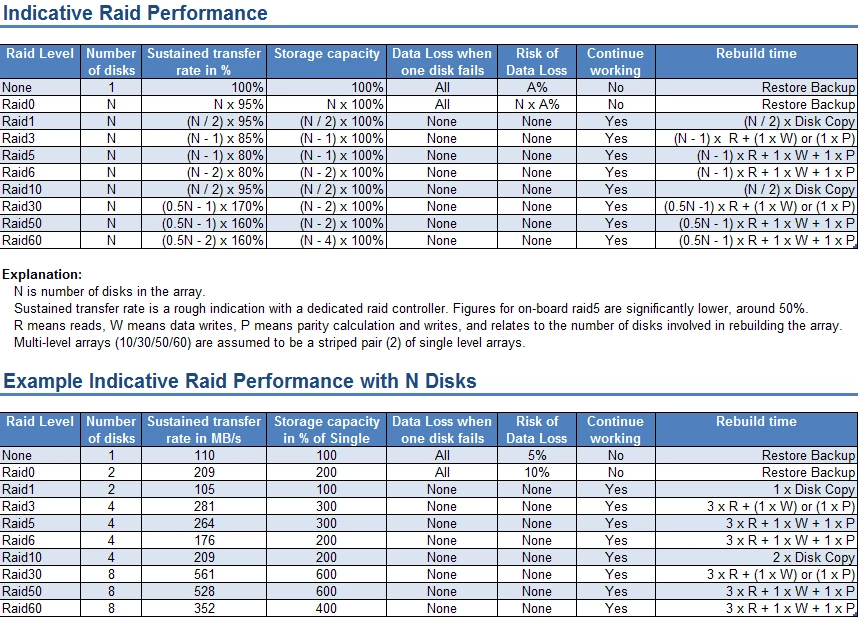
What are the performance gains to be expected from a raid and how long will a rebuild take?
The most important column in the table below is the sustained transfer rate. It is indicative and no guarantee that your raid will achieve exactly the same results. That depends on the controller, the on-board cache and the disks in use. The more tracks you use in your editing, the higher the resolution you use, the more complex your codec, the more you will need a high sustained transfer rate and that means more disks in the array.
Sidebar: While testing a new time-line for the PPBM6 benchmark, using a large variety of source material, including RED and EPIC 4K, 4:2:2 MXF, XDCAM HD and the like, the required sustained transfer rate for simple playback of a pre-rendered time-line was already over 300 MB/s, even with 1/4 resolution playback, because of the 4 4 4 4 full quality deBayering of the 4K material.
Final thoughts
With the increasing popularity of file based formats, the importance of backups of your media can not be stressed enough. In the past one always had the original tape if disaster stroke, but no longer. You need regular backups of your media and projects. With single disks and (R)aid0 you take risks of complete data loss, because of the lack of redundancy. Backups cost extra disks and extra time to create and restore in case of disk failure.
The need for backups in case of mirrored raids is far less, since there is complete redundancy. Sure, mirrored raids require double the number of disks but you save on the number of backup disks and you save time to create and restore backups.
In the case of parity raids, the need for backups is more than with mirrored arrays, but less than with single disks or striped arrays and in the case of 'hot-spares' the need for backups is further reduced. Initially, a parity array may look like a costly endeavor. The raid controller and the number of disks make it expensive, but if you consider what you get, more speed, more storage space, easier administration, less backups required, less time for those backups, continued working in case of a drive failure, even though somewhat sluggish, the cost is often worth more with the peace-of-mind it brings, than continuing with single disks or striped arrays.
 AdChoices