

Harm_Millaard
Inspiring
September 21, 2012
Question

What laptop to get for CS5 or CS6...

  • September 21, 2012
  • 4 replies
  • 45584 views

Increasingly there appear questions about which laptop to get for CS5/6.


First, the question is why a laptop and why not a desktop?

Laptops are always at least 2 to 3 times slower than a desktop, they are significantly more expensive than a desktop with the same or better performance and they need a wall outlet to use. Batteries don't last long enough for editing and you need a wall outlet for external components (disks, monitor, BD-R etc.) that are required. All that makes a laptop more like an expensive, underpowered luggable machine.

For video editing machines it is always best to use a machine for video editing only and use a second system for other applications and this is especially true for much weaker laptops than desktops.

So, let me repeat the question: What are the considerations to use a laptop over a desktop? You have to be very clear about it to sell the idea to the one responsible for the budget. You also have to be clear about the performance penalty, if you decide to go forward with a laptop.

OK, we got this out of the way. You have good arguments to get a laptop and you have succesfully sold the idea to the one responsible for the available budget.

So what are your choices and what do you need to look for in terms of specs?

First, let me remind you of the article Adobe Forums: What PC to build? An update... because it contains a number of relevant issues that influence your choice. Basically there are three approaches possible:

  1. Get a laptop from a brand company like Asus, Dell, HP, Lenovo, Toshiba and the like.
  2. Get a customizable laptop from specialist companies like Sager or Clevo.
  3. Get a custom builder like ADK Video Editing build you a system tuned to your needs.

All these solutions have a number of common components, under the assumption you want to edit HD material:

  • CPU: at least a quad core i7 processor, preferably with hyper-threading. The faster the better.
  • GPU: at least a nVidia GTX 660M or better with 1+ GB DDR5 memory.
  • Disks: at least 2 internal 7200 RPM disks.
  • Connections: minimum is eSATA plus USB3 ports.
  • Monitor: at least 1920 x 1080 resolution and 15.4" screen size or bigger.
  • Memory: bare minimum is 8 GB but workable is only 16 or 32 GB.

Looking at brand names one may come up with a short-list like:
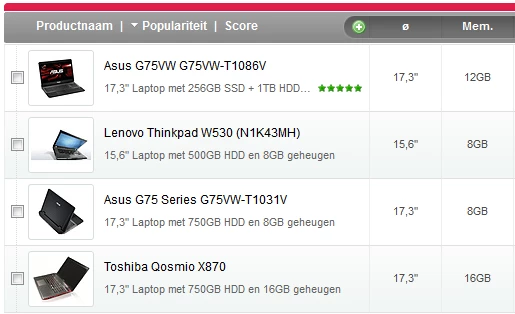
Now, in their standard configurations they are all lacking on some aspects. Insufficient memory, only single disk, or lacking connections. If these can not be configured to meet the above practical minimum requirements, where at least 2 disks is the most crucial, there is only companies like Sager and Clevo to look at. Something like this is about bare minimum, because of the underspecced video card:
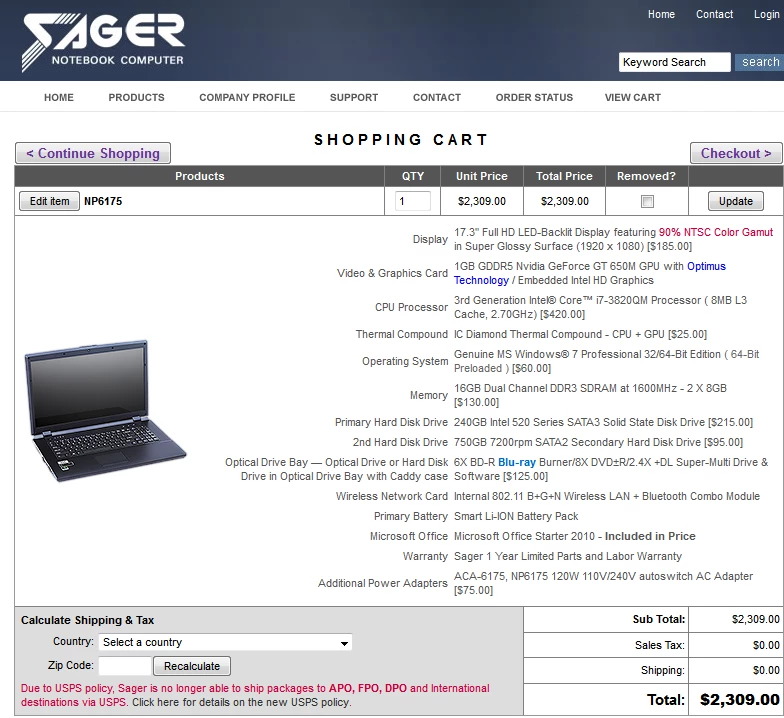
Despite the price this will still be around 3 times slower than an equally priced desktop. If that performance penalty is too big, then one can consider a system like this:
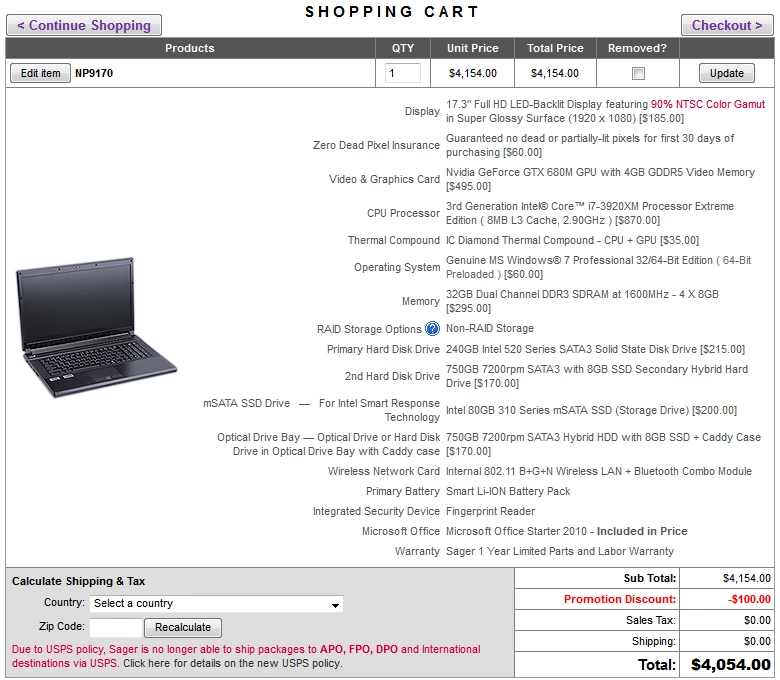
Again, despite the price, this system will still be more than 2 times slower than a far less expensive desktop, but hey, you knew that when you decided on a laptop and got approval for the budget, right?

The last option is to go to a custom builder to get a laptop that is exactly tuned to your needs and budget. It will not be less expensive than the Sager route, but it will get you the best balance between performance and price for your needs. Additionally, you get great service if ever needed.

To sum this up, a laptop is a compromise. A compromise in performance and price. It is not for the faint of heart, faint of wallet. It is not a laptop, it is a luggable system on a wall outlet. An alternative is coasters under a desktop system and you can use other wall outlets as well, but with a better price and far better performance.

I hope this will help people to decide if they really need a laptop and if affirmative, to get the right system for their needs.

This topic has been closed for replies.

4 replies

Participant
May 1, 2013

Harm Millaard wrote:

Increasingly there appear questions about which laptop to get for CS5/6.

First, the question is why a laptop and why not a desktop?

Laptops are always at least 2 to 3 times slower than a desktop

Please forgive what seems like a newbie question, but why is it that laptops "are always at least 2 to 3 times slower than a desktop?

Also, my son is trying to justify buying an Alienware laptop for video editing, which seems like a bad idea in that those systems are optimized for gaming and not necessarily video editing.  At this point, he has characterized his interest in video editing as "a hobby" which leads me to believe that he can get by with a more modest configuration until he really gets serious about it, and save us a lot of money.  He is claiming a need for a $3K system (specs have not been shared with Dad yet).  Couldn't we get him a modest configuration for ~$1500 that would be OK for occasional hobby editing, as long as it meets some of the key specs listed above e.g. quad core i7 processor, 16GB of memory,  and a decent video card?  I want be able to back my response with clear convincing evidence (even though clear convincing evidence does not often matter to a 17 year old ).  Any info would be greatly appreciated.  Thanks....

Bill Gehrke
Inspiring
May 2, 2013

Dave,

Look at the well over 1200 tesr results of our Premiere Pro BenchMark (PPBM5) and select the "Computer Type" tab and filter on "Laptops" and you can see the the results from 72 tested configurations.  Look at the rankings and you will see the currently 72 listings.  If you then filter on a specific version of Premiere (CS5, CS5.5 or CS6) it will give you an idea of where a given configuration will stand in the first column the "Ranking".

Participating Frequently
August 4, 2013

While most of the about is still true for the most part, it has not kept up with the latest advancements made in mobile computing. For obvious reasons a desktop computer will always be faster and more powerful than a laptop. However, today's mobile workstations are quite robust high performance machines that can handle with aplomb virtually any editing task thrown at them.

In fact, some of today's machines are even more capable than many of the high performance desktops of just a few years ago. The part that is not out of date of course, is cost. Which I'm afraid is still roughly twice the cost for the equivalent performance of a desktop. The price of mobility I suppose.

Alex_-_DV411
Participating Frequently
September 22, 2012

Harm Millaard wrote:

Looking at brand names one may come up with a short-list like:

Perhaps Lenovo Y580 (the poor man's version of W530) could be added to that list? GTX660M 2GB, i7-3610QM, 1080p display, 500GB 7200rpm HDD, BD-ROM - all for $999.

Don't see anything similar from Dell (XPS 15 with similar specs is $1300+), nor from HP.

Inspiring
September 21, 2012

As usual, Harm has provided very knowledgeable and helpful advice in this matter. I would like to add that if you are inclined, and feel it's worth a gamble.....New Egg has been selling refurbished Asus i7 laptops that have almost all the necessary components for a lower price than normal. You may have to add more memory yourself and add a quality SSD for OS and programs and pagefile, ( cloned from the supplied drive). Then, use the supplied drive for media and all else in the second bay....or, as an emergency backup of your original configuration. I am not sure,but I think if you put a second Marvell controlled SSD in the second bay instead,( Corsair Pro or Plextor Pro...no Sandforce), you may get the benefit of SATA III speeds from BOTH drives for best laptop performance.....I am not sure if earlier criticisms of SSD degradation still apply with these newer Marvell controlled SSDs.

      I DO know that my old Asus G73JW tested MUCH FASTER on Harm's PPBM5 benchmark when I added extra memory,( from 8 to 14GB ), AND used a Corsair Force 120GB SATA II SSD in each of the two internal drive bays.  On that site you can see similar laptops to mine performing way slower using less memory and conventional spinning HDDs. At the time, I was careful to choose SSDs that had a high read AND write speed. I have had no issues with my SSDs. I also have used the Seagate Momentus XT hybrid HDD as project drive.....and scored lower on the PPBM test,( not submitted).

      Harm is right.....any laptop will not approach the performance of a good desktop setup....not to mention PPro CS 6 appears to be even more powerful and demanding than the 5.03 I'm using. People are reporting needing at least 32GB memory  and more than 2GB video card memory to get better performance.

   Someone posted about Exotic PC selling upgraded laptops, ( some Asus) with up to 32GB memory and muliple HDD configurations....you may be able to upgrade a laptop similarly yourself for less money. Watch the sales at Tiger Direct and New Egg....you may find some thing workable.

Bill Gehrke
Inspiring
September 21, 2012

I would also suggest checking with ADK for their very intelligent configuration of laptops to meet your exact needs.