

What PC to build? An update...
What PC to build, updated January 2012
A question often asked is what system to build for NLE.
The previous article about this topic dates back to March 2010, so it was due an update because there were so many new developments in the past two years, including CS5.5
Basically you can think along three roads, a budget PC, an economical PC and the warrior PC. Notice that MAC is not mentioned here. There are three reasons for that, one is I'm not qualified to really advise on MAC's, two is that they are way overpriced and three they are severely limited in component choices. So this is all about PC.
Whether you want to have a budget, economical or warrior PC, there are a number of common components that you will always need, a case, a PSU, CPU cooler, monitor, keyboard, mouse, DVD/BR burner and stuff like that so I'm not going into those components, with the exception of case, PSU and CPU cooler.
CASE:
While the case of your choice is often determined by looks and what appeals to you (or your CFO, the wife), I want to stress that for all categories, budget, economical or warrior, it is better to use a BIG tower, instead of a mid tower.
Why, you may wonder. Actually there are a lot of reasons. Mid towers can limit your choices in CPU coolers, because the case is not wide enough to install certain CPU coolers. The height of the cooler does not fit in the case. They can limit your choice of video card, because these have grown in length significantly and mid towers often do not allow the installation of certain video cards due to the limited depth or prevent you from installing hard disks in certain slots. Mid towers will limit your expansion capabilities (less drive cages), make installation of components more difficult, have limited cable management features, have limited airflow and tend to become hotter than big towers and thus more noisy (the fans need to run at higher speed) and limit overclockabilty.
A BIG tower is the (only) way to go.
PSU:
The PSU is one of the most crucial components in any system but also the one component most often overlooked. A good PSU will give you years of reliable work on your PC, a suboptimal or mediocre PSU will give you tremendous headaches and unexplainable crashes, hangs or errors, causing you to miss deadlines.
Go to eXtreme Power Supply Calculator Pro v2.5 and get the Pro version. Enter all your components, including planned expansions, set the Motherboard to High End - Desktop, set the CPU Utilization (TDP) to 100%, set System Load to 100% and Capacitor Aging to 30% and press the Calculate button. Add 10 - 15% to this Wattage for safety and note the required amperage on the various rails (+3.3V, +5V and +12V). Based on these figures, select a good GOLD label PSU, that meets the total wattage and the amperage on each rail. It is your best guarantee for long and reliable, troublefree editing.
Budget, economical or warrior system
Before going into these three systems, you can consider them to be a rough 'Best-buying Guide', let me remind you of the basic practical system requirements for CS5.5 and consider your own workflow to interpret these charts.
It starts with the codec:
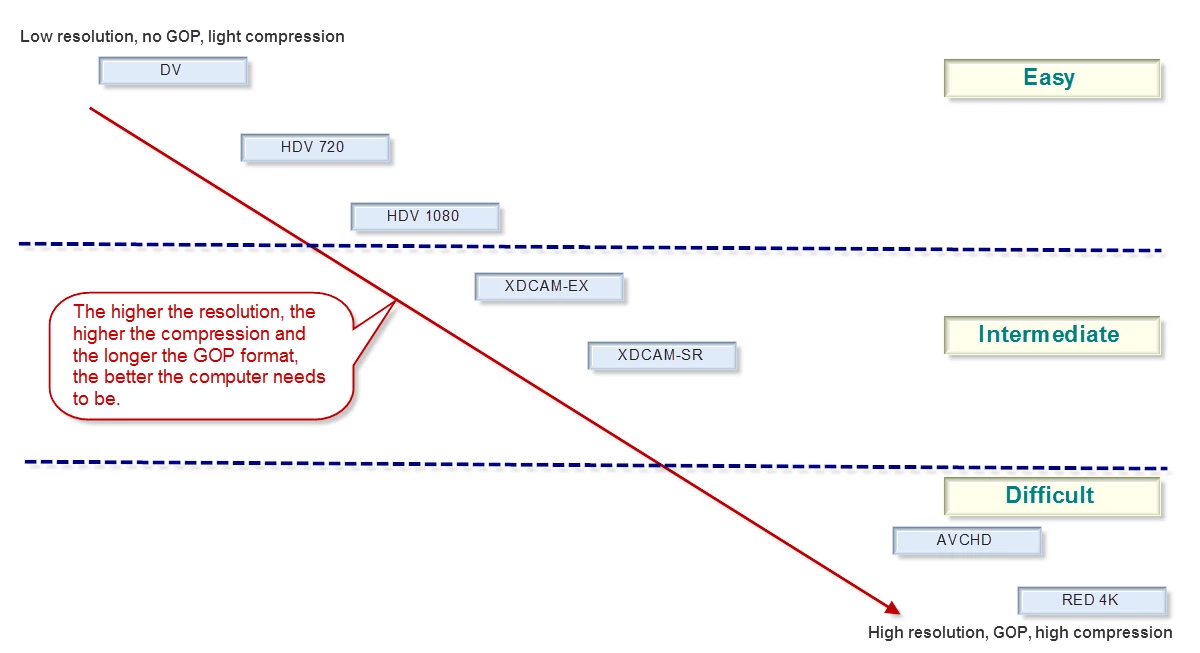
Since DSLR is getting so popular, let me remind you that this is ranked under the 'Difficult' codecs and P2 is an 'Easy' codec. The more difficult the codec you use, the higher the system requirements. See:
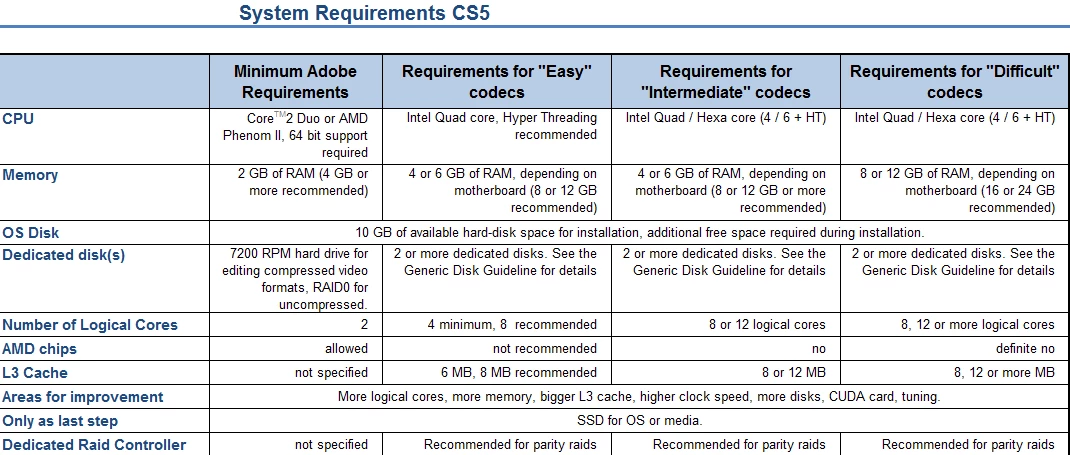
For the full article, see Adobe Forums: System requirements for CS5
As a rough translation from 'Easy', 'Intermediate' and 'Difficult' to the kind of system you want to build, you could say that 'Easy' can be handled quite well with a 'Budget' system, 'Intermediate' is best handled by an 'Economical' or better system and 'Difficult' requires an 'Economical' or better system. A 'Budget' system may struggle with the load of such 'Difficult' codecs.
Note that in the following table, I have mentioned components in each category. These are just examples of what could fit in each category, they are not necessarily a combination of components that I would build per se.
Also note that I have not chosen the fastest CPU in each category, but only unlocked CPU's. Each can be overclocked for optimal results and then will deliver a better Bang-For-The-Buck (BFTB) than the highest clocked CPU in that range. Finally, note that the budget system can benefit from increasing memory to 4 x 4 GB for only € 38 extra. That is the weakest link in the budget system.
Prices mentioned are current day prices in the Netherlands (01-11-2012) including 19% VAT.
Here are my suggestions:
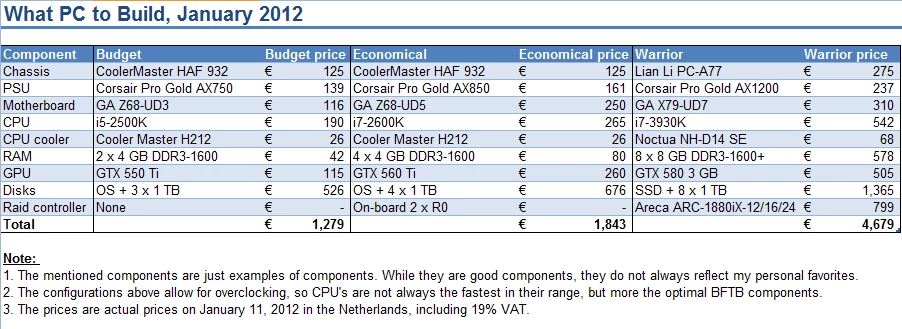
The main difference in comparison to the previous guide, is that the i7-3930K appears to be faster and better affordable than a dual Xeon X5680 system.
Anyway, I hope this helps people comtemplating a new system to get the right components in an affordable system.
 AdChoices