
Hard Drive / SSD optimization for After Effects
Hey everyone! Simply put I'm wondering how to optimize my hard drive setup for After Effects. I'm not sure if the answer to this changes between AE versions so let's just look at CS5.5 and CS6.
My setup:
i7-3930k OC'd to 4.5GHz
48GB of RAM (1866 999 24)
EVGA GTX 770 4GB Classified
120GB SATA II SSD for C drive (OS and programs, nothing else. Not even games)
240GB SATA III SSD for scratch files (50GB reserved) and output
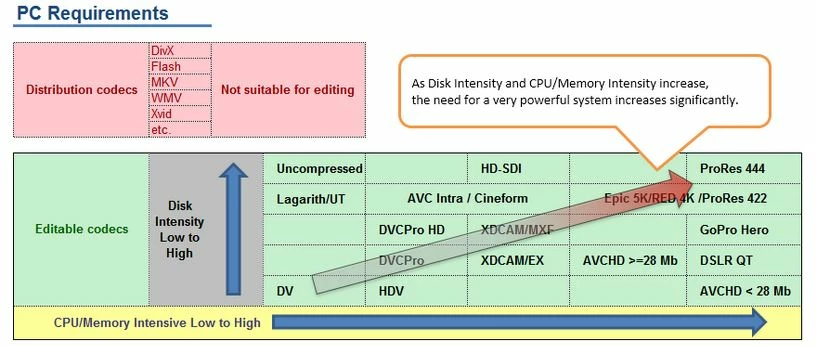
500GB HDD (7200RPM) for media files (Primarily AVCHD)
3TB of external backup (not used while editing)
My system already runs pretty quick for what I do, but if upgrading my Sata II SSD or replacing my HDD with an SSD would give me another significant boost in speed then I'm all for it. I doubt it'd be anywhere near as much of an increase as my last two upgrades though. The GTX 770 gave me a 3.5x render speed boost for my 3D projects and going from 16GB to 48GB of RAM gave me 5.5x ram preview speed boost. Regardless, I'm always looking to squeeze every last ounce of power out of my hardware because less time editing is more time with the family.
Given my current setup. Should I change how I use my current drives or buy another SSD to replace one of my current drives? I was already planning on buying a Samsung 840 EVO 500GB SSD, but if it's really not going to matter then I'll just skip on that.
Oh, I also use Premiere Pro CS5.5 frequently. Not sure if that changes anything.
Thanks!
Eric
EDIT: Just found a link that helps with disk setup for Premiere Pro (below), but I'm still having a hard time figuring out how to optimize my disk setup given that each drive is capable of a different speed. Should my fastest drive be the C drive, the media drive, or the cache/scratch drive?
 AdChoices