
Known Participant
August 9, 2017
Question

Premiere pro cc 2017 & Media encoder cc 2017 Slow rendering

  • August 9, 2017
  • 1 reply
  • 3421 views

Hello,

I believe there is thousand threads about similar problem, but I tried lots of things suggested there and nothing helps.

So few months ago I got my new rig

Ryzen 5 1600 + gtx 1070+16gb ram

I was using media encoder to render videos and video length 30 minutes was rendering in 45-48 minutes it was decent time and I was very happy of my upgrade.

Now the video of 30 minutes are usually rendering over 1h (last video in 1hour 8 minutes), I tryed to do lots of thing suggested on forums like clearing cashe, checking windows for viruses/malvare, defragmenting disks "trying" to select CUDA but nothing changing in rendering time from software only option and CUDA rendering.

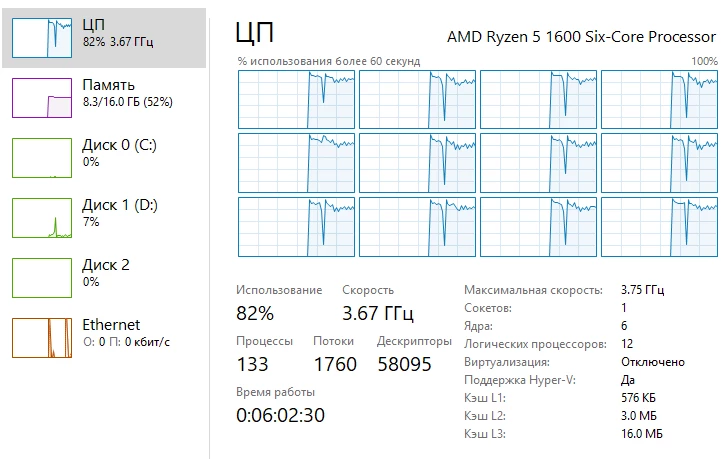
Please any suggestions would be appreciated also will add an image with task manager while rendering video in encoder.
[Moderator note: moved to appropriate forum]

    This topic has been closed for replies.

    1 reply

    Legend
    August 10, 2017

    There's really only two things you can do to speed up exports.

    1. Turn on GPU processing.

    2. Get faster hardware.

    Bill Gehrke
    Inspiring
    August 10, 2017

    Jim, there is one more important thing that the OP can do.

    Tune you system and get rid of a many of those 133 processes.  This editing laptop with dozens of everyday programs installed has only 69 process running and it edits great. Those excess processes are stealing CPU cycles and memory

    Here is part of my startup menu

    And that is just the start of good tuning

    Legend
    August 10, 2017

    Jim, there is one more important thing that the OP can do.  Tune you system and get rid of a many of those 133 processes.

    That's not bad advice.  My recommendation above was predicated on the assumption that the editor is already running on a properly configured system.