

kineticcreative123
Inspiring
November 2, 2017
Answered

Need help ASAP with a stinkin image in outlook. Not rendering full width. I've tried everything!

  • November 2, 2017
  • 1 reply
  • 1080 views

Hi all,

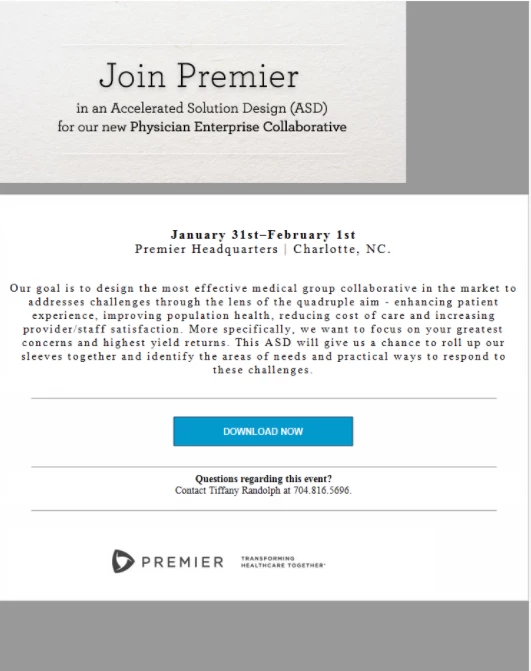
I'm in a pretty big jam and this email needs to go out. Below is the code and a screen shot of what it looks like in litmus (outlook). I know the template code is all jacked up and I don't have the time to rebuild. Also I can't get rid of the grey bar at the bottom.

<!DOCTYPE html PUBLIC "-//W3C//DTD XHTML 1.0 Transitional//EN"

"http://www.w3.org/TR/xhtml1/DTD/xhtml1-transitional.dtd">

<html xmlns="http://www.w3.org/1999/xhtml" lang="en" xml:lang="en">

<head>

<meta http-equiv="Content-Type" content="text/html; charset=utf-8">

<link rel="icon" href="file:///assets/img/icons/foundation-favicon.ico" type="image/x-icon">

<meta name="viewport" content="width=device-width">

<link href="https://cdnjs.cloudflare.com/ajax/libs/foundation-emails/2.2.1/foundation-emails.min.css" rel="stylesheet">

<link href="https://fonts.googleapis.com/css?family=PT+Serif:400,700" rel="stylesheet">

<title>My Hero Template Email Template Subject</title>

<meta name="format-detection" content="date=no">

</head>

<body>

<span class="preheader"></span>

<style type=”text/css”>

.appleLinks p {color:#000000;}

.appleLinks a {color:#000000;}

.appleLinksWhite a {color:#ffffff;}

</style>

<script>

      (function(i,s,o,g,r,a,m){i['GoogleAnalyticsObject']=r;i=i||function(){

      (i.q=i.q||[]).push(arguments)},i.l=1*new Date();a=s.createElement(o),

      m=s.getElementsByTagName(o)[0];a.async=1;a.src=g;m.parentNode.insertBefore(a,m)

      })(window,document,'script','https://www.google-analytics.com/analytics.js','ga');

      ga('create', 'UA-2195009-2', 'auto');

      ga('send', 'pageview');

      ga('create', 'UA-2195009-27', 'auto', {name: "foundation"});

      ga('foundation.send', 'pageview');

      ga('create', 'UA-2195009-47', 'auto', {name: "foundation_emails"});

      ga('foundation_emails.send', 'pageview');

    </script>

<table class="body">

<tr>

<td align="center" class="center" valign="top">

<center data-parsed="">

  <table align="center" class="container float-center">

    <tbody>

<tr>

<td>

<table class="spacer">

<tbody>

<tr>

<td height="16px" style="font-size:16px;line-height:16px;background-color: #999999;"> </td>

</tr>

</tbody>

</table>

<table class="row" style="background-color: #999999">

<tbody>

<tr>

<th style="padding-bottom: 0px;"height="940" class="small-12 large-12 columns first last">

<table style=""width="677">

<tr>

<th width="100%" height="424">

<img style="vertical-align:top;display:block;width:100%;background-color: #ffffff;"alt="" src="http://offers.premierinc.com/rs/381-NBB-525/images/Join-Premier.jpg">

<table class="spacer">

<tbody>

<tr>

<td height="14px" style="font-size:16px;line-height:16px;">&#xA0;</td>

</tr>

</tbody>

</table>

<table style="background-color: #ffffff;padding-left: 35px;padding-right: 35px;"width="743" class="callout" >

<tr>

<th class="callout-inner primary appleLinks" style="background-color: #ffffff;border:0;margin:">

<p style="background-color:#ffffff;margin-bottom: 20px;margin-top:35px; padding-left: 35px; padding-right: 35px; text-align: center;font-family: 'PT Serif', serif;line-height: 1.2;font-size: 18px;letter-spacing: 2px;color:#000000"><b>January&#8203; 31st&#8203;–February&#8203; 1st&#8203;</b><br>

  Premier Headquarters | Charlotte, NC.</p>

<p style="background-color:#ffffff;margin-bottom: 20px;margin-top:35px; padding-left: 35px; padding-right: 35px; text-align: center;font-family: 'PT Serif', serif;line-height: 1.2;font-size: 16px;letter-spacing: 2px;color:#000000">Our goal is to design the most effective medical group collaborative in the market to addresses challenges through the lens of the quadruple aim - enhancing patient experience, improving population health, reducing cost of care and increasing provider/staff satisfaction. More specifically, we want to focus on your greatest concerns and highest yield returns.  This ASD will give us a chance to roll up our sleeves together and identify the areas of needs and practical ways to respond to these challenges.</p>

<hr width="90%"><br>

<center><div><!--[if mso]>

  <v:roundrect xmlns:v="urn:schemas-microsoft-com:vml" xmlns:w="urn:schemas-microsoft-com:office:word" href="http://" style="height:40px;v-text-anchor:middle;width:250px;" arcsize="0%" strokecolor="#1e3650" fillcolor="#0099cc">

    <w:anchorlock/>

    <center style="color:#ffffff;font-family:sans-serif;font-size:13px;font-weight:bold;">DOWNLOAD NOW</center>

  </v:roundrect>

<![endif]--><a class="appleLinksWhite"href=""

style="background-color:#0099cc;border-radius:0px;color:#ffffff;display:inline-block;font- family:sans-serif;font-size:14px;font-weight:bold;line-height:40px;text-align:center;text- decoration:none;width:250px;-webkit-text-size-adjust:none;mso-hide:all;">REGISTER NOW</a></div><br><hr width="90%"></p></center>

<p style="text-align: center;font-size: 14px;font-family: 'PT Serif', serif;line-height: 1.4;background-color: #ffffff"><b>Questions regarding this event?</b> <br>

Contact Tiffany Randolph at 704.816.5696. </p><hr width="90%"><br><img style="vertical-align:top"alt="" src="http://offers.premierinc.com/rs/381-NBB-525/images/footer.jpg"></th>

<th class="expander"></th>

</tr>

</table>

<tbody>

<tr>

</tr>

</tbody>

</table>

</th>

</tr>

</table>

</th>

</tr>

</tbody>

</table>

<center data-parsed="">

</center>

</td>

</tr>

</tbody>

</table>

</center>

</td>

</tr>

</table>

<div style="display:none; white-space:nowrap; font:15px courier; line-height:0;"></div>

</body>

</html>

Looks good here except outlook:

Looks bad in outlook:
    This topic has been closed for replies.
    Correct answer osgood_

    Looks like the same issue we had yeaterday with the table being slightly wider than the image. I don't really know why that is but I suspect Outlook doesnt play nicely with padding added to <td> cells, which is making them slightly wider than they should be....

    Anyway you are going to have to get a bit creative again.

    Firstly your image has a black keyline running down the right hand edge  - can you get rid of that in Photoshop or whatever weapon you use for editing images.

    Next add bgColor="#EBEAE8" to the style tag for the <td> cell  then add margin: 0 auto; to the style tag of the image, as shown below: (That should center the image in the cell and the background color of the <td> cell should then match the images background color.

    <td valign="top" style="border-bottom: 20px solid #999999" bgColor="#EBEAE8">

    <img  src="http://offers.premierinc.com/rs/381-NBB-525/images/Join-Premier.jpg" width="100%" style="display:block; margin: 0 auto;" />

    </td>

    As for the Register Now button problem add a class "register_now" to the table which is currently 45% in width as shown below:

    <table class="register_now" cellspacing="0" cellpadding="0" border="0" align="center" width="45%">

    Then add the below css to the media query - see if that helps the problem:

    .register_now {

    width: 100%!important;

    }

    1 reply

    Legend
    November 2, 2017

    Try this code::::

    <!DOCTYPE html PUBLIC "-//W3C//DTD XHTML 1.0 Transitional//EN" "http://www.w3.org/TR/xhtml1/DTD/xhtml1-transitional.dtd">

    <html xmlns="http://www.w3.org/1999/xhtml">

    <head>

    <meta http-equiv="Content-Type" content="text/html; charset=UTF-8" />

    <title>Join Premier</title>

    <meta name="viewport" content="width=device-width, initial-scale=1, maximum-scale=1">

    <link href="https://fonts.googleapis.com/css?family=PT+Serif:400,700" rel="stylesheet">

    <style>

    @media screen and (max-width: 560px) {

    .inner_table {

    width: 100%!important;

    }

    }

    </style>

    </head>

    <body>

    <!-- Outer Table -->

    <table cellspacing="0" cellpadding="0" border="0" width="100%">

    <tr>

    <td>

    <!-- Inner Table -->

    <table class="inner_table" cellspacing="0" cellpadding="0" border="0" align="center" style="width: 600px;">

    <tr>

    <td style="border: 20px solid #999999;">

    <table cellpadding="0" cellspacing="0" border="0">

    <tr>

    <td valign="top" style="border-bottom: 20px solid #999999;">

    <img  src="http://offers.premierinc.com/rs/381-NBB-525/images/Join-Premier.jpg" width="100%" style="display:block;" />

    </td>

    </tr>

    <tr>

    <td style="font-family: 'PT Serif', serif; font-size: 20px; letter-spacing: 1px; text-align: center; padding: 40px 0;">

    <strong>January​ 31st​–February​ 1st​</strong><br />

    Premier Headquarters | Charlotte, NC.

    </td>

    </tr>

    <tr>

    <td style="font-family: 'PT Serif', serif; font-size: 17px; line-height: 25px; letter-spacing: 1px; text-align: center; padding: 0 40px 30px 40px;">

    Our goal is to design the most effective medical group collaborative in the market to addresses challenges through the lens of the quadruple aim - enhancing patient experience, improving population health, reducing cost of care and increasing provider/staff satisfaction. More specifically, we want to focus on your greatest concerns and highest yield returns. This ASD will give us a chance to roll up our sleeves together and identify the areas of needs and practical ways to respond to these challenges.

    </td>

    </tr>

    <tr>

    <td>

    <!-- Register Now Button -->

    <table cellspacing="0" cellpadding="0" border="0" align="center" width="90%">

    <tr>

    <td style="padding: 30px 30px; border-top: 1px solid #000000; border-bottom: 1px solid #000000;" >

    <table cellspacing="0" cellpadding="0" border="0" align="center" width="45%">

    <tr>

    <td style="background-color: #0099CC; padding: 15px 40px; font-family: helvetica, sans-serif; font-size: 14px; line-height: 22px; text-align: center;">

    <a href="#" style="text-decoration: none; color: #ffffff;">REGISTER NOW</a>

    </td>

    </tr>

    </table>

    </td>

    </tr>

    <tr>

    <td style="font-family: 'PT Serif', serif; font-size: 16px; line-height: 22px; text-align: center; padding: 20px 40px; border-bottom: 1px solid #000000;">

    <strong>Questions regarding this event?</strong><br />

    Contact Tiffany Randolph at 704.816.5696.

    </td>

    </tr>

    </table>

    <!-- End Register Now Button -->

    </td>

    </tr>

    <tr>

    <td style="padding: 15px 0;"><img src="http://offers.premierinc.com/rs/381-NBB-525/images/footer.jpg" alt="" width="100%" style="display: block;" /></td>

    </tr>

    </table>

    </td>

    </tr>

    </table>

    <!-- End Inner Table -->

    </td>

    </tr>

    </table>

    <!-- End Outer Table -->

    </body>

    </html>

    kineticcreative123
    Inspiring
    November 2, 2017

    Perfect!

    Only issue is a little space on the right of the image.

    Just noticed the mobile phone is doing this:

    osgood_Correct answer
    Legend
    November 2, 2017

    Looks like the same issue we had yeaterday with the table being slightly wider than the image. I don't really know why that is but I suspect Outlook doesnt play nicely with padding added to <td> cells, which is making them slightly wider than they should be....

    Anyway you are going to have to get a bit creative again.

    Firstly your image has a black keyline running down the right hand edge  - can you get rid of that in Photoshop or whatever weapon you use for editing images.

    Next add bgColor="#EBEAE8" to the style tag for the <td> cell  then add margin: 0 auto; to the style tag of the image, as shown below: (That should center the image in the cell and the background color of the <td> cell should then match the images background color.

    <td valign="top" style="border-bottom: 20px solid #999999" bgColor="#EBEAE8">

    <img  src="http://offers.premierinc.com/rs/381-NBB-525/images/Join-Premier.jpg" width="100%" style="display:block; margin: 0 auto;" />

    </td>

    As for the Register Now button problem add a class "register_now" to the table which is currently 45% in width as shown below:

    <table class="register_now" cellspacing="0" cellpadding="0" border="0" align="center" width="45%">

    Then add the below css to the media query - see if that helps the problem:

    .register_now {

    width: 100%!important;

    }