
Participating Frequently
June 1, 2020
Answered

AE MP3ファイルの音が出ないです

  • June 1, 2020
  • 4 replies
  • 8191 views

アフターエフェクト2020版のバージョン17.1

OSはウィンドウズ10HOME バージョン1909

の環境で使用しています。


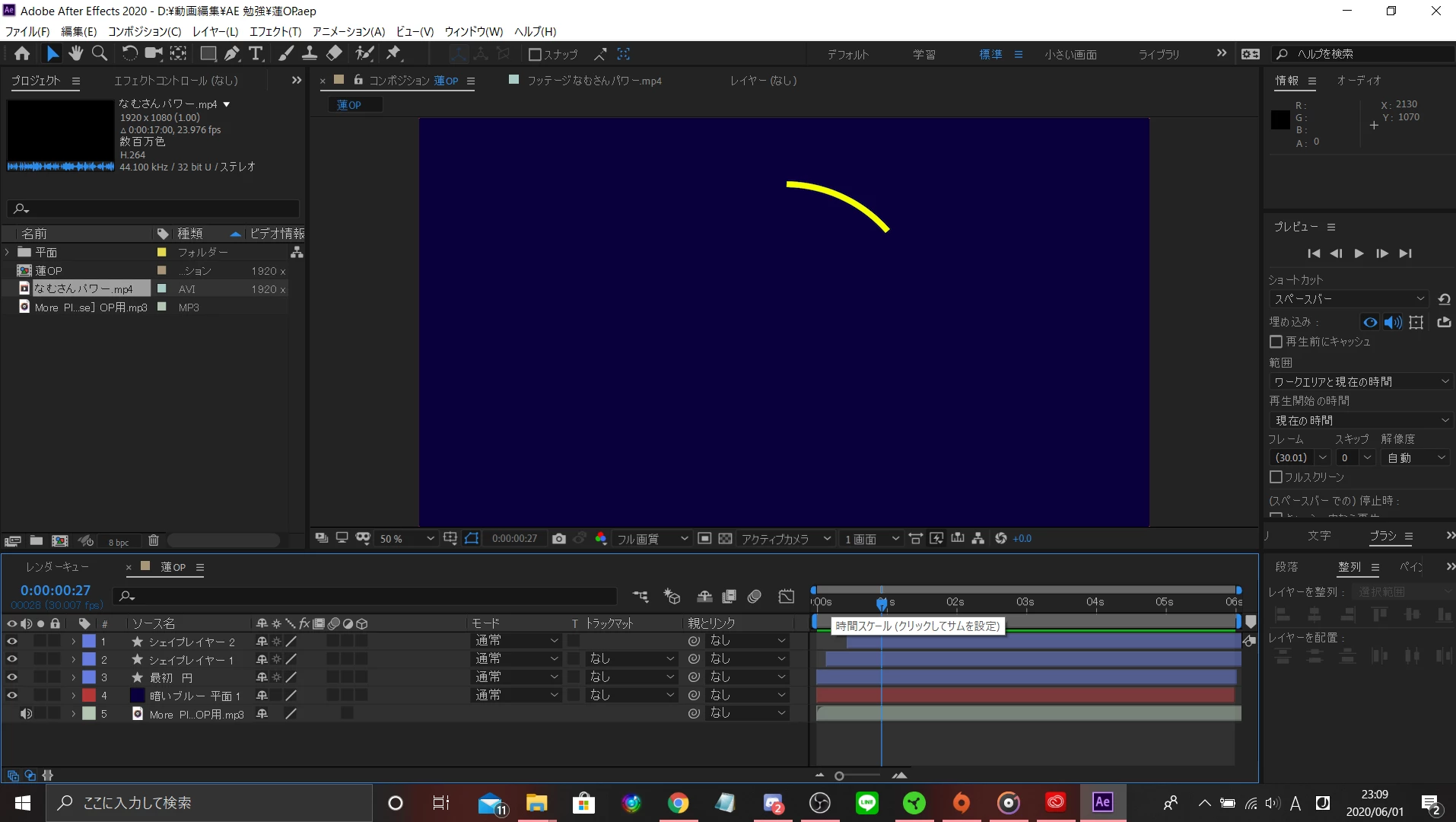
プレビューでMP4の音が出ないです。教えて下さい!!


 画像の通り、左下のスピーカーもオンになっていますし、右のプレビューのスピーカーもオンになっているはずです。

 本体の音量も確認しました。一度AEを落としてから再起動も試しましたし、ファイルを入れなおしましたが解決しません。

 環境設定もわからないなりに少し触りましたが変化なしです。


調べてもこれ以上の情報は出てきませんでした。助けて下さい
 

This topic has been closed for replies.
Correct answer Mukaida

別のMP3ファイルや動画ファイルの音は出ていますか?

オーディオの環境設定のについては下記リンクにありますが、改善できない場合は環境設定のリセットを試してください。
https://helpx.adobe.com/jp/premiere-pro/using/preferences.html#audio_hardware_preferences
https://helpx.adobe.com/jp/after-effects/using/preferences.html#reset_prefs

4 replies

assause
Community Expert
Community Expert
June 2, 2020

After Effects Community (us) から After Effects フォーラム (Japan) に移動しました。


※6/2よりジャパンコミュニティが独立しました。

OussK
Community Expert
Community Expert
June 2, 2020

Select your MP4 layer and double hit L on the keyboard and see if there are an audio waveform on this layer, and if so that mean you have some configuration problem and if no waveform appeared that's mean the problem related to your file


-OussK

MukaidaCommunity ExpertCorrect answer
Community Expert
June 2, 2020

別のMP3ファイルや動画ファイルの音は出ていますか?

オーディオの環境設定のについては下記リンクにありますが、改善できない場合は環境設定のリセットを試してください。
https://helpx.adobe.com/jp/premiere-pro/using/preferences.html#audio_hardware_preferences
https://helpx.adobe.com/jp/after-effects/using/preferences.html#reset_prefs

tsukiAuthor
Participating Frequently
June 1, 2020

本文に「MP4」と書いてありますが誤字です。「MP3」です