Participant
April 17, 2020
Answered

サンプルレート

  • April 17, 2020
  • 1 reply
  • 2146 views

オーディオの入力デバイスと出力デバイスのサンプルレートが一致しない為、録音が出来ないと表示される。


CS5.5

Windous10、64bit

This topic has been closed for replies.
Correct answer SteveG_AudioMasters_

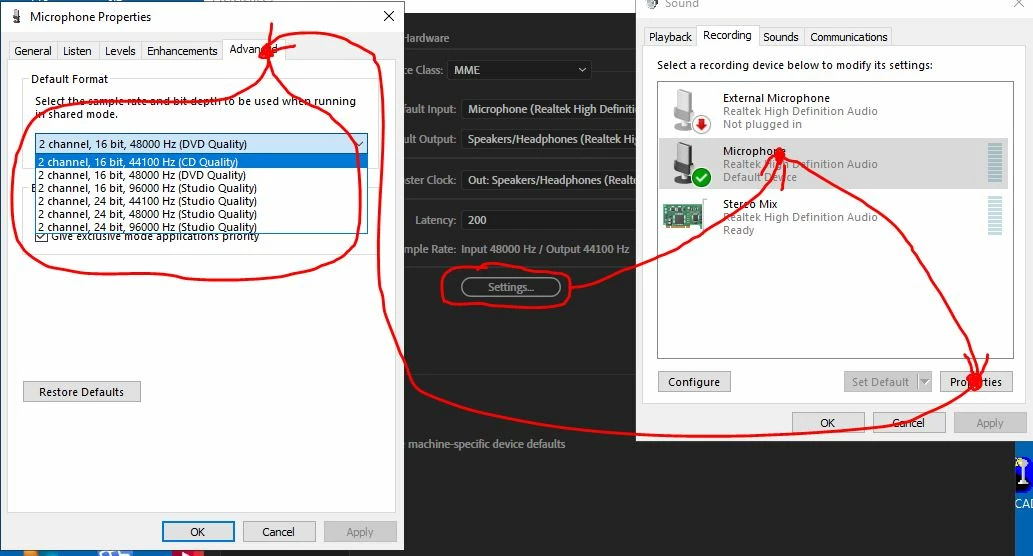
You need to change the default settings on your sound device so that they match the sample rate you want to record at. Or you have to change the sample rate you record at to match what the sound device is set to. To change the default sample rate on your sound device you have to follow the steps in this diagram, which you can do from Audition's hardware settings page:

サウンドデバイスのデフォルト設定を変更して、録音するサンプルレートに一致させる必要があります。または、サウンドデバイスの設定と一致するように、記録するサンプルレートを変更する必要があります。サウンドデバイスのデフォルトのサンプルレートを変更するには、この図の手順に従う必要があります。この手順は、Auditionのハードウェア設定ページから実行できます。

1 reply

SteveG_AudioMasters_
Community Expert
SteveG_AudioMasters_Community ExpertCorrect answer
Community Expert
April 17, 2020

You need to change the default settings on your sound device so that they match the sample rate you want to record at. Or you have to change the sample rate you record at to match what the sound device is set to. To change the default sample rate on your sound device you have to follow the steps in this diagram, which you can do from Audition's hardware settings page:

サウンドデバイスのデフォルト設定を変更して、録音するサンプルレートに一致させる必要があります。または、サウンドデバイスの設定と一致するように、記録するサンプルレートを変更する必要があります。サウンドデバイスのデフォルトのサンプルレートを変更するには、この図の手順に従う必要があります。この手順は、Auditionのハードウェア設定ページから実行できます。

Participant
April 17, 2020

ありがとうございます。

解決しました。