順子大984646
Participant
December 20, 2019
Answered

イラレからWMFへの書き出し 不具合

  • December 20, 2019
  • 2 replies
  • 1579 views

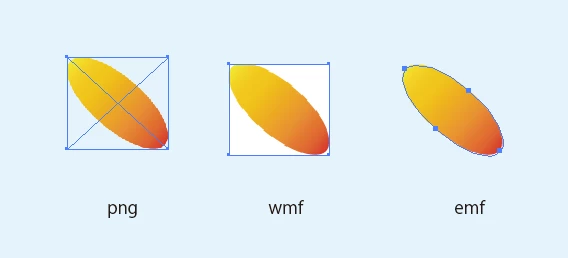
イラストレーターからWMFへの書き出したところ画像の後の背景が白になってしまいます。
イラレから直接、コピーしてPPTに貼り付けるた場合は背景が抜かれてきれいに表示されます。
WMFに書き出しても、きれいに背景がぬけるようにしたい。どなたかわかる方いらっしゃいますか?


イラレのVerは23.1 です。

    This topic has been closed for replies.
    Correct answer Ten A

    wmfファイルの場合ベクターデータに関する制限が存在するためベクターでの書き出しを行う場合はemfを利用します。また、ビットマップの書き出しが必要ならばpngを利用するべきでしょう。wmfでなければならない理由はありますか?

    2 replies

    Ten A
    Community Expert
    Ten ACommunity ExpertCorrect answer
    Community Expert
    December 24, 2019

    wmfファイルの場合ベクターデータに関する制限が存在するためベクターでの書き出しを行う場合はemfを利用します。また、ビットマップの書き出しが必要ならばpngを利用するべきでしょう。wmfでなければならない理由はありますか?

    順子大984646
    Participant
    December 24, 2019

    emf形式は比較的新しいので、office系での動作の確認をまだしていないのですが、検証を進めて切り替えた方が良さそうですね。 ありがとうございました。


    Srishti Bali
    Community Manager
    Community Manager
    December 21, 2019

    Hi there,


    Thanks for reaching out. If I get it correctly, when you copy-paste an object from Illustrator, it gets pasted without background but when you paste it after exporting to WMF it gets pasted with a background. I tried but couldn't replicate this issue at my end.


    They both look same at my end. I would request that if you can share a few more details like:

    • Operating system you are working on.
    • Step by step workflow you are following.
    • Screenshot of how it looks at your end.
    • Is the issue related to a specific document(s)/asset(s)? If yes, could you please share the document(s)/asset(s) with us? You can upload it to the creative cloud and share the download link. 


    Regards,

    Srishti

    順子大984646
    Participant
    December 23, 2019

    ありがとうございます。

    win10を使用しています。

    パスを切ってグラデーションを付けているだけです。特別なことはしていません。

    リンク


    Srishti Bali
    Community Manager
    Community Manager
    December 27, 2019

    Thanks so much for explaining this. I can replicate this issue at my end. I will check for the WMF files with our Product team. Till the time it is fixed, please continue using PNGs or EMF format as suggested by Ten A


    Regards!