Participant
April 1, 2020
Answered

ブラシツールについて

  • April 1, 2020
  • 1 reply
  • 865 views

ブラシツールにてカリグラフィを作成し、線を引いたのですが、

筆圧は感知するものの、「入り抜き」の「抜き」がうまくいかず、

先端が尖らずに丸くなってしまいます。


https://www.youtube.com/watch?v=pRff05FouDY&t=105s

↑の動画のように、サッと線を引きたいのですが、どうすればよいでしょうか?


また、使用しているPCはSurface Pro 4です。

    This topic has been closed for replies.
    Correct answer Myra Ferguson

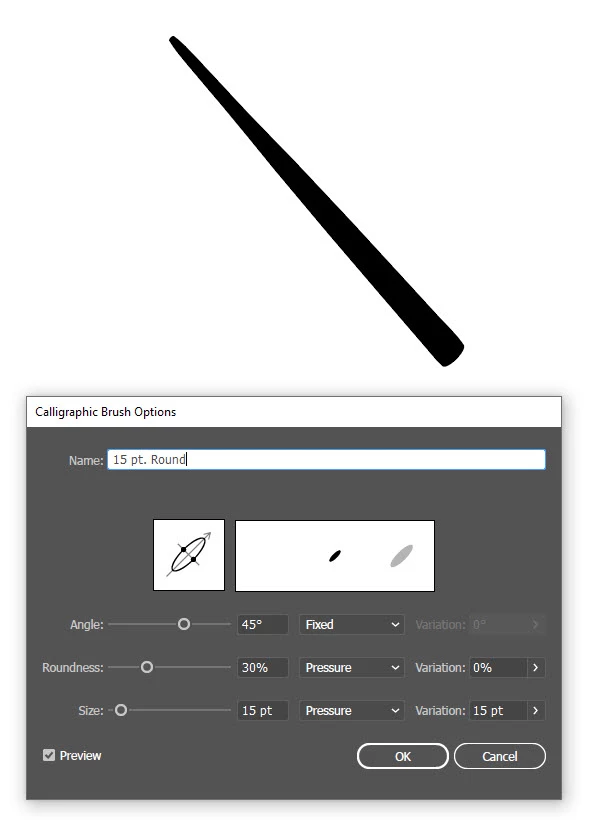
    Is this more like what you were wanting? I took a screenshot, so you could see the settings. I can see the numbers in your settings, but I can't tell which settings are used from the dropdown menu. I have this brush set to Fixed for the Angle and Pressure for both Roundness and Size. When I drew the line, I applied very little pressure in the beginning and more at the end. I hope that helps. 🙂


    1 reply

    Myra Ferguson
    Community Expert
    Community Expert
    April 1, 2020

    What are the settings you used on the calligraphic brush that you made? And can you post a screenshot of the result that you're getting?

    usagihamuAuthor
    Participant
    April 2, 2020

    Larry G. Schneider
    Community Expert
    Community Expert
    April 2, 2020

    You will need to use a triangle instead of a circle to generate the brush.