Answered
最近Mac miniを購入しました。OSはYosemiteバージョン10.10.1です。
以前使用していたOS10.7.5で作成したIllustrator CS6のファイルを開いた時、
Didot Regularが文字化け?しているようですが、OSの影響でしょうか?
▼OS10.7.5
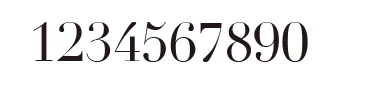
▼OS10.10.1

また、他の欧文フォントでこのような現象がありましたら教えてください。
よろしくお願いします。

以前使用していたOS10.7.5で作成したIllustrator CS6のファイルを開いた時、
Didot Regularが文字化け?しているようですが、OSの影響でしょうか?
▼OS10.7.5
▼OS10.10.1
また、他の欧文フォントでこのような現象がありましたら教えてください。
よろしくお願いします。
ありがとうございました。
2014/12/30 9:34、assause <forums_noreply@adobe.com> のメール:
最近Mac miniを購入しました。OSはYosemiteバージョン10.10.1です。
created by assause in サポート総合案内 (Japan) - View the full discussion
結論としてはそれでいいと思います。
If the reply above answers your question, please take a moment to mark this answer as correct by visiting: https://forums.adobe.com/message/7051826#7051826 and clicking ‘Correct’ below the answer
Replies to this message go to everyone subscribed to this thread, not directly to the person who posted the message. To post a reply, either reply to this email or visit the message page:
Please note that the Adobe Forums do not accept email attachments. If you want to embed an image in your message please visit the thread in the forum and click the camera icon: https://forums.adobe.com/message/7051826#7051826
To unsubscribe from this thread, please visit the message page at , click "Following" at the top right, & "Stop Following"
Start a new discussion in サポート総合案内 (Japan) by email or at Adobe Community
For more information about maintaining your forum email notifications please go to https://forums.adobe.com/thread/1516624.
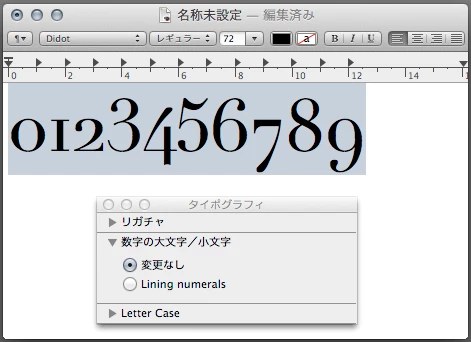
一応参考になるかと思いまして、OSX 10.9 のテキストエディットで新旧バージョンの違いを見てみました。
Didot.ttc バージョンが 9.0d1e1 の場合。
「Lining numerals」こちらがデフォルトになっています。(数字の大文字/小文字? 言いたい事は分かりますが...)
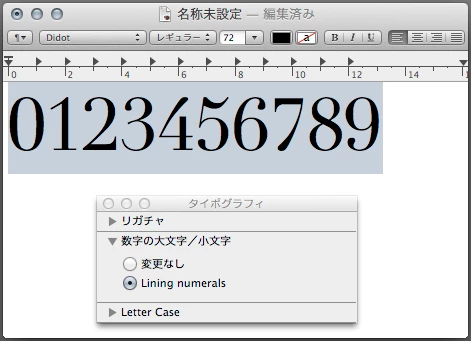
「変更なし」に切り替えると Old-style 数字になります。
Didot.ttc バージョンが 6.1d4e1 の場合。
「Lining Numerals」
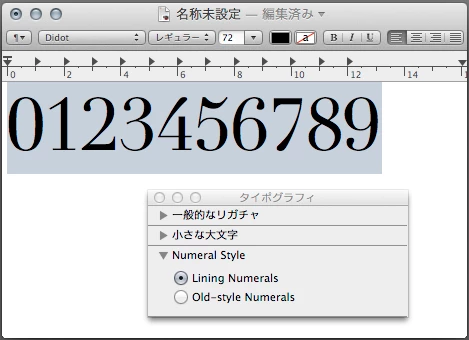
「Old-style Numerals」に切り替えても Old-style 数字になりません???。
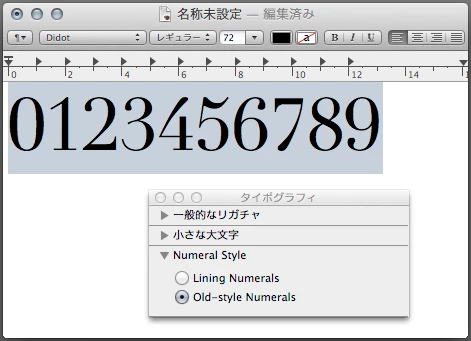
Mac OSX の付属フォントはここら辺がよくわからない仕様ですから気をつけた方がいいと思います。
英語だったり日本語だったり、「古いスタイルの数字」や「トラディショナル数字」とかスタイル名も統一感が有りません。
Already have an account? Login
No account yet? Create an account
Enter your E-mail address. We'll send you an e-mail with instructions to reset your password.


 AdChoices