Answered
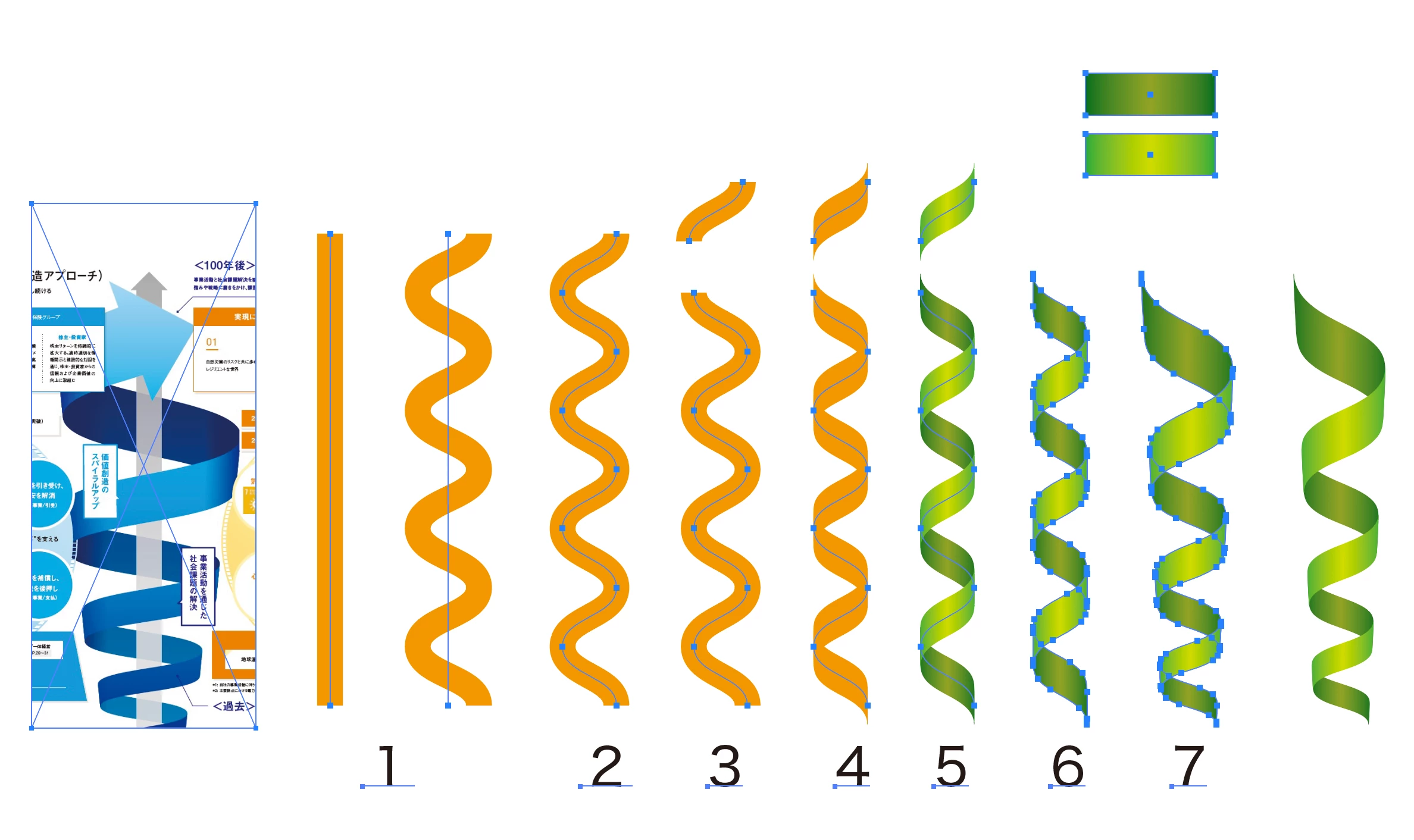
螺旋部分を平面で作ってみました。
1*直線を引いて効果→パスの変形→ジグザグ(滑らか)
2*オブジェクト→アピアランスを分割(ジグザグを実線化します)
3*アンカーポイントごとにパスを分断する
4*ブラシ「5pt.平筆」を適用して線幅を整える
5*交互に明暗のグラデーションを適用
6*オブジェクト→アピアランスを分割(線を図形化します)
7*グループ化して自由変形ツールなどで上方を左右均等に広げる
調整次第で類似する螺旋形になるかなと思います。
一例として参考になれば幸いです。
Sign up
Already have an account? Login
To post, reply, or follow discussions, please sign in with your Adobe ID.
Sign inSign in to Adobe Community
To post, reply, or follow discussions, please sign in with your Adobe ID.
Sign inEnter your E-mail address. We'll send you an e-mail with instructions to reset your password.