
Participant
November 10, 2019
Answered

プリセットパネルが表示されない(初めてプリセットを使うとき)

  • November 10, 2019
  • 3 replies
  • 2506 views

初めてプリセットを使おうとしてます。プリセットをダウンロードし、【編集】→【環境設定】→【プリセット】→【Lightroomの現像プリセットを表示】→【Settings】の中にxmp形式のファイルを入れましたが、

カタログ、フォルダ等のパネルがあるところに、プリセットパネルがそもそもありません。【ファイル】の中の【現像プロファイルとプリセットを読み込み】も選択できません。

どうしたらプリセットパネルが表示されますか??
This topic has been closed for replies.
Correct answer Rob_Cullen

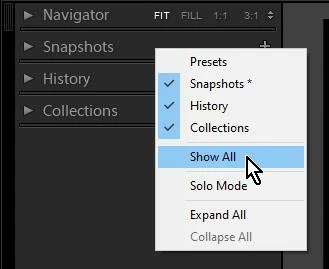
Preset Panel will be visible only in the Develop Module.


If it is not visible in the Develop Module it may be hidden.

[Right-Click] on another panel header and choose [Show All]

3 replies

KEILA0517Author
Participant
November 11, 2019

プリセットパネルが出てきません。

Rob_Cullen
Community Expert
Rob_CullenCommunity ExpertCorrect answer
Community Expert
November 11, 2019

Preset Panel will be visible only in the Develop Module.


If it is not visible in the Develop Module it may be hidden.

[Right-Click] on another panel header and choose [Show All]

Regards. My System: Windows-11, Lightroom-Classic 15.1.1, Photoshop 27.3.1, ACR 18.1.1, Lightroom 9.0, Lr-iOS 10.4.0, Bridge 16.0.2 .
KEILA0517Author
Participant
November 14, 2019

Thank you,

I choose develop module,

I find out it.

Thank you.

GoldingD
Legend
November 10, 2019

They go in:

Mac: /Library/Application Support/Adobe/CameraRaw/Settings

Win: C:\ProgramData\Adobe\CameraRaw\Settings


Theresa J
Community Expert
Community Expert
November 10, 2019

Which version of Lightroom are you using, Lightroom (cloud) or Lightroom Classic?

KEILA0517Author
Participant
November 10, 2019

Lightroom Classic 9.0です。