Answered

This topic is closed to new replies. Start a new post to keep the conversation going.
こんばんは、崇人29259185p77q さん
まず、OSとそのバージョン、Premiere Proのバージョンを教えていただけますか。
シーケンスの「パネル」メニューから開いたメニューから「オーディオユニット時間で表示」をクリックしてチェックをはずめば通常のタイムコードの戻ると思います。
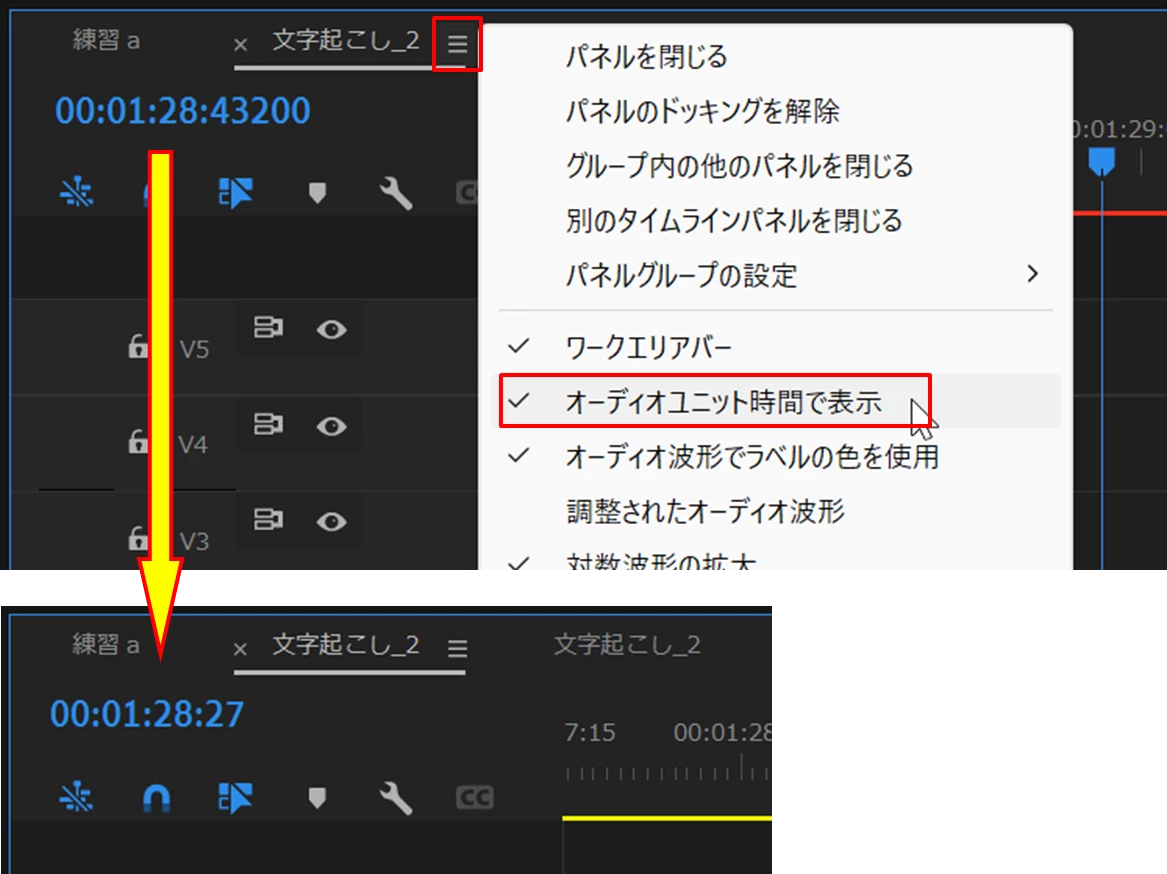
参考ですが、
当部はフレームレートの代わりに使う単位で、5桁の「オーディオサンプル」と3桁の「ミリ秒」があります。いずれもオーディオ関係で使用される単位です。
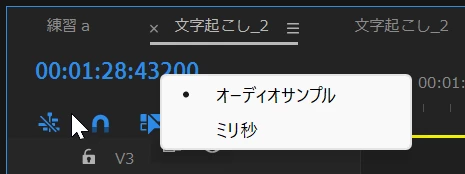
サンプルレートを記載したサイトがありましたので、リンクを張っておきます。
https://www.maustopia.com/2021/11/07/sample_rate-2/
また、ミリ秒は1/1000秒です


Sign up
Already have an account? Login
To post, reply, or follow discussions, please sign in with your Adobe ID.
Sign inSign in to Adobe Community
No account yet? Create an account
To post, reply, or follow discussions, please sign in with your Adobe ID.
Sign inEnter your E-mail address. We'll send you an e-mail with instructions to reset your password.
 AdChoices