Answered

This topic is closed to new replies. Start a new post to keep the conversation going.
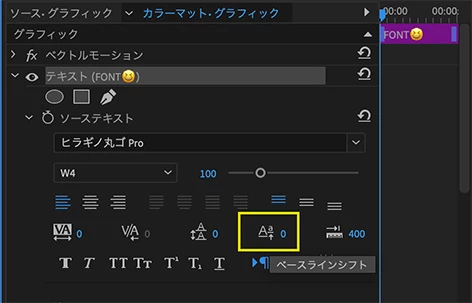
種類の異なるフォントでテキストを作成すると調整が必要になることはあります。
絵文字だけを選択して、下図の「ベースラインシフト」の数値を変えると真ん中に配置できます。


Sign up
Already have an account? Login
To post, reply, or follow discussions, please sign in with your Adobe ID.
Sign inSign in to Adobe Community
No account yet? Create an account
To post, reply, or follow discussions, please sign in with your Adobe ID.
Sign inEnter your E-mail address. We'll send you an e-mail with instructions to reset your password.
 AdChoices