The easiest way to do this is to place one clip on the video track above the other in the Timeline panel, then move the Crop keyframes of the upper clip later in time.
Here is a second method. It is more complex, but it keeps everything in one clip.
Add a shape layer in the Properties panel.
In the Effects panel, add the Crop effect, then set keyframes for Right.
Select both the shape layer and the Crop effect, then right-click and choose Duplicate.
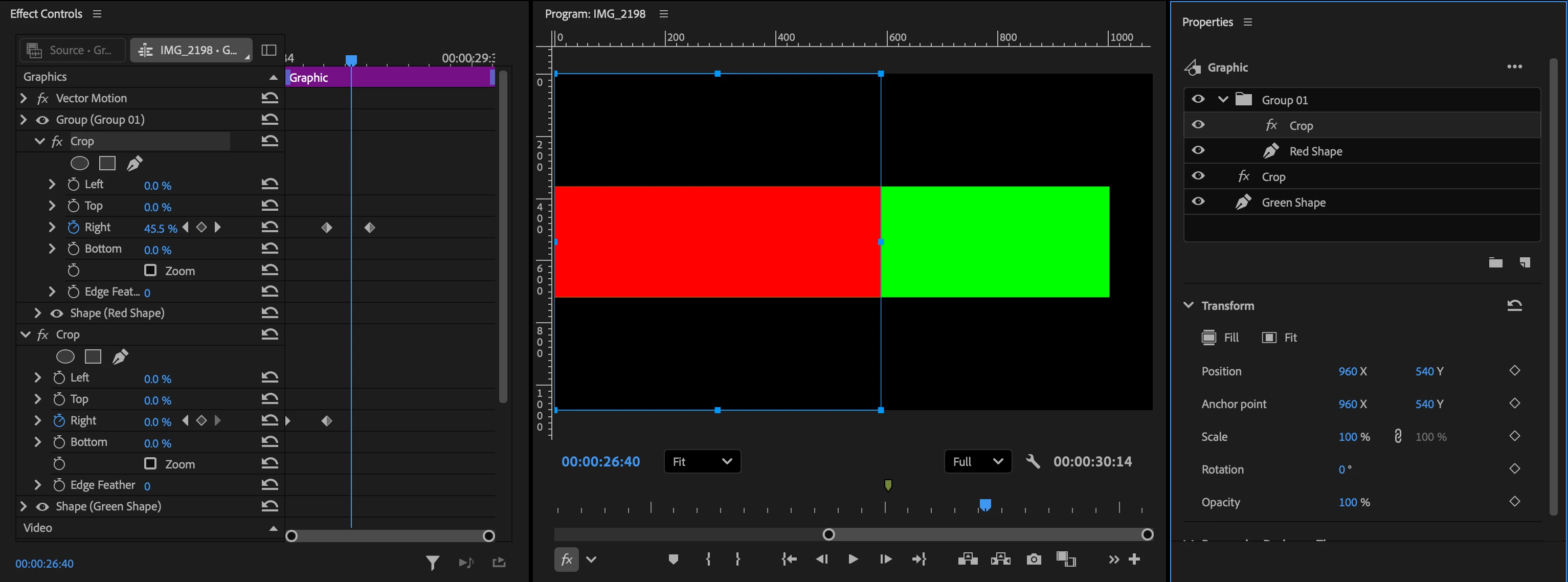
Click the folder icon to create a new group. Place the upper shape layer and its Crop effect inside that group. The Crop effect then affects only the shape layer inside that group.
In the Effect Controls panel, move the keyframes later in time.
The easiest way to do this is to place one clip on the video track above the other in the Timeline panel, then move the Crop keyframes of the upper clip later in time.
Here is a second method. It is more complex, but it keeps everything in one clip.
Add a shape layer in the Properties panel.
In the Effects panel, add the Crop effect, then set keyframes for Right.
Select both the shape layer and the Crop effect, then right-click and choose Duplicate.
Click the folder icon to create a new group. Place the upper shape layer and its Crop effect inside that group. The Crop effect then affects only the shape layer inside that group.
In the Effect Controls panel, move the keyframes later in time.




 AdChoices