


Answered

150kwCorrect answer
Community Expert
May 7, 2022 2:05 PM UTC
こんばんは
>・・・解決しました!!
お役に立てたようで良かったです。
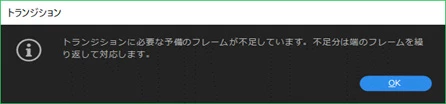
予備フレームの補足ですが、予備フレームが不足すると、下図のようなメッセージが表示されますので、その場合は予備フレームのフレーム数を多くします。
また、トランジションのデュレーション入力は、数値を連打するとセミコロンまたはコロンは自動的に入力されます(0100 → 00;00;01;00)。Premiere Pro、After EffectsやPremiere Elements等の映像関係ソフトのデュレーション入力ではこの方法が使えます。便利な方法ですので是非ご使用ください。
それから、「正解」をクリックして頂き有り難うございます。
 AdChoices