


Participant
December 28, 2022
Answered

아크로뱃 pro 사용 문의

  • December 28, 2022
  • 1 reply
  • 462 views

안녕하세요 기업용 아크로뱃 pro 권한을 얻어

데스크탑용 아크로뱃 pro를 다운받았는데, pdf 파일을 열면 기존에 사용하던

아래처럼 아크로뱃 리더 버전으로 열리는 것 같습니다.

편집기가 전혀 뜨지 않고요..
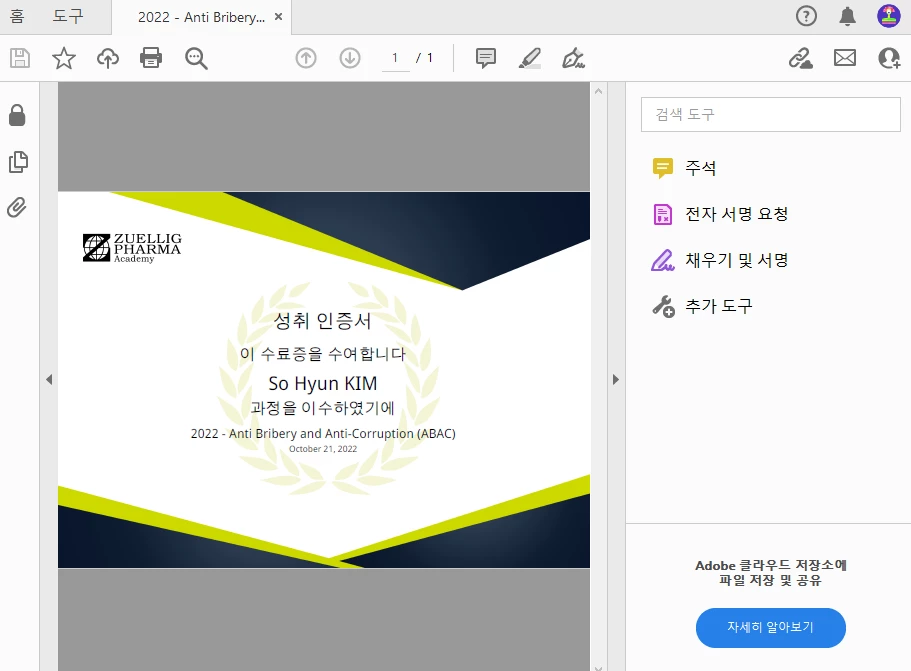
 

온라인 상에서는 아크로뱃 pro 편집기가 정상적으로 작동합니다..

데스크탑용 앱으로도 사용하고 싶은데 어떻게 해야하는 걸까요 ????ㅠ ㅠ


[Moderator moved the thread to the correct forum]

This topic has been closed for replies.
Correct answer AkanchhaS8194121

Hi @sohyun27724377koc0 


Thanks for reaching out.

As you have mentioned, the desktop app opens Acrobat Reader, which is freeware.

If you have an enterprise license, you should have Adobe Acrobat Pro.

You can download your license from your Adobe account itself https://account.adobe.com/ 

Or you can download the offline installer from this link and activate using your Adobe ID and password: https://helpx.adobe.com/acrobat/kb/acrobat-dc-downloads.html 


Let us know if it doesn't help.


Thanks,

Akanchha 

1 reply

AkanchhaS8194121
AkanchhaS8194121Correct answer
Legend
December 28, 2022

Hi @sohyun27724377koc0 


Thanks for reaching out.

As you have mentioned, the desktop app opens Acrobat Reader, which is freeware.

If you have an enterprise license, you should have Adobe Acrobat Pro.

You can download your license from your Adobe account itself https://account.adobe.com/ 

Or you can download the offline installer from this link and activate using your Adobe ID and password: https://helpx.adobe.com/acrobat/kb/acrobat-dc-downloads.html 


Let us know if it doesn't help.


Thanks,

Akanchha 

Participant
January 5, 2023

해결했습니다 감사합니다~