



strong_epicness6034
Participant
June 16, 2026
Question

어도비 아크로벳 앱이 실행되어 있는 상태에서는 새로운 파일이 열리지 않습니다

  • June 16, 2026
  • 2 replies
  • 32 views

제목: [Bug Report] Acrobat Pro on MacBook M4 cannot open additional PDF files while already running (False Permission Error)

안녕하세요.

MacBook M4 환경에서 Adobe Acrobat Pro 사용 중 재현 가능한 버그로 보이는 문제를 보고드립니다.

■ 사용 환경

  • Device: MacBook M4

  • OS: macOS Sequoia 15.6

  • Product: Adobe Acrobat Pro (Subscription Version)

  • Installation: 새 Mac에서 처음 설치하였으며, 이전 Mac 또는 Windows에서 데이터를 마이그레이션(Migration Assistant)하지 않았습니다.

■ 문제 증상

Adobe Acrobat이 완전히 종료되어 있는 상태에서는 PDF 파일이 정상적으로 열립니다.

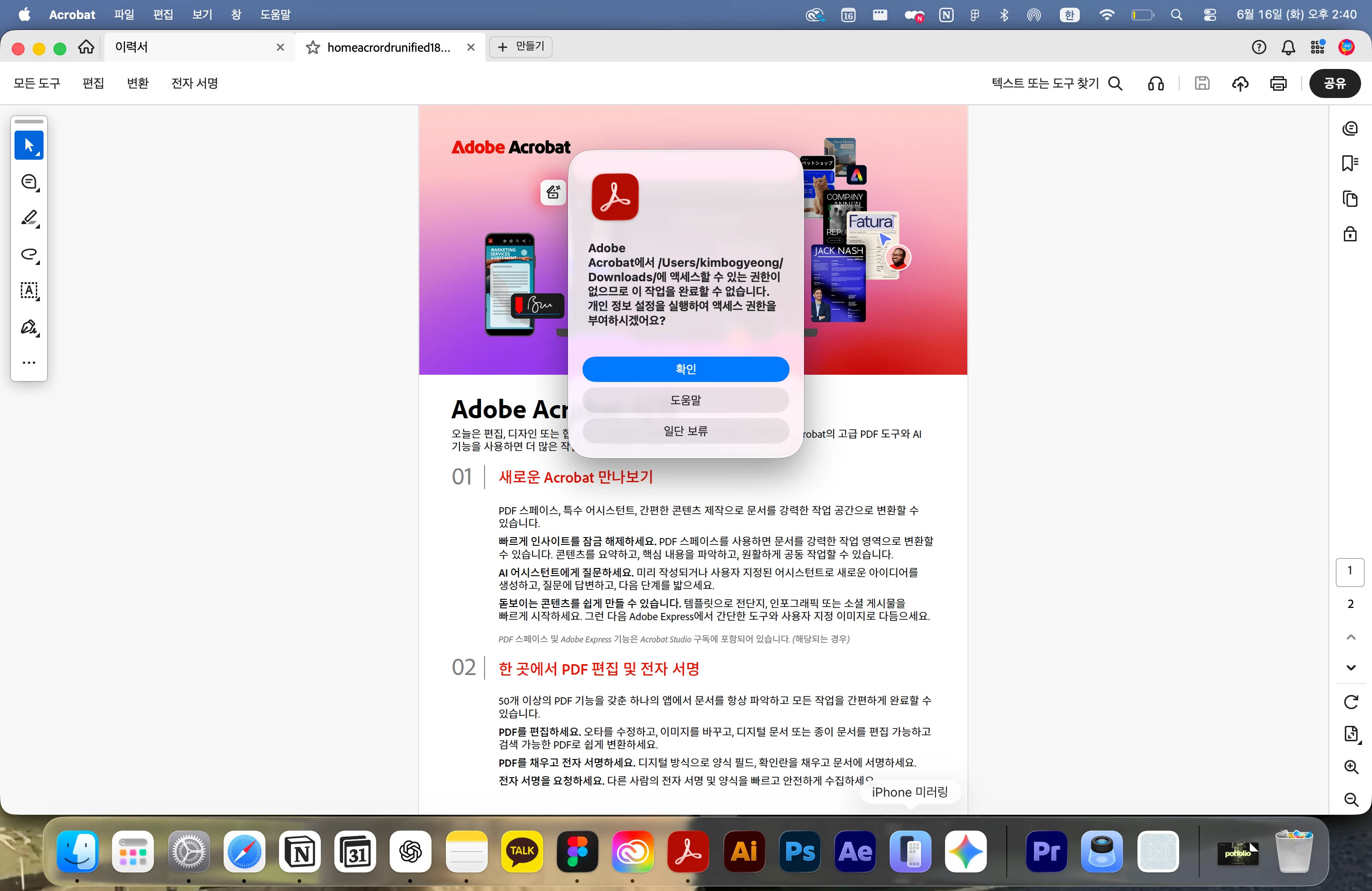
그러나 Adobe Acrobat이 이미 실행 중인 상태에서 다른 PDF 파일을 열려고 하면 아래와 같은 권한 오류 팝업이 나타나며 파일이 열리지 않습니다.

예시 메시지:

"Adobe Acrobat에서 '/Users/[username]/Downloads/' 또는 '/Users/[username]/Desktop/'에 액세스할 수 있는 권한이 없으므로 이 작업을 완료할 수 없습니다. 개인정보 설정을 실행하여 액세스 권한을 부여하시겠어요?"

■ 재현 방법 (100% 재현)

  1. Adobe Acrobat을 완전히 종료합니다.

  2. Finder에서 PDF 파일 A를 더블클릭합니다.

  3. PDF 파일 A는 정상적으로 열립니다.

  4. Acrobat이 실행 중인 상태에서 PDF 파일 B를 열려고 시도합니다.

  5. 아래 모든 방법에서 동일한 권한 오류가 발생합니다.

  • Finder에서 다른 PDF 파일 더블클릭

  • Acrobat → 파일(File) → 열기(Open)

  • Acrobat → 최근 항목(Open Recent)

모든 경우에서 동일한 권한 팝업이 발생하며 새로운 PDF 파일을 열 수 없습니다.

■ 중요한 점

이 문제는 일반적인 macOS 권한 부족 현상과 다르게 보입니다.

그 이유는 다음과 같습니다.

  1. Acrobat이 종료된 상태에서는 동일한 폴더의 PDF 파일이 정상적으로 열립니다.

  2. 동일한 Desktop 및 Downloads 폴더에 있는 파일을 첫 번째 파일로는 열 수 있습니다.

  3. 권한이 실제로 없다면 첫 번째 파일도 열리지 않아야 하지만, 문제는 Acrobat이 이미 실행 중일 때만 발생합니다.

  4. Acrobat은 이미 Downloads 또는 Desktop에 있는 PDF를 표시하고 있으면서, 같은 폴더에 대해 "접근 권한이 없다"고 표시합니다.

따라서 실제 권한 부족이라기보다, Acrobat이 이미 실행 중인 상태에서 새로운 파일을 열 때 macOS 파일 접근 권한을 잘못 처리하거나 잘못 인식하는 버그로 보입니다.

■ 이미 시도한 해결 방법

  1. System Settings → Privacy & Security → Full Disk Access에서 Adobe Acrobat 허용

  2. System Settings → Privacy & Security → Files and Folders에서 Desktop Folder 및 Downloads Folder 허용

  3. Full Disk Access OFF → Mac 재부팅 → ON 재설정

  4. Mac 여러 차례 재부팅

  5. Adobe Acrobat 삭제 후 재설치

  6. PDF 파일을 Desktop, Downloads 등 서로 다른 위치로 이동하여 테스트

  7. 파일명 및 폴더명을 모두 영어로 변경하여 테스트

  8. Migration Assistant 사용 없이 새 Mac에 처음부터 설치

  9. Acrobat 실행 중 Finder, File → Open, Open Recent 등 모든 경로에서 동일 증상 확인

위의 모든 방법을 시도했지만 문제가 해결되지 않았습니다.

■ 요청 사항

  1. 해당 현상이 macOS Sequoia + Apple Silicon(M4) 환경에서 알려진 버그인지 확인 부탁드립니다.

  2. Acrobat 엔지니어링 팀으로 에스컬레이션(Escalation) 부탁드립니다.

  3. 진단 로그(Logs) 수집 방법 및 추가로 수행해야 할 디버깅 절차가 있다면 안내 부탁드립니다.

현재 증상은 단순한 macOS 권한 설정 문제가 아니라, Acrobat이 이미 실행 중인 상태에서 추가 PDF 파일을 열 때 권한을 잘못 처리하는 재현 가능한 버그로 판단됩니다.

감사합니다.
 

2 replies

Community Manager
June 25, 2026


해외커뮤니티에도 비슷한 게시글이 있습니다. 위 글 참고하여 진행해봐주시겠습니까?

아크로뱃 앱 실행 > 기본설정 > 보안(고급) > 시작할 때 보호 모드 활성화(미리보기) 체크 해제


strong_epicness6034
Participant
June 25, 2026

Thank you for your support. Thanks to your help, I was able to resolve the issue successfully!

strong_epicness6034
Participant
June 16, 2026

Title: [Bug Report] Acrobat Pro on MacBook M4 Cannot Open Additional PDF Files While Already Running (False Permission Error)

Hello,

I would like to report what appears to be a reproducible bug in Adobe Acrobat Pro on my MacBook M4.

■ Environment

  • Device: MacBook M4

  • OS: macOS Sequoia 15.6

  • Product: Adobe Acrobat Pro (Subscription Version)

  • Installation: Acrobat was installed on a brand-new Mac. No data or settings were migrated from a previous Mac or Windows PC using Migration Assistant.

■ Issue Description

If Adobe Acrobat is completely closed, I can open PDF files normally.

However, once Adobe Acrobat is already running, I cannot open any additional PDF files. Instead, Acrobat displays a permission error and refuses to open the file.

Example message:

"Adobe Acrobat does not have permission to access '/Users/[username]/Downloads/' or '/Users/[username]/Desktop/'. Would you like to open Privacy Settings to grant access?"

■ Steps to Reproduce (100% Reproducible)

  1. Completely quit Adobe Acrobat.

  2. Double-click PDF file A in Finder.

  3. PDF file A opens normally.

  4. While Acrobat is still running, try to open PDF file B.

  5. The same permission error occurs in all of the following situations:

  • Double-clicking another PDF file in Finder

  • File → Open inside Acrobat

  • Open Recent inside Acrobat

In every case, Acrobat displays the permission error and cannot open the additional PDF file.

■ Why This Does Not Appear to Be a Normal macOS Permission Issue

  1. PDF files open normally when Acrobat is not already running.

  2. The first PDF file from the same Desktop or Downloads folder can be opened without any issue.

  3. If this were a genuine permission problem, even the first PDF file should fail to open.

  4. Acrobat is already displaying a PDF from the Downloads or Desktop folder, yet it simultaneously reports that it does not have permission to access that same folder.

Because of this behavior, the issue appears to be related to how Acrobat handles file access permissions when opening additional PDF files while the application is already running, rather than an actual macOS permission denial.

■ Troubleshooting Already Attempted

  1. Granted Full Disk Access to Adobe Acrobat under System Settings → Privacy & Security → Full Disk Access.

  2. Enabled Desktop Folder and Downloads Folder permissions under System Settings → Privacy & Security → Files and Folders.

  3. Disabled and re-enabled Full Disk Access after restarting the Mac.

  4. Restarted the Mac multiple times.

  5. Uninstalled and reinstalled Adobe Acrobat.

  6. Tested PDF files stored in different locations, including Desktop and Downloads.

  7. Renamed files and folders using English names only.

  8. Confirmed that the Mac was set up as a new device without using Migration Assistant.

  9. Verified that the same issue occurs when opening files via Finder, File → Open, and Open Recent while Acrobat is already running.

None of the above steps resolved the issue.

■ Request

  1. Please confirm whether this is a known issue on macOS Sequoia with Apple Silicon (M4) Macs.

  2. Please escalate this issue to the Acrobat engineering team for investigation.

  3. Please advise how to collect diagnostic logs and whether there are any additional debugging steps that can be performed.

At this point, the issue appears to be a reproducible bug in which Acrobat incorrectly handles file permissions when opening additional PDF files while already running, rather than a simple macOS permission configuration issue.

Thank you for your assistance.