


Answered

로닉스Correct answer
Community Expert
February 15, 2023
최신 버전으로 업데이트 되면서 에프터 이펙트의 트랙 매트 기능은 위에 있는 레이어에만 마스크 되는게 아닌
작업중인 컴프 파일 안에 있는 레이어중 하나를 선택해서 마스크 할 수 있게 되었습니다.
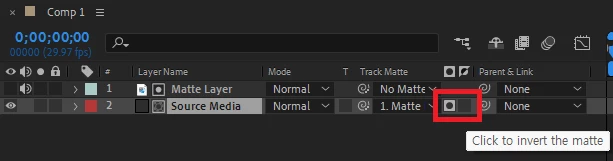
마스크 레이어를 선택하면 뒤에 알파와 루마등의 옵션이 아이콘으로 따로 생깁니다.
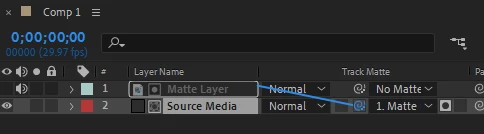
Pick Whip으로 매트 시킬 레이어를 선택합니다.
붉게 표시한 곳에서 루마, 알파와 반전 여부를 선택하여 사용합니다.
 AdChoices