
Answered
Acrobat DC Proでの上線から下線への変更方法
Acrobat DC Proを使用しております。注釈ツールの下線においてPDF文章中に下線を挿入すると、それが上線になってしまいます。
上線を下線に戻す方法をお教え頂けないでしょうか。

Acrobat DC Proを使用しております。注釈ツールの下線においてPDF文章中に下線を挿入すると、それが上線になってしまいます。
上線を下線に戻す方法をお教え頂けないでしょうか。
Hi Master_kino,
Assuming you are referring to underline text in a pdf, Go to Tools > Comment, select T with line beneath it and select the text which you want to underline. Below is the screenshot:
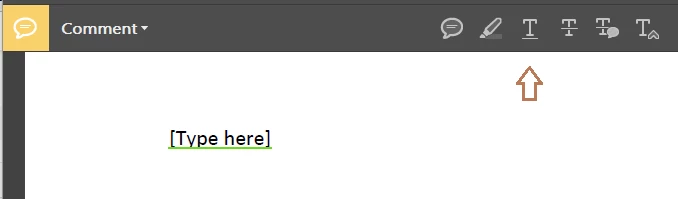
Feel free to update this discussion if you need any help.
Shivam
Already have an account? Login
No account yet? Create an account
Enter your E-mail address. We'll send you an e-mail with instructions to reset your password.


 AdChoices