


"Correct recognized text" displays gibberish when working with Japanese
I am using Acrobat Pro for MacOS, Version 2023.006.20360, on a 2021 14-inch MacBook Pro running an Apple M1 Pro chip. The OS is Sonoma, 14.0.
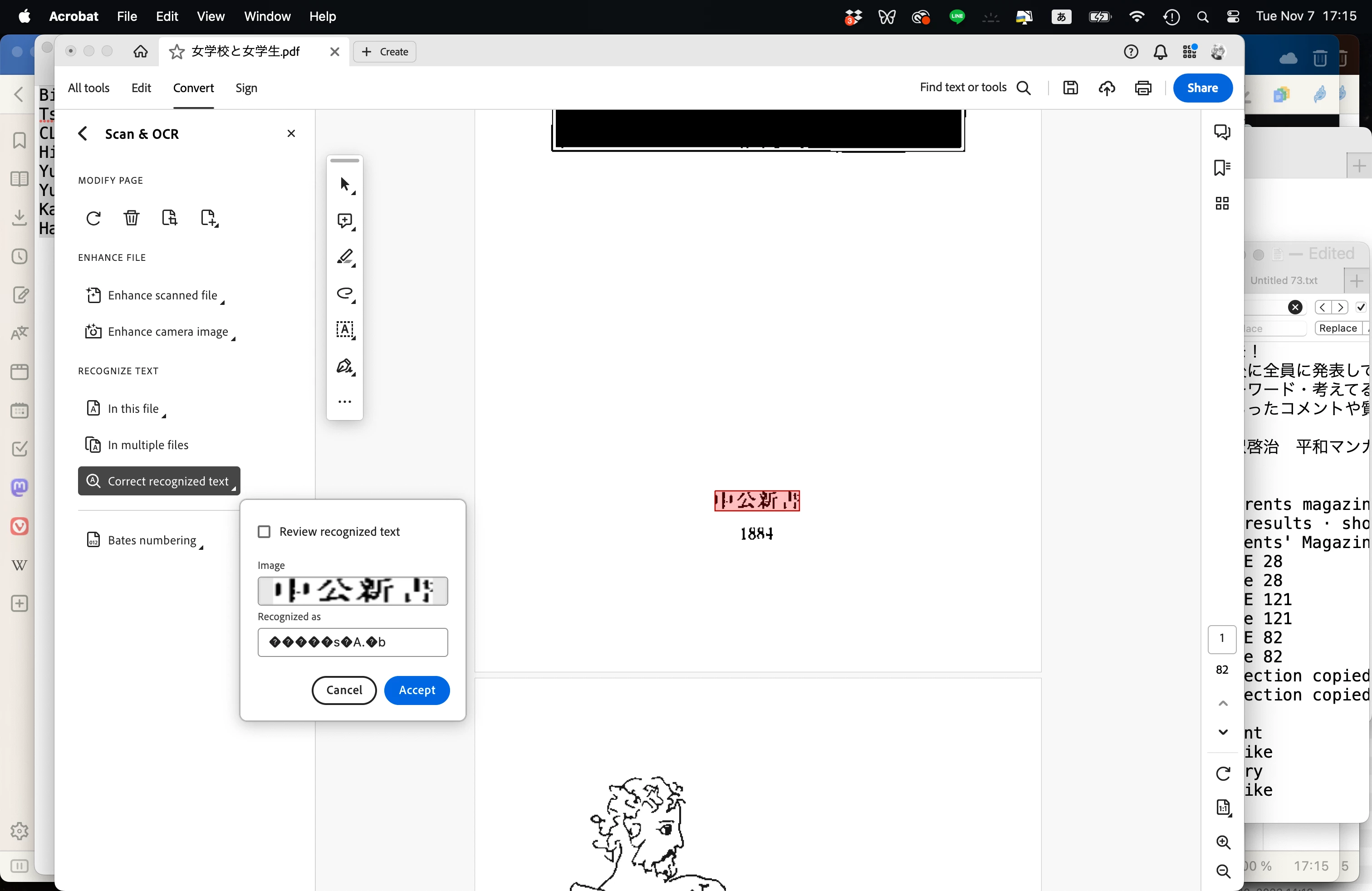
I want to correct the OCR recognized text of a scanned Japanese document, but even though Acrobat has successfully recognized 99% of the Japanese text, when I run "Correct recognized text," the text in the "Recognized as" space in the pop-up window displays as classic "mojibake" gibberish. Here's a concrete example. The actual Japanese text should be 中公新書. Acrobat successfully recoginizes the first three characters, but misinterprets the last character as ",'}." This is easily confirmed when I copy the recognized text into a word processor. Yet the pop-up window in "Correct recognized text" displays the recognized text as "�����s�A.�b" All the recognized Japanese text is displayed in this way, so Acrobat's "Correct recognized text" function is useless in Japanese. There's no way to tell from the displayed results whether the text was successfully recognized, and I can only check it by copying all the text and pasting it into a word processor, which makes correcting the text extremely difficult (obviously). Although the attached image is the app displaying in English, when I switch the app language to Japanese the same thing happens.
 AdChoices