


July 17, 2019
質問

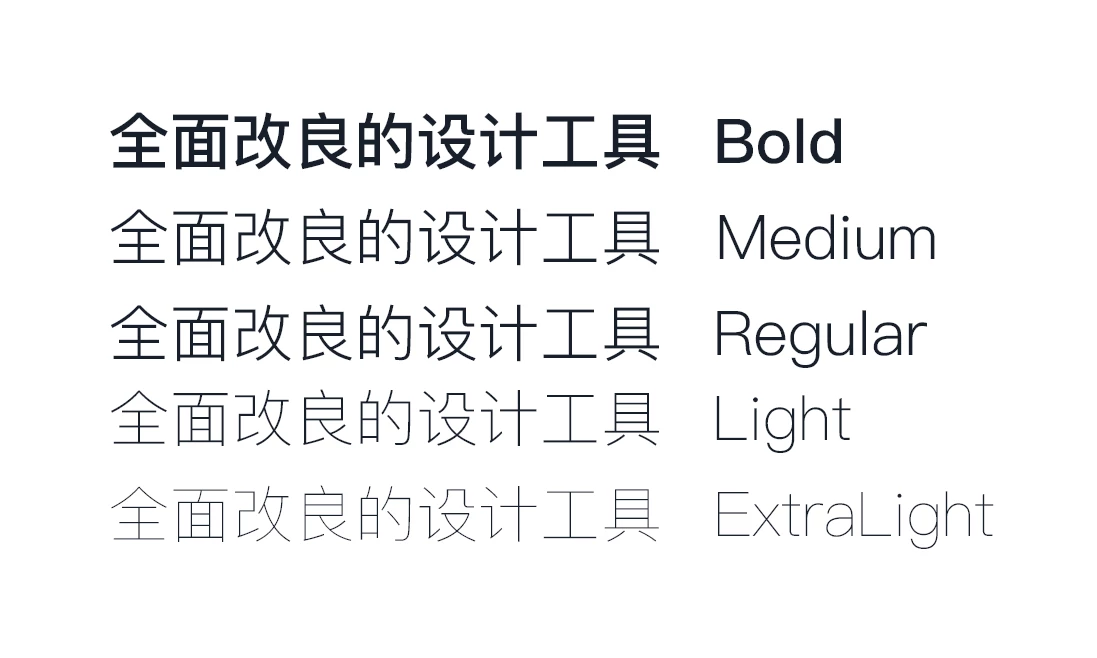
win10系统20.2.12.1版本的xd中,苹方中/英字体medium与regular显示结果一样
  • July 17, 2019
  • 返信数 4.
  • 2172 ビュー

你好:

我是Adobe XD忠实用户,感谢XD的开发者

从XD的第一个版本到现在的版本中,Windows10系统中的苹方字体字重medium与regular显示出来的结果是一样的(如图所示),目前这个问题只存在于XD中,在其他的软件中没有出现这个问题,在XD的版本更新中一直都没得到解决,给设计师们在工作中带来极大不便,希望XD开发者在未来的版本更新中解决这个问题。

再次由衷感谢XD开发者

    このトピックへの返信は締め切られました。

    返信数 4

    ChuckYang
    Participant
    August 12, 2019

    我好像解决这个问题了!当然也包含其他字体的同样问题。下面是问题原因和解决方法:

    原因:我开始思考是不是字体本身问题,因为其他大部分字体都是没这个问题的,于是我通过字体编辑工具“FontCreator”打开了medium和regular的苹方字体。“字体-属性”中果然发现问题所在:

    medium和regular的“粗细度”都是选的“标准(常规)”,就是这个导致了XD中实际显示的粗细完全一样而在手机预览却又是正常的!

    于是解决方法也知道了:改变medium的粗细度为“半粗(稍粗)”。最后字体另存为OTF格式即可。

    -------------------------------------

    下面是卸载原字体后重新安装刚刚修改的字体后XD效果:

    完美解决。

    August 12, 2019

    老哥,这个字体包能发一份给我吗?谢谢了

    <Personal info removed by moderator>

    Participant
    August 7, 2019

    我也有这样的问题。Pingfang SC 的字重有问题。不过还好上传到蓝湖等协作平台,字体的显示是正确的。

    wsssss
    Participant
    July 29, 2019

    你好,我和身边的朋友们也遇到了同样的问题,此问题紧出现在了win10-Xd中,ps内字体能显示正常。希望开发者们给予帮助

    HARSHIKA_VERMA
    Community Manager
    Community Manager
    July 29, 2019

    Hi Jeffery,

    Thank you for reaching out. I understand it could be annoying. I'd like to confirm if you've tried the solutions mentioned in this post and still you're facing the same issue. Please share the OS and XD version of your machine, and if you can share the file with me over a private message.

    Also, send the URL of this forum post for reference. To send a private message, click my profile picture and use the Message button.

    Let me know if you face any issues with this. I'd be happy to help.

    Thanks,

    Harshika

    italosan
    Community Expert
    Community Expert
    July 17, 2019

    Hi, we are sorry that you encountered a problem with Adobe XD. Can I ask you to list the technical specifications of your PC?

    July 17, 2019

    这是我的windows系统规格,我也资讯了我朋友们,他们也都出现了这样的问题

    HI,This is my windows system specification, I also informed my friends, they also have such problems

    HARSHIKA_VERMA
    Community Manager
    Community Manager
    July 17, 2019

    Hi there,

    Thank you for sharing the details. I'd like to know a few more details like:

    • Is it happening with any specific font family?
    • Are these Adobe Fonts or normal fonts?

    Thanks,

    Harshika