
Answered
Rucca CinaCorrect answer
Legend
October 25, 2024
일러스트를 실행하기 위한 C++파일의 설치또는 복구진행이 필요해 보이네요
Visual Studio C++ 패키지 복구를 진행 해볼게요.
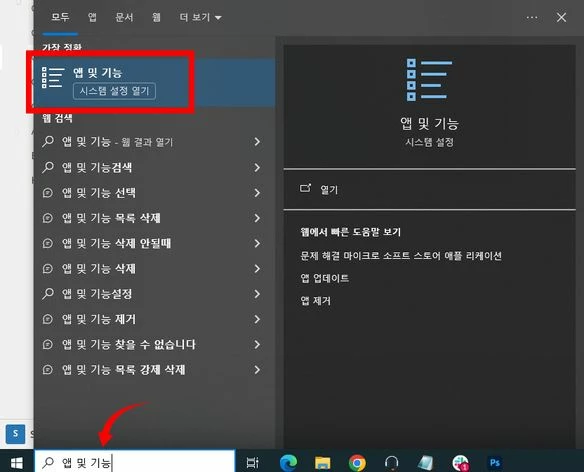
1. 윈도우 메뉴 우측의 검색 창에서 "앱 및 기능"을 입력해 앱을 열어주세요.
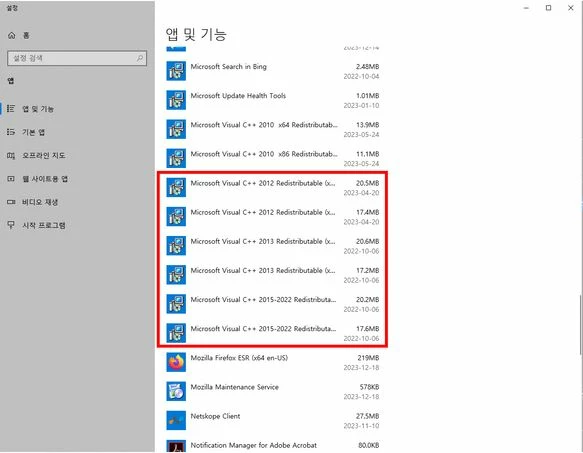
2. 설치된 앱 중에서 "Microsoft Visual C++ 2012 ~ 2022" 을 찾습니다.
3. "Microsoft Visual C++ 2012 부터 2022 버전 까지, 수정 버튼을 눌러 복구를 진행 해주세요.
※ 절대 "제거" 버튼을 누르지 마세요
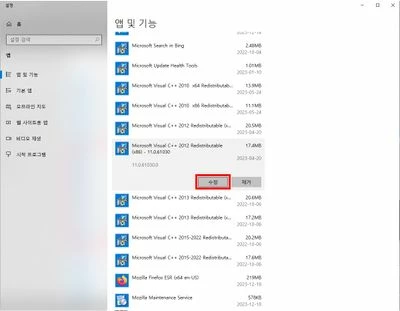
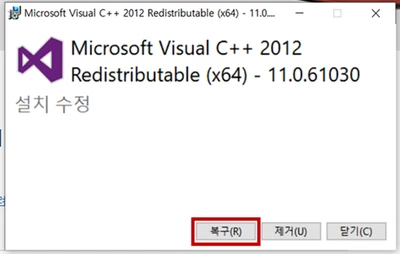
4. 2012 버전부터, 2015 - 2022 버전까지 모두 복구 진행을 하셨다면,
PC를 재 부팅하고 증상을 테스트 해봅니다.


 AdChoices