

Participant
June 4, 2021
Question

맥북 Big Sur 에 Creative Cloud 및 포토샵을 설치할 수 없습니다.

  • June 4, 2021
  • 1 reply
  • 1000 views

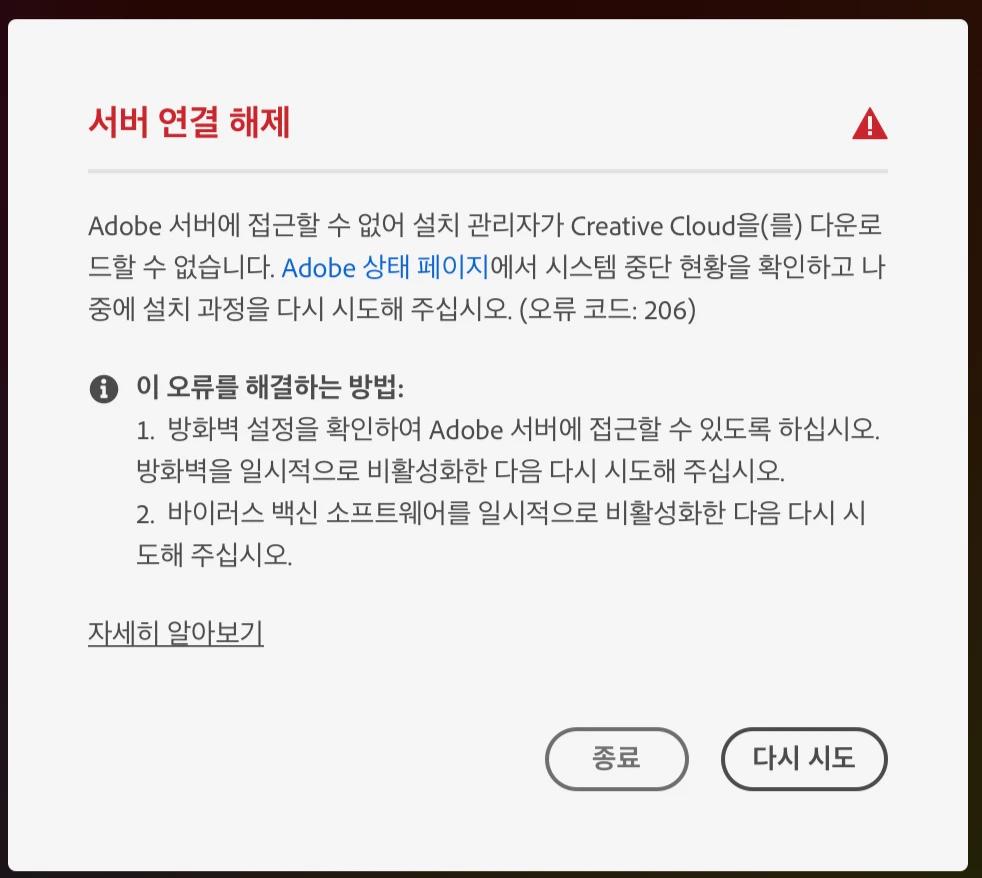
설치하려고 하면 반복적으로 웹브라우저 로그인을 시도하다가 결국

아래와 같은 문구가 나옵니다. 

오류를 해결하는 방법에 나오는대로 진행을 해보았으나,

역시나 연결이 안되어 설치를 완료할 수 없습니다. 


맥북에서 이러한 현상이 있어서 저의 아이맥에서도 똑같이 설치를 시도하였으나,

결과는 동일합니다. 


왜그럴까요?


    This topic has been closed for replies.

    1 reply

    Govardhan.V
    Participating Frequently
    June 4, 2021

    Have you updated Mac OS BigSur version to latest. Its 11..4.1??


    Reference :

    https://helpx.adobe.com/photoshop/kb/photoshop-and-macos-big-sur.html


    If unable to install Adobe Creative Cloud app :


    Try alternate download link:

    https://helpx.adobe.com/kr/download-install/kb/creative-cloud-desktop-app-download.html

    Participant
    June 5, 2021

    Right, I've updated to BigSur 11.4.

    I already tried to follow the guide in https://helpx.adobe.com, but unable to sign in my account in Creative Cloud App. 

    Only can see a message as below.

    this message is continuously poping up window.

    Nancy OShea
    Community Expert
    Community Expert
    June 5, 2021

    I can't read Korean, sorry.

    Is that notice asking for your Creative Cloud or your computer user password?


    Nancy O'Shea— Product User & Community Expert
